How to Sell Personalized Gift Sets That Share Stock with Single Items on Shopify
Sell a pre-made personalized gift set on Shopify that deducts stock from the blanket, bib and beanie you also sell on their own, with one app.
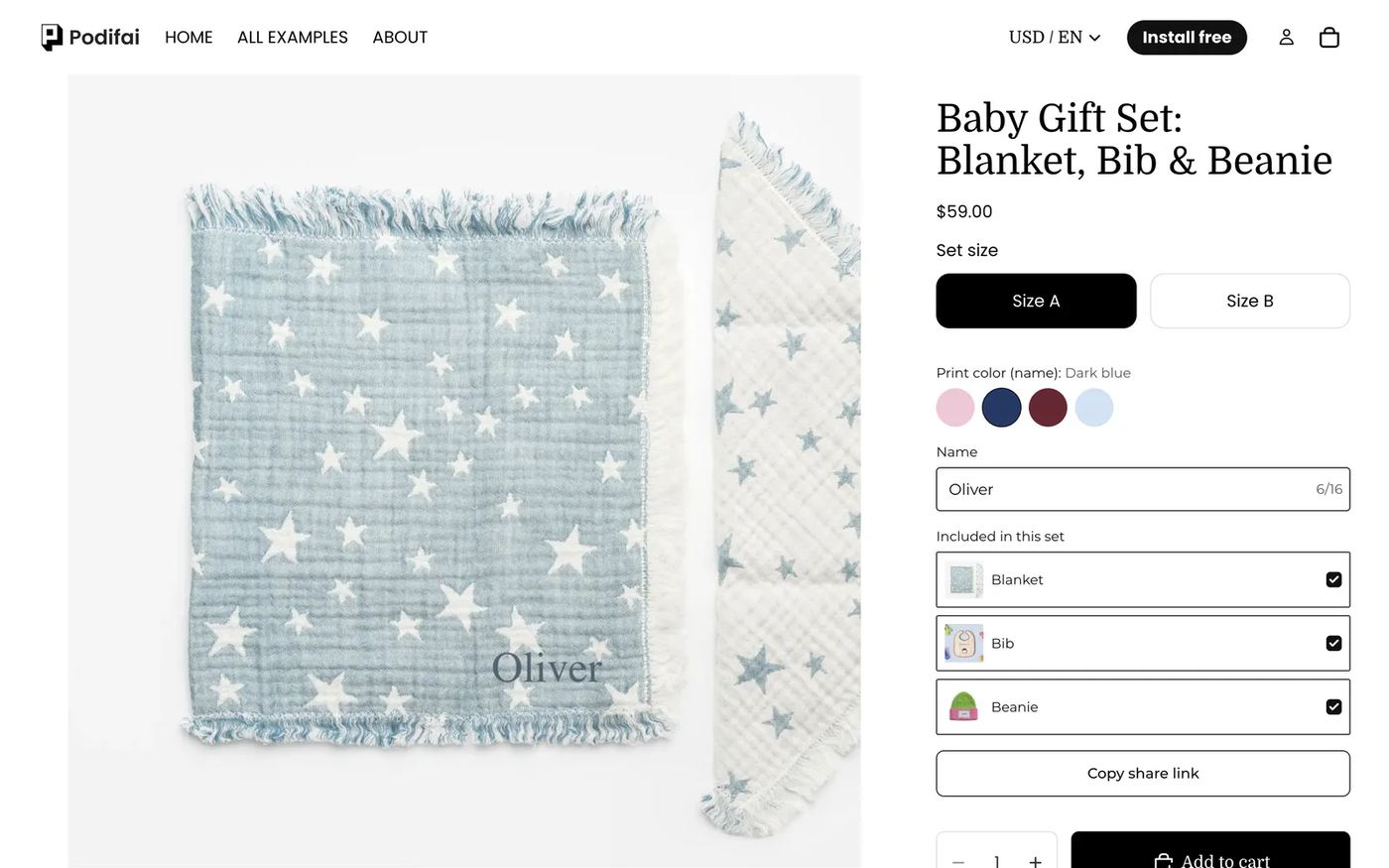
TL;DR: To sell a pre-made gift set whose items are also sold on their own, make the set one Shopify product with its own price and turn off Shopify inventory tracking for it. In Podifai, add a Checkbox called Included in this set with one value per item, link each value to that item's Shopify variant, select all values by default and set min and max selections to the number of items. Each set sold deducts one of every item, a set with a sold-out item cannot be added to cart, and cancelling with Restock inventory puts the stock back. Personalization such as a name and print color sits on the same product. Everything here is on the Free plan.
What does the shopper see?
- Pick the set size. Each size can contain different items.
- Choose a print color and type the name.
- Check what is included. Every item is ticked by default, with a small photo.
- Add to cart. The set is one cart line with its contents listed under it.
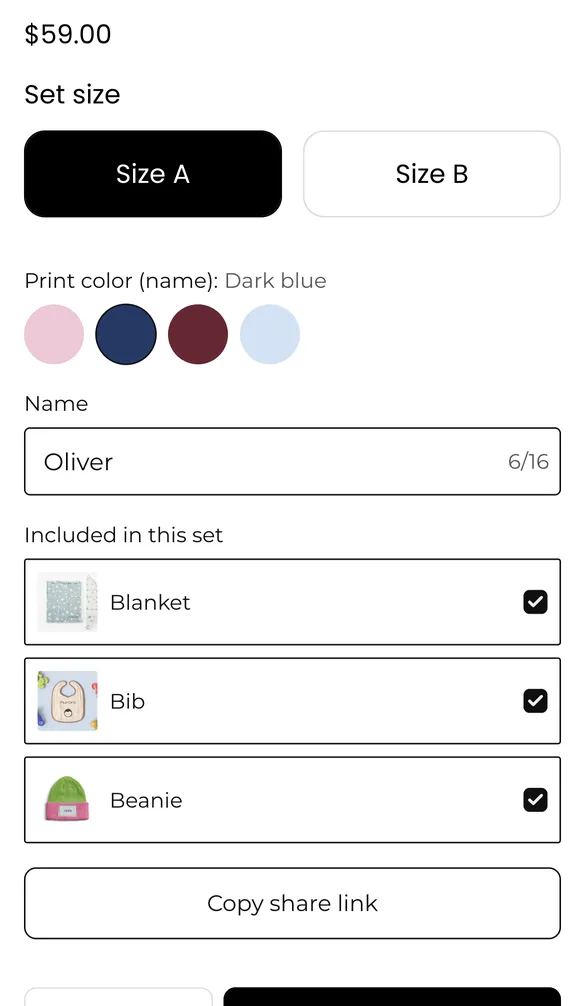
Try it yourself on the live demo product.
What do you need before you start?
1. Install Podifai and turn on the app embed
Install Podifai from the Shopify App Store, then open Online Store > Themes > Edit theme > App embeds and switch on Podifai Customizer. See Enable App Embed.
2. Track stock on the single items
The blanket, bib and beanie are normal Shopify products with inventory tracking turned on. These are the counts the set will draw from.
3. Create the set as its own product
Create one Shopify product for the set with the set price, for example $59. Turn off inventory tracking on the set itself, because its availability now comes from the items inside it.
Should I use a bundle app or Podifai for a gift set?
A fixed set and a build-your-own box are different problems. Pick the tool that matches how your set is sold:
| Your situation | Use | What it gives you |
|---|---|---|
| Shoppers pick the items themselves | A bundle or mix-and-match app | The bundle app handles pricing and item choice |
| The set is pre-made and needs personalization | One Podifai Checkbox linked to each item, as in the demo | Name, color and shared stock on one product, in one app |
| The set is pre-made with no personalization | Either works | Shopify Bundles is also free for fixed sets |
Podifai keeps the set as one product and one cart line at the set price, so your theme, reviews and collection pages treat it like any other product.
What is the fastest way to set this up?
There is no ready-made gift set template, because every set links to your own item variants. You can still start the personalization from a Podifai template, such as Baby Blanket, with Copy to Product, then add the Included in this set Checkbox from the steps below.
Which options do you need?
The whole customizer is 4 Podifai options on one Shopify product:
| Option | Podifai type | Key settings | Price |
|---|---|---|---|
| Set size | Shopify variant | Size A, Size B (optional) | Set price |
| Print color (name) | Color Swatch | Four print colors, required | No charge |
| Name | Text Input | Required, 16 characters | No charge |
| Included in this set | Checkbox | One value per item, all selected, min = max, Card style | No charge; each value linked to an item variant |
How to set it up in Podifai, step by step
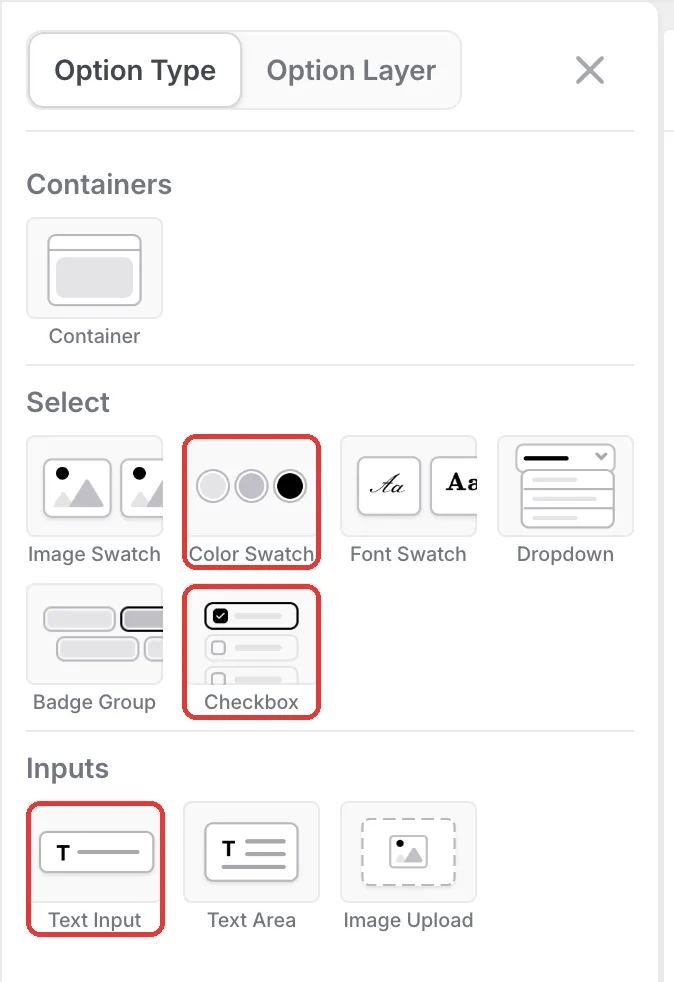
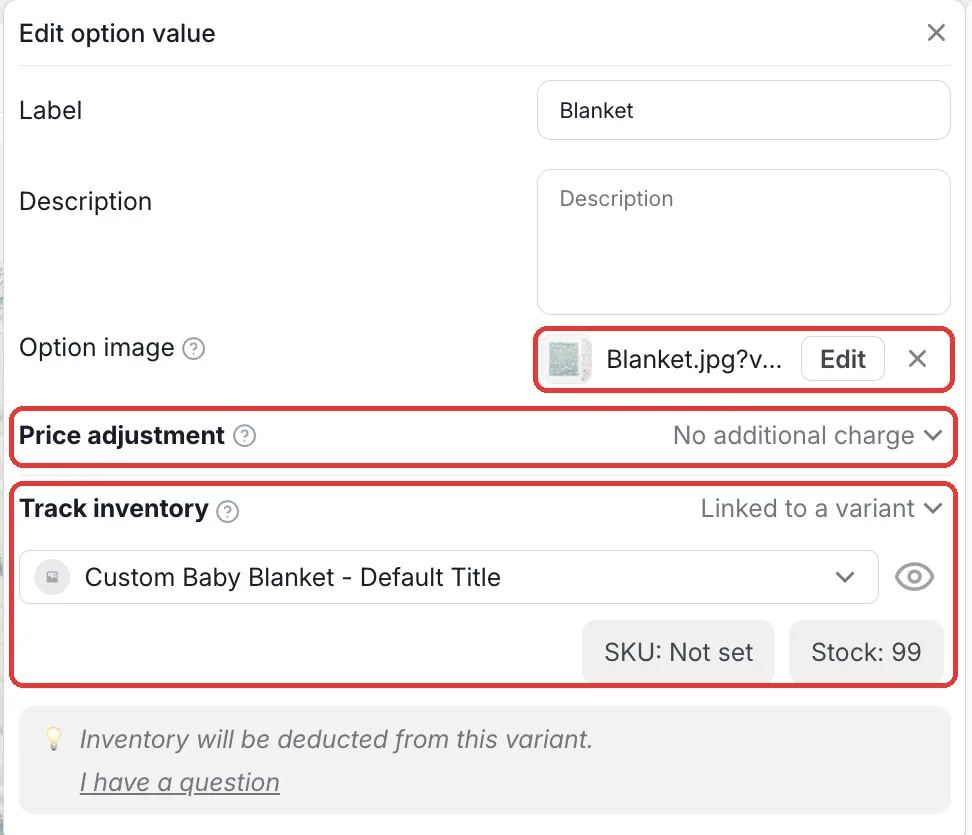
These steps match the live demo product. Red boxes mark what to change; numbers follow the order in the step text.
Step 1: Add the option types
Open the set product in the Podifai editor and click the menu icon on the left. Add a Color Swatch for the print color, a Text Input for the name and a Checkbox for the set contents.
Step 2: Link each item to its Shopify variant
In the Checkbox, add one value per item and click a value to open Edit option value. Upload a small photo of the item, keep Price adjustment on No additional charge, then set Track inventory to Linked to a variant and pick the item's variant. Podifai shows its current stock. Repeat for every item.
- Uploading an image renames the value to the file name. Check the label after each upload.
- Do not add the item as a paid bundle variant. The set price already covers it.
Step 3: Make the contents fixed
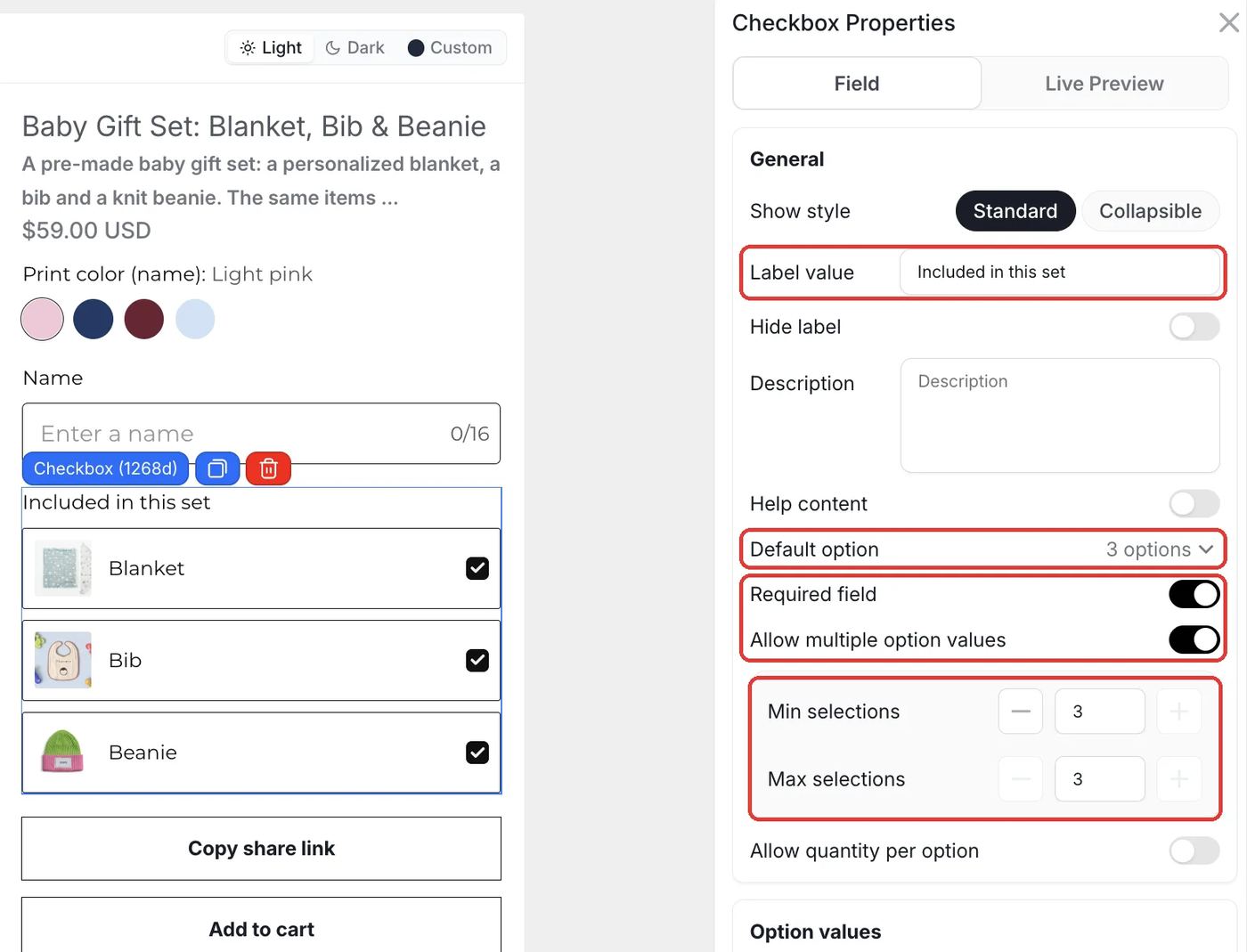
Set the label to Included in this set. Under Default option, select every value. Turn on Required field and Allow multiple option values, then set Min selections and Max selections to the number of items, 3 in the demo.
- If a shopper unticks an item, Add to cart shows Please select exactly 3 options, so the set always ships complete.
Step 4: Show different contents per set size
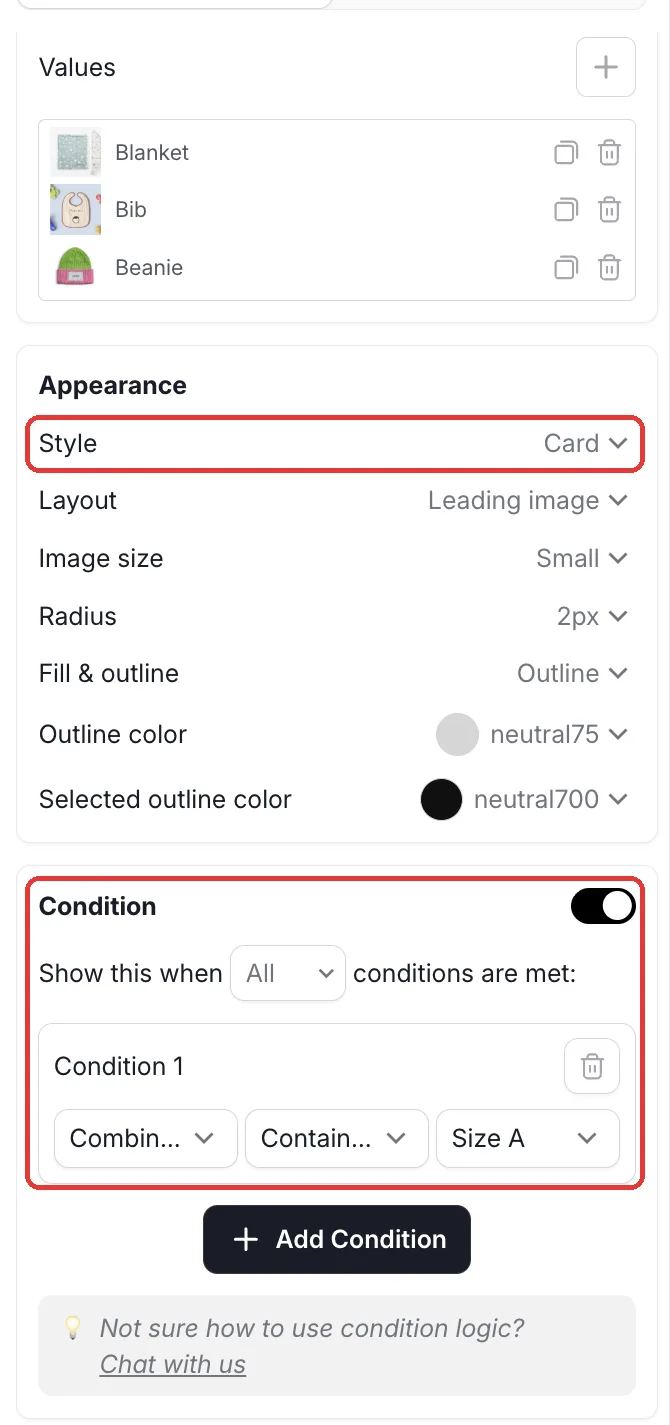
Under Appearance, choose the Card style with Leading image so the items read as a list of contents. If the set has Shopify variants, duplicate the Checkbox for each one and add a Condition: Combined Shopify variant contains that size. Link each copy to the items for that size, click Save and test both sizes on the storefront.
- Only the visible Checkbox is added to the cart, so a Size B order never deducts Size A items.
What happens in the cart and after the order?
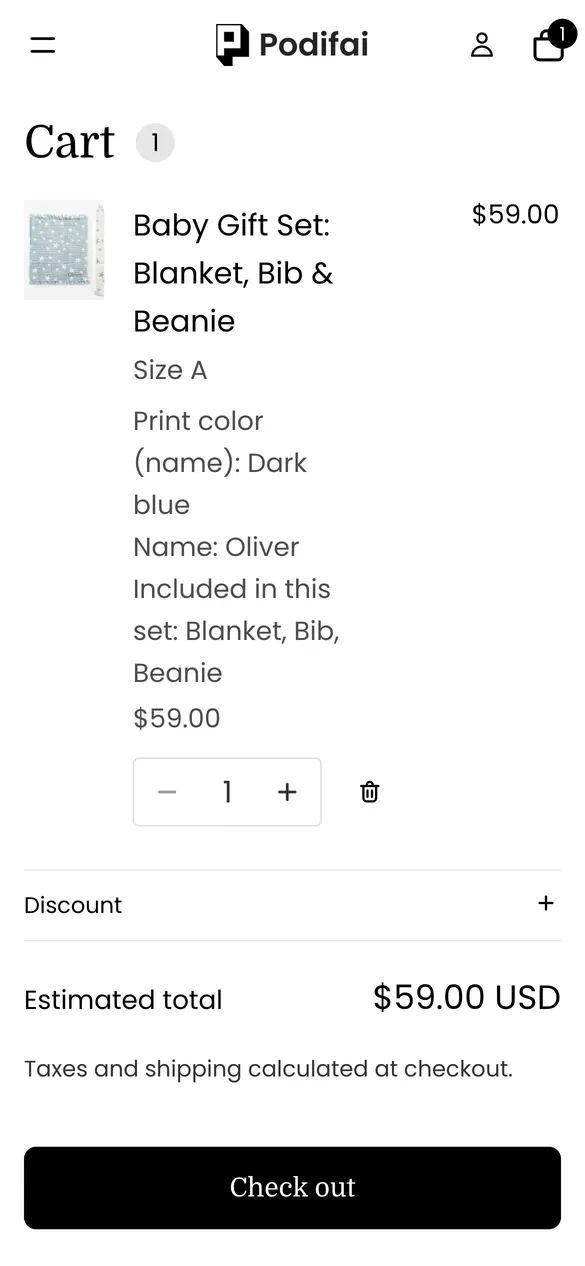
- About a minute after the order is created, Podifai deducts one blanket, one bib and one beanie from their Shopify stock. Buying two sets deducts two of each.
- If any item is out of stock, the set cannot be added to the cart, and the set quantity is limited by the item with the least stock.
- Cancelling the order in Shopify with Restock inventory ticked adds the item stock back.
- The contents, name and print color are saved as line item properties, so the packing team sees exactly what goes in the box.
Troubleshooting
The set still shows as in stock on collection pages
Shopify does not track the set itself, so collection pages keep showing it when an item runs out. The product page blocks Add to cart. Mention the item on the product page, or hide the set while you restock.
The set itself also loses stock
Inventory tracking is still on for the set product, so Shopify counts the set down as well. Turn it off so only the items inside the set are deducted. See Linked inventory and add-on pricing.
Stock did not come back after a refund
Restock runs when you cancel the order with Restock inventory ticked. For a refund without cancelling, check the item counts and adjust them in Shopify. See Order creation, cancellations and refunds.
Selling tips
- Sell sets and singles from one stock. Because the set draws from the same counts as the single items, you never promise a set you cannot pack.
- Use item photos, not icons. Small product photos in the Card style tell shoppers what is in the box and reduce questions before purchase.
- Keep the set price simple. Price the set below the sum of its items and say so in the description. The set price is what collection pages show.
What else can you sell with this setup?
A linked Checkbox works for any pre-made set whose parts are also sold alone:
- Newborn and baby shower gift sets
- Christmas and Sinterklaas gift boxes
- Skincare and candle sets
- Stationery and teacher gift kits
- Jewelry sets with a matching necklace and bracelet
Frequently asked questions
Create the set as its own product with inventory tracking off. In Podifai, add a Checkbox with one value per item, link each value to the item's Shopify variant, select all values by default and set min and max selections to the item count. Each set ordered deducts one of each item.
Not for a pre-made set. A bundle app fits sets where shoppers choose the items. For a fixed set that also needs a name or print color, Podifai handles the contents, the shared stock and the personalization on one product.
The linked value becomes unavailable, so the set cannot be added to the cart. Collection pages still show the set, because Shopify does not track the set itself.
Yes. Cancel the order in Shopify with Restock inventory ticked and Podifai adds the linked item stock back. After a refund without cancelling, adjust the counts manually.
Yes. Keep the sizes as Shopify variants, add one Checkbox per size and use a Shopify variant condition so each size shows and deducts only its own items.
Linked inventory, checkboxes and conditions are on the Free plan, which covers up to 3 custom products. Starter ($7.9/month) covers 30 products and Growth ($15.9/month) is unlimited.
More Podifai use cases
- How to Sell Personalized Embroidered Dog Bandanas on Shopify
- How to Sell Custom Photo Phone Cases on Shopify
- How to Sell Monogrammed Leather Keychains on Shopify
- How to Sell Custom Neon Signs on Shopify
- How to Build a Charm Bracelet Builder on Shopify
- How to Sell Custom Hoodies with Front, Back and Sleeve Prints on Shopify
- How to Sell Custom Pickleball Paddles on Shopify
- How to Sell Custom Wedding Invitations on Shopify
- How to Sell Personalized Pens with a Paid Engraving Add-on on Shopify
- How to Sell Custom Trucker Hats on Shopify
Related help docs
Build this customizer on your store
Free for 3 custom products. Start from the ready-made template and change what you need.
 Install Podifai free