Page updated: October 6, 2026 · Competitor pricing checked: October 6, 2026
Teeinblue Pricing vs Podifai: Which Product Customizer Fits Shopify?
Teeinblue combines photo and text personalization with design imports, order artwork and connected POD workflows. Podifai offers embedded 2D live preview, product options and transparent PNG artwork with plans from $0/month.
TL;DR: which app should you choose?
Choose Podifai when you need Shopify text/photo previews for up to three custom products on Free, or product-count pricing without app per-item fees. Choose it when its flattened PNG artwork fits your production workflow.
Choose Teeinblue when you need PSD/Canva imports, compatible vector artwork or connected POD workflows. Budget for Blue's $49 subscription plus applicable item fees, and confirm your campaign and provider handoff.
Feature availability depends on the plan and setup. See the pricing and workflow comparison below.
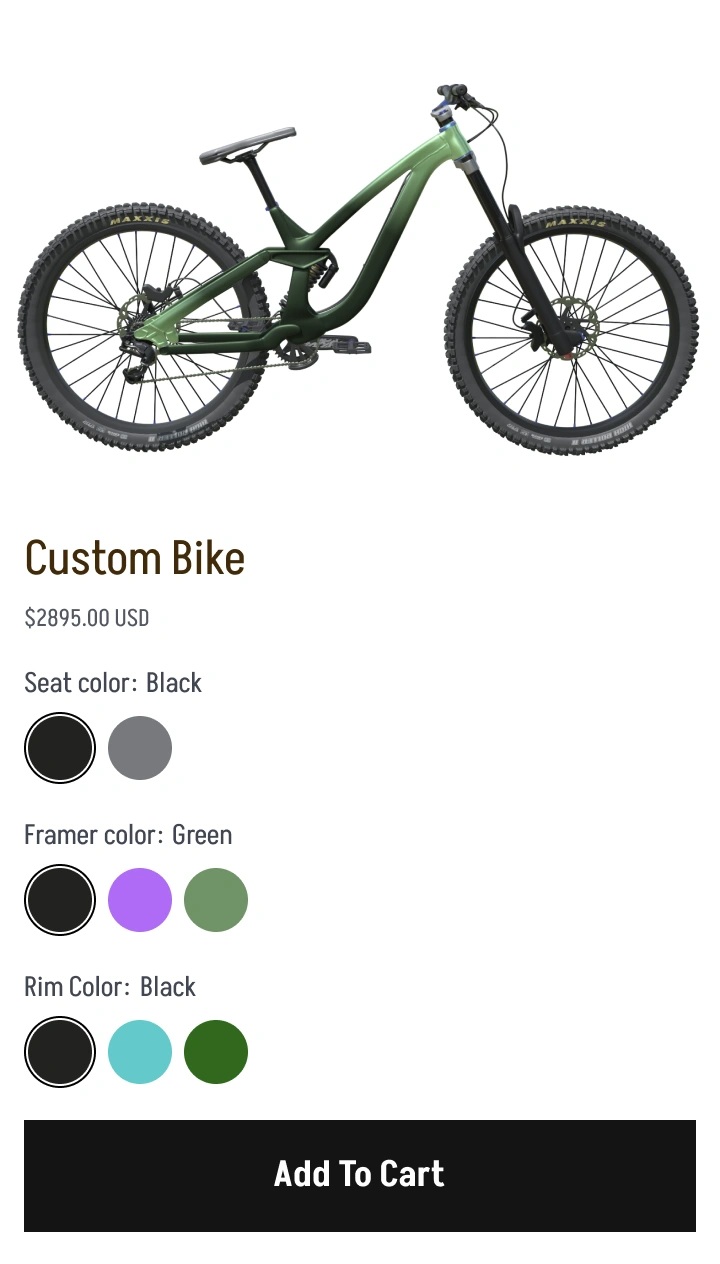
Podifai example illustration. Dated demo observations are below.
What Should You Check Before Switching?
Both apps can fit common photo and text products. Compare how your design becomes an order file, which supplier receives it, and how your account is billed. Teeinblue Blue and legacy accounts have different terms.
Public product demos · October 2026
Compare real product examples
Explore customization across different product types. Each pair records the inputs and visible result in the linked demos, with template differences explained below. Product prices shown in screenshots are separate from app subscription prices.
Tote bags: ABC initials
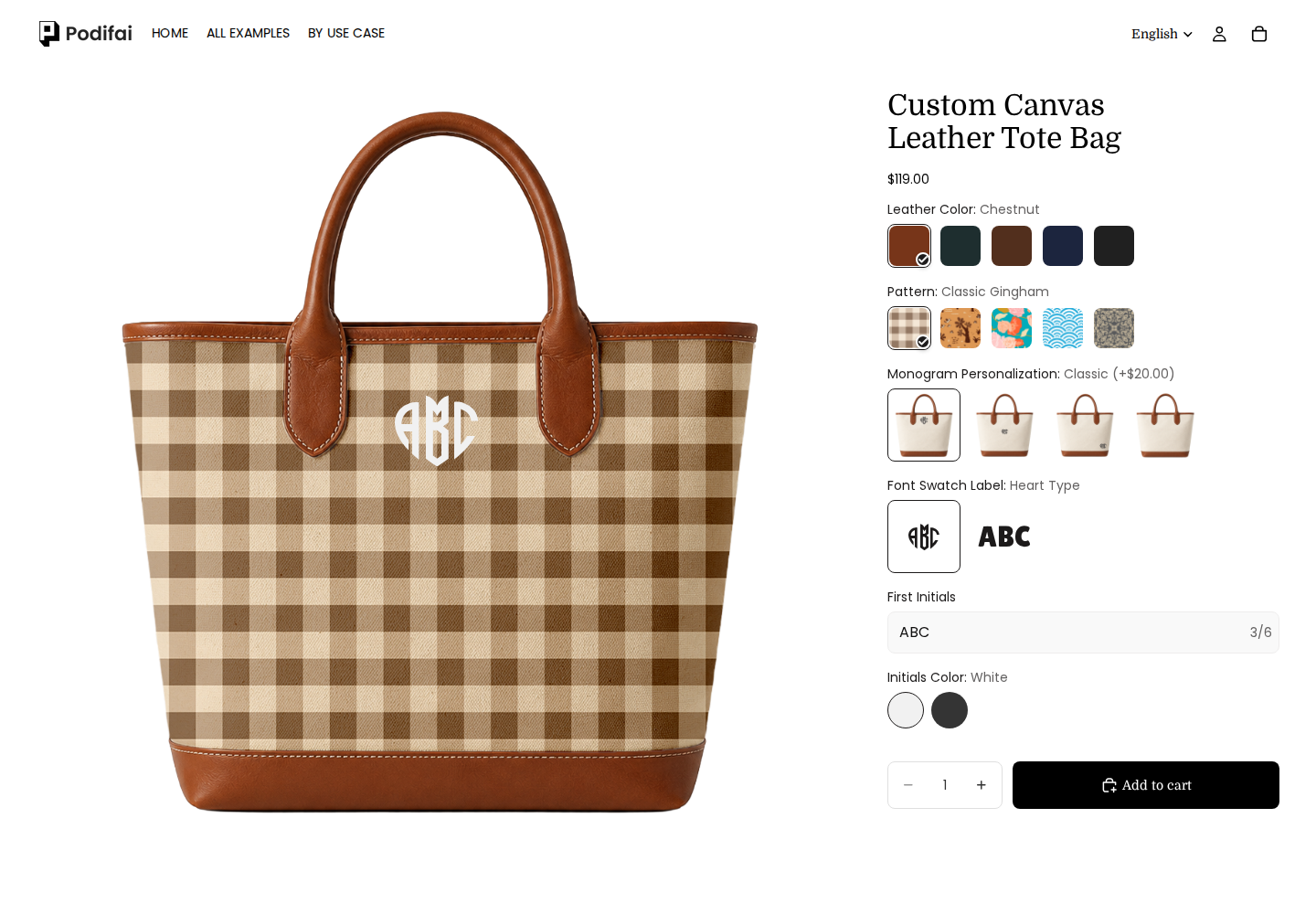
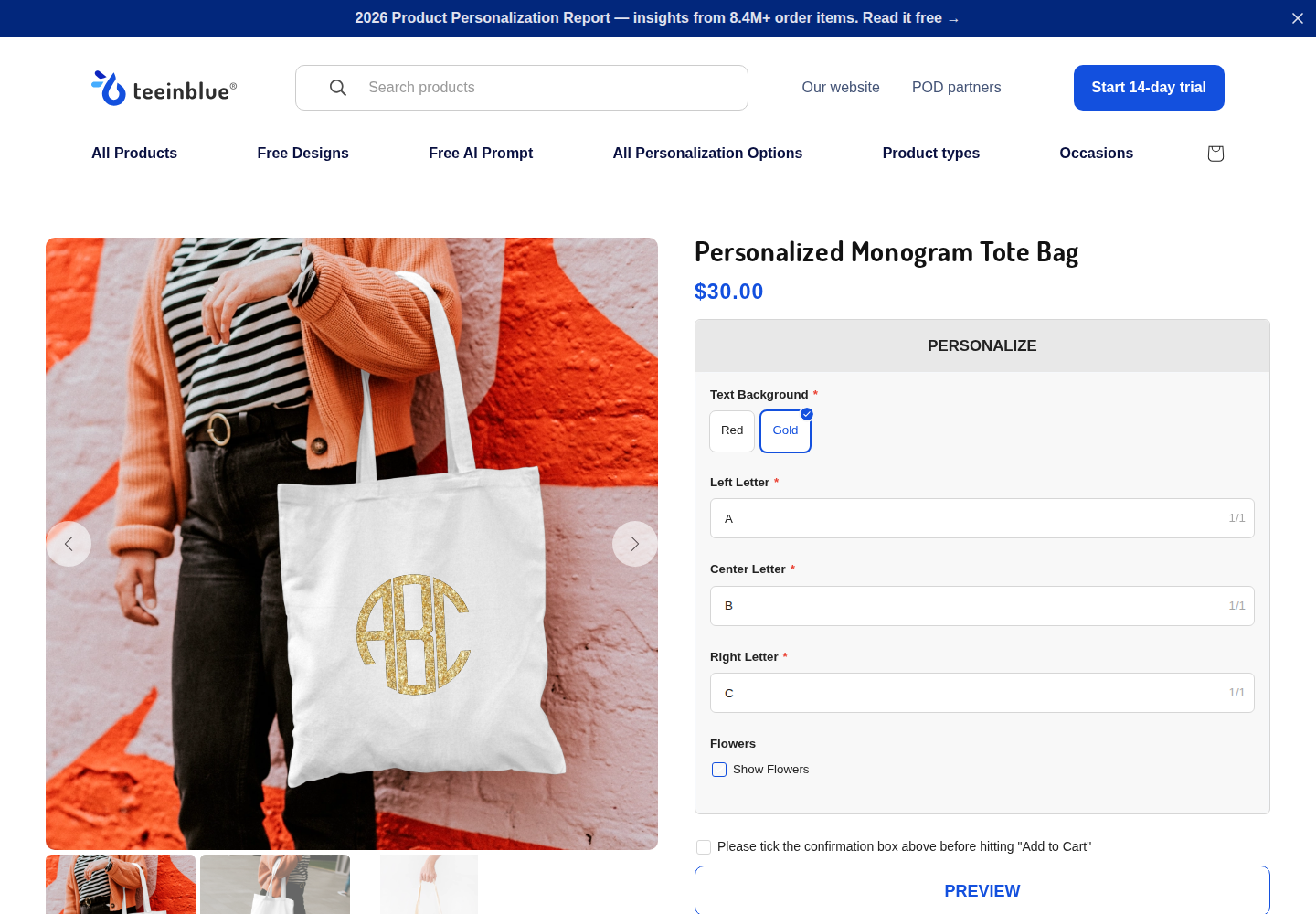
Both examples use ABC on a tote bag. Styles, colors and letter layouts differ.
Podifai
ABC tote with Chestnut, Classic Gingham, Heart Type and White selected.
These screenshots document storefront configuration and previews. They do not establish checkout, production-file quality, merchant setup effort or every mobile interaction. A template that retains its original product photo does not establish that the app lacks preview support elsewhere.
How Much Does Teeinblue Cost vs Podifai?
Blue: $49 per 30-day cycle plus $0.10–$0.40 per order item after the first 100 orders. Order volume sets the fee tier; quantity does not multiply an item fee. Accounts created before March 3, 2026 may retain different legacy terms.
Pricing
Teeinblue Blue
Podifai
Subscription
$49 per 30-day cycle; one subscription for connected Shopify stores
Unlimited products and options
Free forever: $0/month
3 custom products
Starter: $7.9/month
30 custom products
Growth: $15.9/month
Unlimited custom products
Usage fees
$0.10–$0.40 per item; first 100 orders exempt
No app transaction or per-item fees
Free use
Development stores only; paid subscription for a live store
Live-store Free plan for 3 custom products
Trial
14 days at first activation; reinstalling does not reset it
Free plan available; review paid-plan terms on installation
Blue usage tiers: orders set the rate, items incur the fee
Orders per 30-day usage cycle
Published fee per order item
1–100
$0.00
101–1,000
$0.40
1,001–10,000
$0.20
10,001+
$0.10
Order volume is combined across organization stores and resets every 30 days from installation. Fees apply per order item, not physical quantity; add-on charge items are also billable. Confirm the exact calculation across tier transitions before budgeting a total.
Already using Teeinblue? Check your account terms.
Blue applies to accounts created on or after March 3, 2026. Earlier accounts may retain legacy plans with different fees; switching to Blue is permanent. Check your existing billing offer before comparing costs.
USD · Pricing checked October 6, 2026 · App fees only; Shopify, production, shipping and external services are separate. Compare the required workflow before estimating savings.
We used the same inputs where the templates allowed them and recorded differences in category, layout and workflow. These are observations of the linked demos, not app-wide performance benchmarks. Demo product prices are separate from subscription prices.
Initials, text layout and personalization style
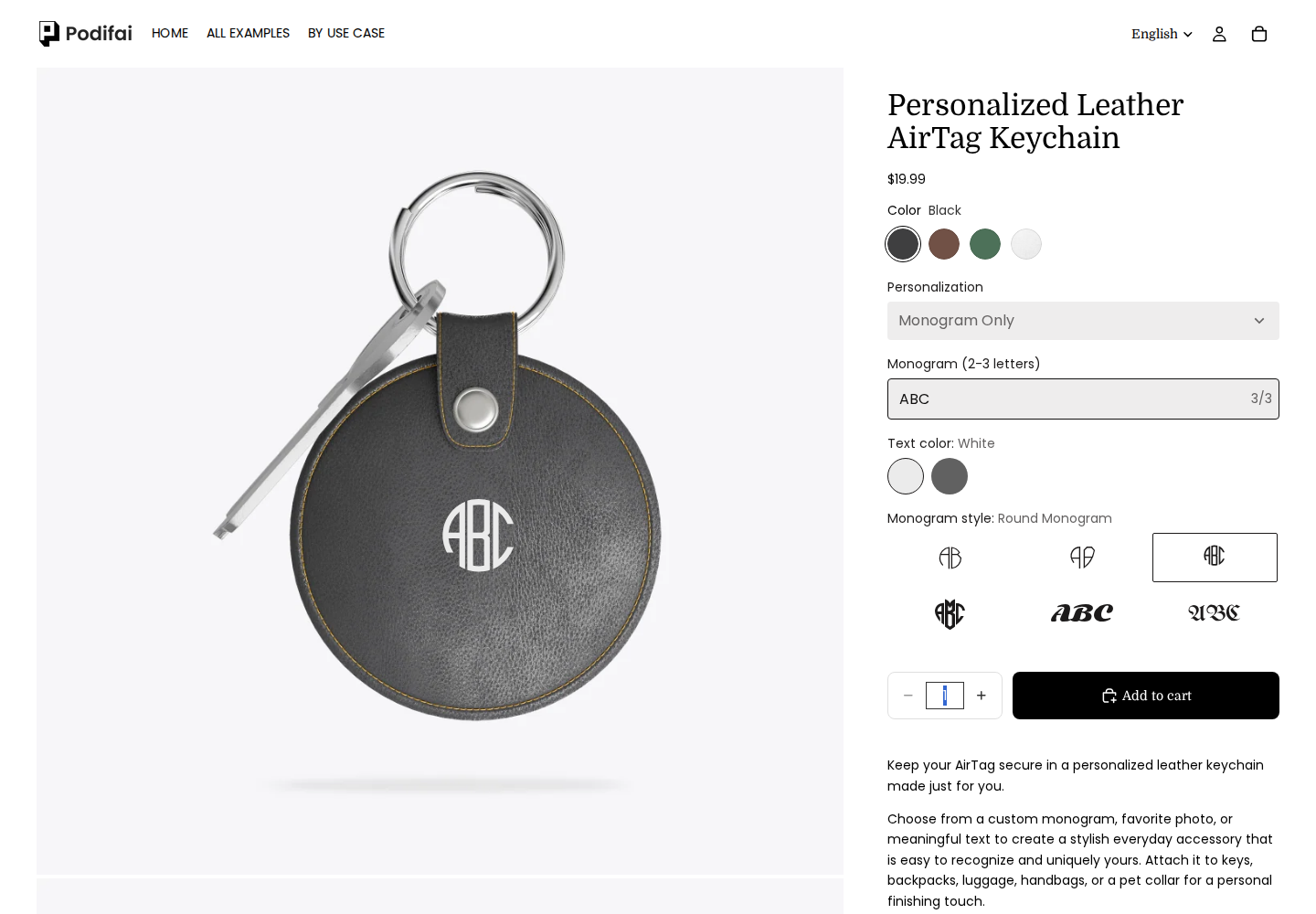
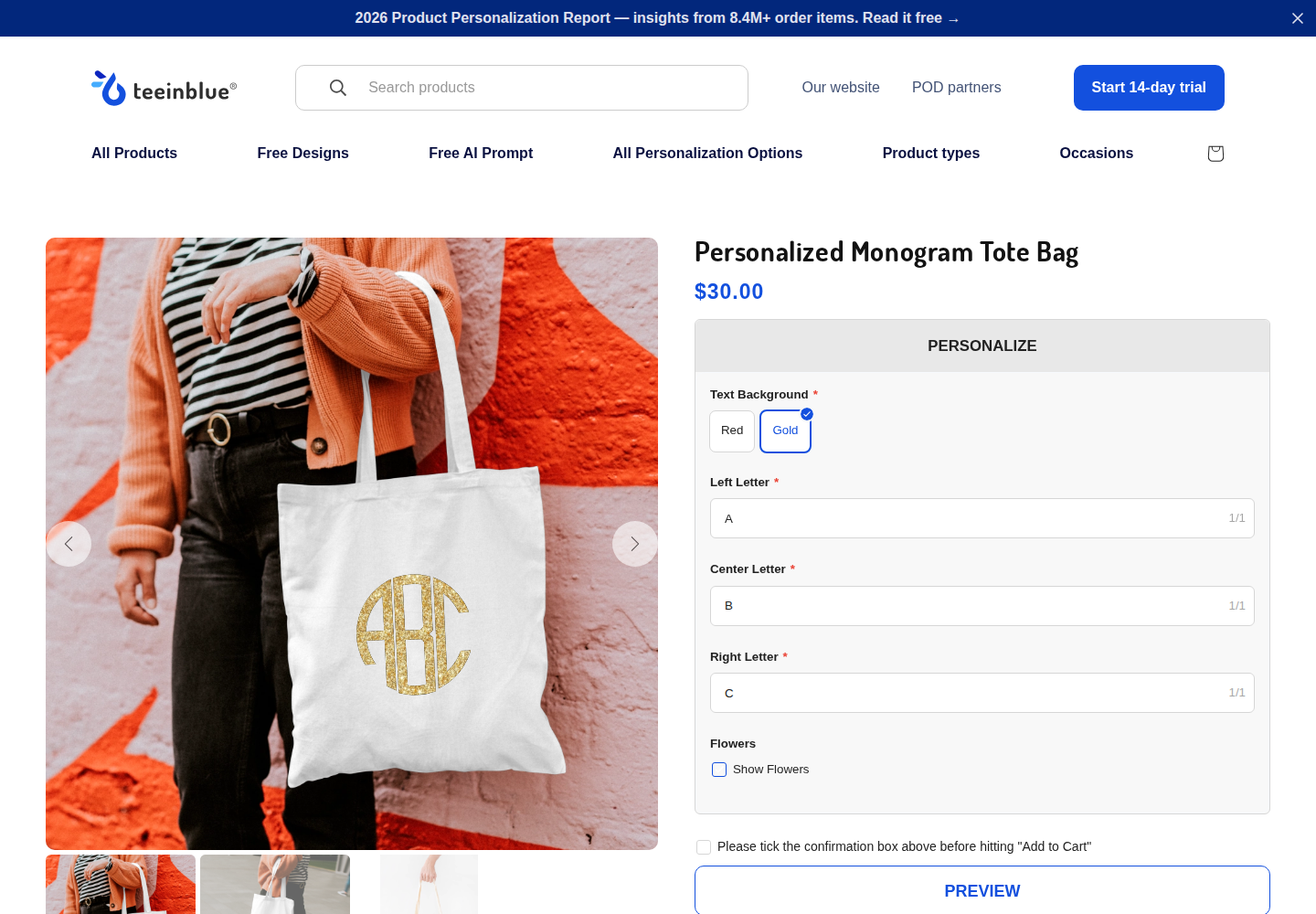
Enter the same three initials, ABC, on a Podifai leather keychain and a Teeinblue tote. Compare letter entry, layout choices and the on-product preview. These are different products, so this example does not establish which app is faster or produces better manufacturing output.
Podifai
Leather keychain
ABC in one three-character field on a leather keychain. Round Monogram, White text; six layout choices are visible. View full sizeTry the official example
Input: ABC in Round Monogram; Black keychain, White text
Observed result: One field accepts all three letters (3/3). ABC appears on the keychain, with six layout cards and text-color choices visible.
Use case: Short initials on a leather accessory with selectable layouts.
Limits: This screenshot records ABC in Round Monogram. The six cards are this template's layout choices, not an app-wide font count. It does not verify production artwork.
Teeinblue
Adjacent monogram tote
A, B and C in separate one-character fields on a tote. Gold selected, Flowers off; all three inputs retain their values. View full sizeTry the official example
Input: A / B / C in separate fields; Gold, Flowers off
Observed result: Each letter remains in its own field (1/1), and the gold ABC monogram appears on the tote. Text-background choices and the optional Flowers control are visible.
Use case: A structured three-letter monogram with optional decorative artwork.
Limits: This screenshot verifies the retained A/B/C values and visible preview. The tote differs from the leather keychain; cart, production files and manufacturing quality were not tested.
Start with initial count and letter order. Where two layouts meet the same requirement, test legibility and order data rather than declaring a universal winner.
Upload the same pet portrait to a mug
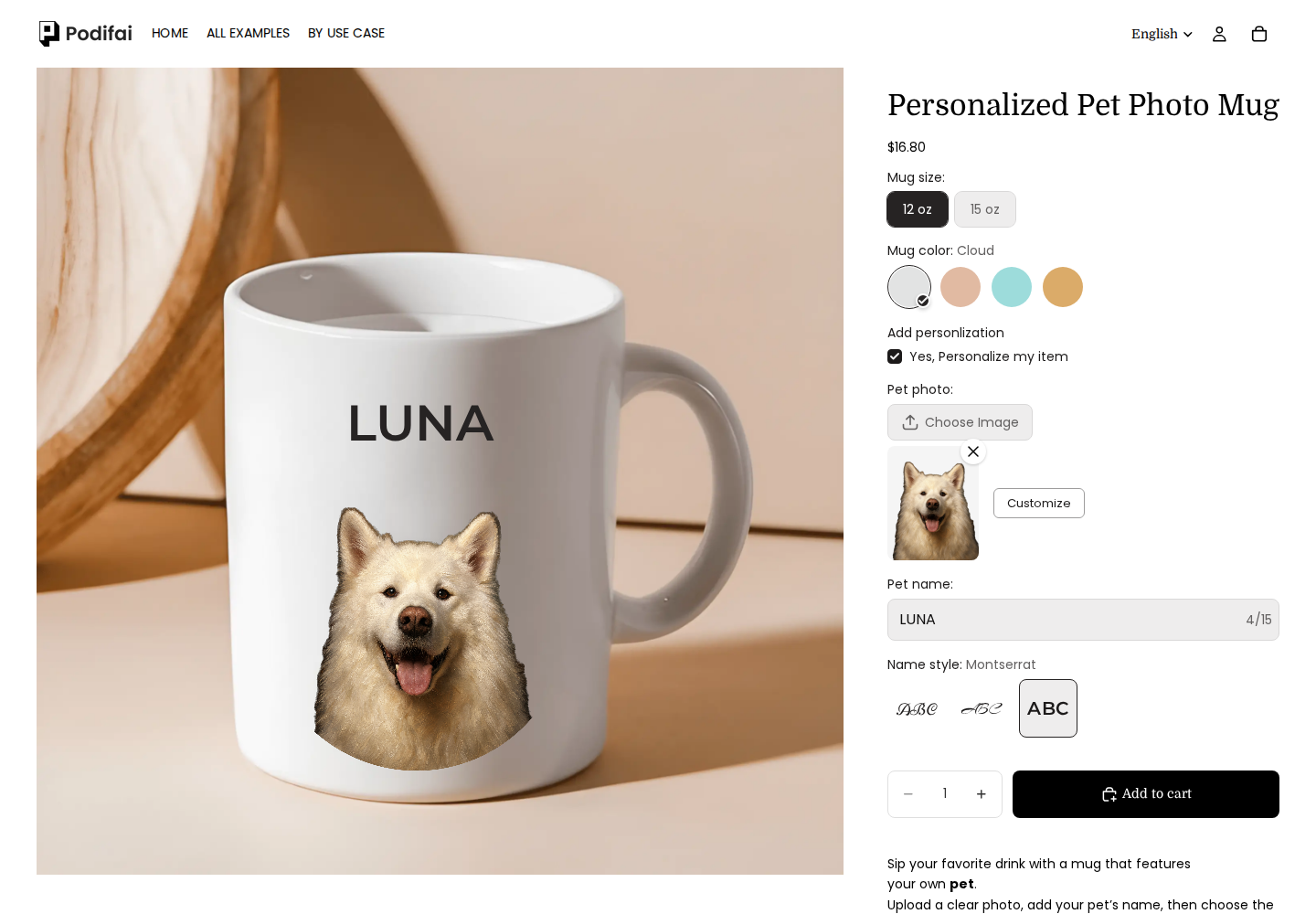
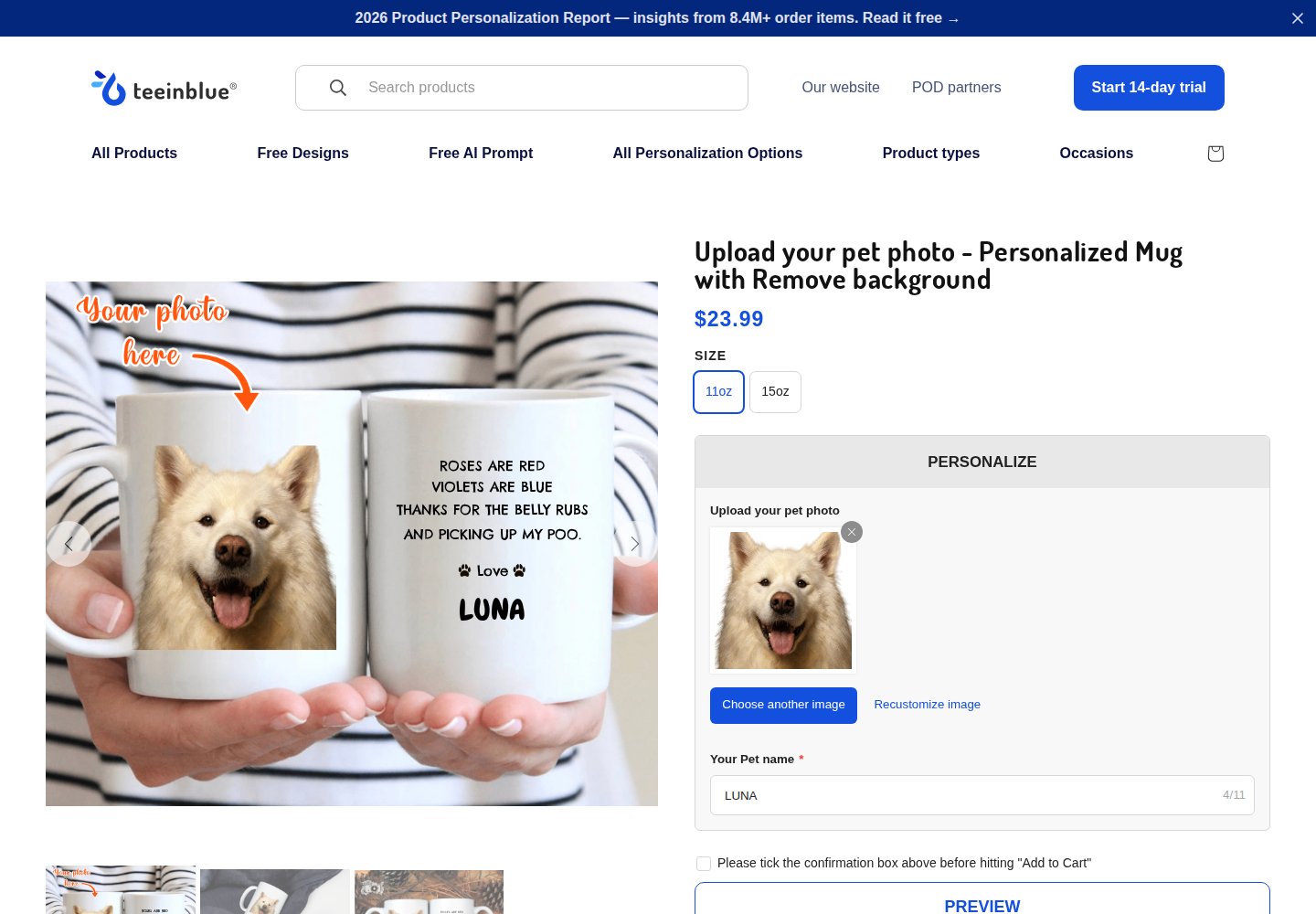
Upload the same portrait and enter LUNA on two mugs. Compare the circular photo treatment in Podifai with the configured Teeinblue portrait/cropper workflow. The templates and displayed product prices differ; these observations do not verify production files.
Observed result: Upload opened a crop popup with zoom and Select. After Select, the pet appeared without its original dark background in the $23.99 mockup, with LUNA on a second visible face. Recustomize image remained available.
Use case: A background-removed portrait with a second-side message.
Limits: Alpha transparency, edge quality and production files were not inspected. Confirmation and cart flow were not submitted.
Choose the artwork treatment first. Judge the uploaded image in the actual product preview, not just its upload thumbnail. Circular fitting, background removal and watercolor address different design needs.
Merchant setup and production output
Merchant-admin setup was not independently tested. A storefront screenshot cannot establish setup effort, inventory deduction or fulfillment reliability. Podifai's transparent PNG documentation describes production artwork; actual files and provider requirements need a separate merchant-side check.
Teeinblue workflows to qualify before switching
Teeinblue vs Podifai: feature comparison
✓ Supported · × Not supported · — Not confirmed
Options
Feature
Teeinblue
Podifai
Image swatches
Supported
Supported
Preset color swatches
Supported
Supported
Arbitrary color picker
Supported
Not confirmed
Shopper font choices
Conditional support: Font categories and custom TTF fonts are documented; OTF is excluded.
Supported
Dropdown choices
Supported
Supported
Text buttons / badges
Conditional support: Clipart categories can display inline text radio buttons.
Supported
Single-line text input
Supported
Supported
Multiline text area
Conditional support: Paragraph text is documented with a fixed container and configuration limits.
Supported
Customer image upload
Supported
Supported
Minimum selection validation
Not confirmed
Supported
Maximum selection validation
Not confirmed
Supported
Hover help tooltips
Not confirmed
Supported
Popup help tooltips
Not confirmed
Supported
Collapsible option groups
Not confirmed
Supported
Next / Previous sections
Not confirmed
Not confirmed
Preview
Feature
Teeinblue
Podifai
Layered 2D live preview
Supported
Supported
Uploaded image on product
Supported
Supported
Uploaded-photo shape / mask
Conditional support: A cropper supports zoom/crop and custom PNG crop shapes.
Supported
Mockup-only mask behavior
Conditional support: Mockup masks crop the shopper preview, not the final order artwork.
Not confirmed
Switchable product previews
Supported
Supported
Inline storefront customizer
Conditional support: Product-page settings document form styles, gallery and popup modes.
Supported
Popup customization workflow
Conditional support: Product-page settings document form styles, gallery and popup modes.
Supported
Enlarged design preview
Conditional support: Product-page settings document form styles, gallery and popup modes.
Supported
Variant-driven preview background
Conditional support: Variant-linked gallery images are documented; configure the target variant/mockup.
Supported
Interactive 3D engine
Not confirmed
Not supported
Augmented reality workflow
Not confirmed
Not confirmed
Image editing
Feature
Teeinblue
Podifai
Move uploaded image
Conditional support: Photo Reposition permits movement, resizing and rotation when configured.
Supported
Resize / zoom uploaded image
Conditional support: Photo Reposition permits movement, resizing and rotation when configured.
Supported
Rotate uploaded image
Conditional support: Photo Reposition permits movement, resizing and rotation when configured.
Supported
Crop / fit uploaded image
Conditional support: A cropper supports zoom/crop and custom PNG crop shapes.
Supported
Shopper image opacity control
Not confirmed
Supported
Shopper grayscale control
Not confirmed
Supported
Automatic photo background removal
Conditional support: Merchant-enabled removal uses the free built-in beta or a connected third-party service.
Supported
Grayscale on upload
Conditional support: Uploaded photos can be converted to black and white when the merchant enables the effect.
Supported
FaceCut effect
Conditional support: The corresponding Cutout.pro photo effect is documented.
Not confirmed
Cartoonize effect
Conditional support: The corresponding Cutout.pro photo effect is documented.
Not confirmed
Watercolor photo treatment
Conditional support: Photo/AI effects are advertised; qualify the required effect and production output.
Not confirmed
Text
Feature
Teeinblue
Podifai
Engraving visual text effect
Not confirmed
Supported
Emboss visual text effect
Not confirmed
Supported
Text shadow
Conditional support: Text shadow is advertised in the official feature overview.
Supported
Curved text
Conditional support: Warped single-line text is documented; paragraph curve/skew is excluded.
Supported
Two-letter monogram layout
Not confirmed
Supported
Three-letter monogram layout
Supported
Supported
Fixed-width text area
Conditional support: Single-line text has a configured frame width; paragraphs wrap within a fixed container.
Supported
Automatic text resizing
Conditional support: Single-line text scales down at the width limit; paragraphs fit a fixed-height container.
Supported
Text character limits
Conditional support: A merchant-configured character limit constrains text entry.
Supported
Color selector linked to text
Conditional support: Artwork 2.0 can populate font/color values across text layers.
Supported
Font selector linked to text
Conditional support: Artwork 2.0 can populate font/color values across text layers.
Supported
Text alignment
Conditional support: Text alignment is configurable; paragraphs offer horizontal and vertical alignment.
Supported
Custom font uploads
Conditional support: Font categories and custom TTF fonts are documented; OTF is excluded.
Supported
Pricing rules
Feature
Teeinblue
Podifai
Fixed option surcharge
Conditional support: Additional Charge uses a Shopify variant price and an extra cart line.
Supported
Percentage option adjustment
Not confirmed
Not confirmed
Linked Shopify add-on variant pricing
Conditional support: Additional Charge uses a Shopify variant price and an extra cart line.
Supported
Style changes Shopify variant price
Not confirmed
Not confirmed
Inventory
Feature
Teeinblue
Podifai
Variant-linked stock
Not confirmed
Supported
Hide unavailable choices
Not confirmed
Supported
Disable unavailable choices
Not confirmed
Supported
Independent custom stock count
Not confirmed
Supported
Custom inventory SKU
Not confirmed
Supported
Custom inventory barcode
Not confirmed
Supported
Paid-order stock deduction
Not confirmed
Supported
Templates
Feature
Teeinblue
Podifai
Ready-made personalization templates
Supported
Supported
Reusable templates / option sets
Conditional support: Global/local templates and cross-artwork global options are documented.
Supported
Storefront
Feature
Teeinblue
Podifai
Multilingual system messages
Conditional support: Static product-page UI content can be translated for published Shopify languages.
Supported
Automatic option-label translation
Conditional support: Artwork option titles support AI translation after artwork import into translations.
Conditional support: AI Auto Translation covers custom option content; reviewed translations take effect after confirmation.
Shopify app-block placement
Not confirmed
Supported
In-app option styling
Conditional support: Product-page settings document form styles, gallery and popup modes.
Supported
Shared global brand settings
Not confirmed
Supported
Removal of app branding
Not confirmed
Not confirmed
Product-page / theme compatibility
Not confirmed
Conditional support: Modern OS 2.0; nonstandard forms need a compatibility check.
Rules
Feature
Teeinblue
Podifai
Conditional show / hide
Conditional support: Layer dependencies and multiple AND conditions are documented.
Supported
Equals condition
Conditional support: Layer dependencies and multiple AND conditions are documented.
Supported
Not equals condition
Not confirmed
Supported
Order handoff
Feature
Teeinblue
Podifai
Final preview URL on order
Not confirmed
Supported
Preview URL retained in cart
Not confirmed
Supported
Customized cart thumbnail
Not confirmed
Conditional support: Theme template change may be required.
Original upload reference on order
Not confirmed
Supported
Order-email setup assistance
Not confirmed
Supported
Packing-slip setup assistance
Not confirmed
Supported
Custom preview thumbnail at checkout
Not confirmed
Not supported
Edit customization in cart
Conditional support: Edit design in cart requires the app setting and theme/Liquid integration.
Not supported
Generate compound SKU from components
Not confirmed
Not supported
CSV export with design links
Conditional support: Provider CSV templates and general item/design-link export are documented.
Not confirmed
Production
Feature
Teeinblue
Podifai
Automatic production artwork
Supported
Conditional support: When enabled, generation starts at Shopify order creation, including unpaid orders; complete files download as an order ZIP.
PNG production format
Supported
Conditional support: Documented flattened RGB PNG artwork, delivered in an order ZIP.
Transparent production canvas
Not confirmed
Conditional support: Full canvas transparent margins are retained; backgrounds already inside uploaded photos remain.
Production resolution / dimensions
Conditional support: Artwork is resized to the final provider print area; match pixel dimensions.
Conditional support: Documented 300 DPI and longest side up to 3600 pixels; aspect ratio preserved.
Multiple-view production artwork
Not confirmed
Conditional support: One PNG per view containing included text/upload customization; views without included artwork have no PNG.
Production formats beyond PNG
Conditional support: The vendor lists JPG/PDF/SVG/AI/EPS output; vector rendering is documented with compatible artwork.
Not confirmed
Separate preview and production layers
Conditional support: Layer display settings separate shopper mockups from production artwork.
Not confirmed
Fulfillment
Feature
Teeinblue
Podifai
Native Printful integration
Conditional support: These providers are named in API-connected fulfillment instructions.
Not confirmed
Native Printify integration
Conditional support: These providers are named in API-connected fulfillment instructions.
Not confirmed
Native ShineOn integration
Conditional support: These providers are named in API-connected fulfillment instructions.
Not confirmed
Automated provider order submission
Conditional support: Some compatible provider apps can auto-read attached designs; Product Base uses manual Confirm & Send.
Not confirmed
Confirm and send to POD providers
Conditional support: Product Base supports single/bulk Confirm & Send after mapping.
Not confirmed
Specialty tools
Feature
Teeinblue
Podifai
Star map generator
Supported
Not confirmed
Moon phase generator
Conditional support: Moon Phase is documented as an Artwork 2.0 layer/value type.
Not confirmed
Calendar generator
Conditional support: A date-selected calendar is documented; vector output is explicitly excluded for this layer.
Not confirmed
Crossword generator
Conditional support: Name-based Scrabble grids with separate or combined input fields are documented.
Not confirmed
Preset clipart library
Supported
Not confirmed
Editable Canva element import
Conditional support: Canva designs import with element-specific conversion and font/effect exclusions.
Not confirmed
Platforms
Feature
Teeinblue
Podifai
Etsy integration
Not confirmed
Not confirmed
Amazon integration
Not confirmed
Not confirmed
WooCommerce integration
Not confirmed
Not confirmed
Merchant setup
Feature
Teeinblue
Podifai
Bulk option editing
Not confirmed
Not confirmed
PSD layer and template import
Conditional support: 8-bit PSD import modes are documented; layer ratios and conversion may need correction.
Not confirmed
Reuse options across artworks
Conditional support: Artwork 2.0 global options can be linked across artworks.
Conditional support: A linked custom template shares its option setup and subsequent updates across products.
AI assistant for merchant operations
Conditional support: MCP actions are documented for an authenticated, scoped account connection.
Not confirmed
Production workflow
Feature
Teeinblue
Podifai
All-over-print workflow
Not confirmed
Not confirmed
Machine embroidery output
Not confirmed
Not confirmed
Laser cutting / engraving output
Not confirmed
Not confirmed
Support
Feature
Teeinblue
Podifai
Chat / email support
Supported
Supported
Individual onboarding call
Not confirmed
Supported
Public help center
Supported
Supported
Founder-led priority support
Not confirmed
Supported
Use cases
Feature
Teeinblue
Podifai
Leather text personalization
Not confirmed
Supported
Tumbler engraving preview
Not confirmed
Conditional support: Published feature list names tumbler engraving; actual engraving output not qualified.
Personalized jewelry preview
Not confirmed
Supported
Custom apparel / accessories
Conditional support: The listing advertises customizable POD goods and photo/text workflows.
Supported
Personalized gifts / homeware
Conditional support: The listing advertises customizable POD goods and photo/text workflows.
Supported
Charm selection builder
Not confirmed
Supported
Which One Is Right for You?
Choose around your storefront design, production workflow and app costs.
Before switching, test one complete product
Use your artwork and required options. Check preview placement, character limits, price changes and mobile controls; add it to the cart and inspect the saved order data. Verify the production file's dimensions, transparency and placement, then the provider handoff. For inventory, record numeric stock before and after the documented deduction event and check cancellation behavior. Ask about automatic import, checkout thumbnails or percentage pricing if your store depends on them.
We have not independently measured merchant setup time or verified both apps' production files, stock deduction and provider receipt. The screenshots establish the recorded storefront states.
Common Questions
Pricing, storefront previews, production files and switching.
Blue: $49 per 30-day cycle plus $0.10–$0.40 per order item after the first 100 orders. Order volume sets the fee tier; quantity does not multiply an item fee. Accounts created before March 3, 2026 may retain different legacy terms. Development stores only; paid subscription for a live store. A 14-day trial is published. Shopify, production and shipping charges are separate.
The Blue plan uses order volume to determine the fee tier, but charges per order item. Five units in one order item incur one item fee, not five. Add-on charge items are also billable. The first 100 orders have no usage fee. Confirm how your multi-item orders and tier transitions are billed before calculating a total.
Free forever: $0/month for 3 custom products; Starter: $7.9/month for 30 custom products; Growth: $15.9/month for unlimited custom products. Podifai does not charge app transaction or per-item fees. Check that the required output and fulfillment workflow fit your store before switching.
Yes. Both rendered the same portrait and LUNA in the recorded mug demos. Podifai used a circular photo area; Teeinblue offered a cropper, with the portrait displayed without its dark background in the mug preview. That visible result does not establish the exact processing method or transparent production-file edges. In the illustrated initials comparison, Podifai accepts ABC in one field on a keychain; Teeinblue accepts A, B and C in three separate fields on a tote. Both preview three initials, with different products and controls.
Yes, when its shop-wide generation setting is enabled; it is off by default. Podifai documents one flattened transparent PNG for each view with included text or uploaded-photo artwork, delivered in an order ZIP. Product backgrounds and Image Swatch artwork are excluded. The longest side is up to 3600 pixels at 300 DPI; an existing background inside an uploaded photo remains. Teeinblue documents order artwork and compatible vector workflows. Inspect the actual file and supplier requirements before switching.
The documented Product Base workflow uses Confirm & Send, individually or in bulk, after provider and variant mapping. The Shopify campaign workflow also documents automatic design reading by compatible provider apps, with the required order-link settings. These are different paths. Confirm the exact supplier and campaign type; an integration listing alone does not establish unattended dispatch. Podifai's PNG output does not establish an equivalent native POD connection.
Teeinblue documents 8-bit PSD and Canva import; conversion, fonts and effects have specific limitations. Automatic Teeinblue-to-Podifai migration has not been verified. Both apps document AI-assisted option translation with merchant review. Podifai covers product/template custom options; Teeinblue imports artwork into its translation workflow. Existing artwork and translations are not verified as portable between apps. Test a representative product and each required language.
Teeinblue documents cart editing with an app setting plus theme/Liquid integration, and saved customization and production artwork in its order workflow. Podifai documents saved selections, original upload links and a final preview link when available. Podifai cart thumbnails need theme setup; its documentation says checkout uses the default or variant image. Check the actual theme, cart and order rather than assuming every image appears at every step.
Consider Podifai when layered 2D photo/text personalization, catalog-based pricing and transparent PNG output meet your requirements. Keep Teeinblue on the shortlist when you need its documented design imports, compatible vector configuration or connected POD handoff. Both apps document option translations and reusable setup, with different configuration scopes. Neither the demo observations nor this source review establishes a universal winner for setup time, support speed or page performance.
Start with the Free plan for up to 3 custom products. Review the evidence and test your preview, pricing, order data and required production output before moving your catalog.
Teeinblue primary pricing and feature sources were reviewed on October 5, 2026. Public demo observations retain their original October 4 capture scope. A dash means the exact requirement is not confirmed, not that it is unavailable. Merchant setup, production files, stock deduction and provider receipt were not independently verified.
Method: this page maps published competitor capabilities to Podifai's current supported workflow. It does not present setup time, page speed, reliability, or migration effort as a measured benchmark unless a section explicitly describes the test and its conditions. Quoted reviews, when present, are selected qualitative examples rather than a representative satisfaction sample; use the linked live archive to review the full rating distribution and current context.