 Free install on Shopify
Two-letter layout
Set an exact two-character input and control the relative scale and spacing of both letters.
Let shoppers enter initials, choose a monogram style, font, color, and placement, and preview the personalized product before checkout.
Direct answer
Product-page controls
The interface should explain the finished design through labels, validation, and preview instead of expecting shoppers to memorize monogram etiquette.
Collect one, two, three, or more letters with required fields, character limits, and an order example that matches the selected design.
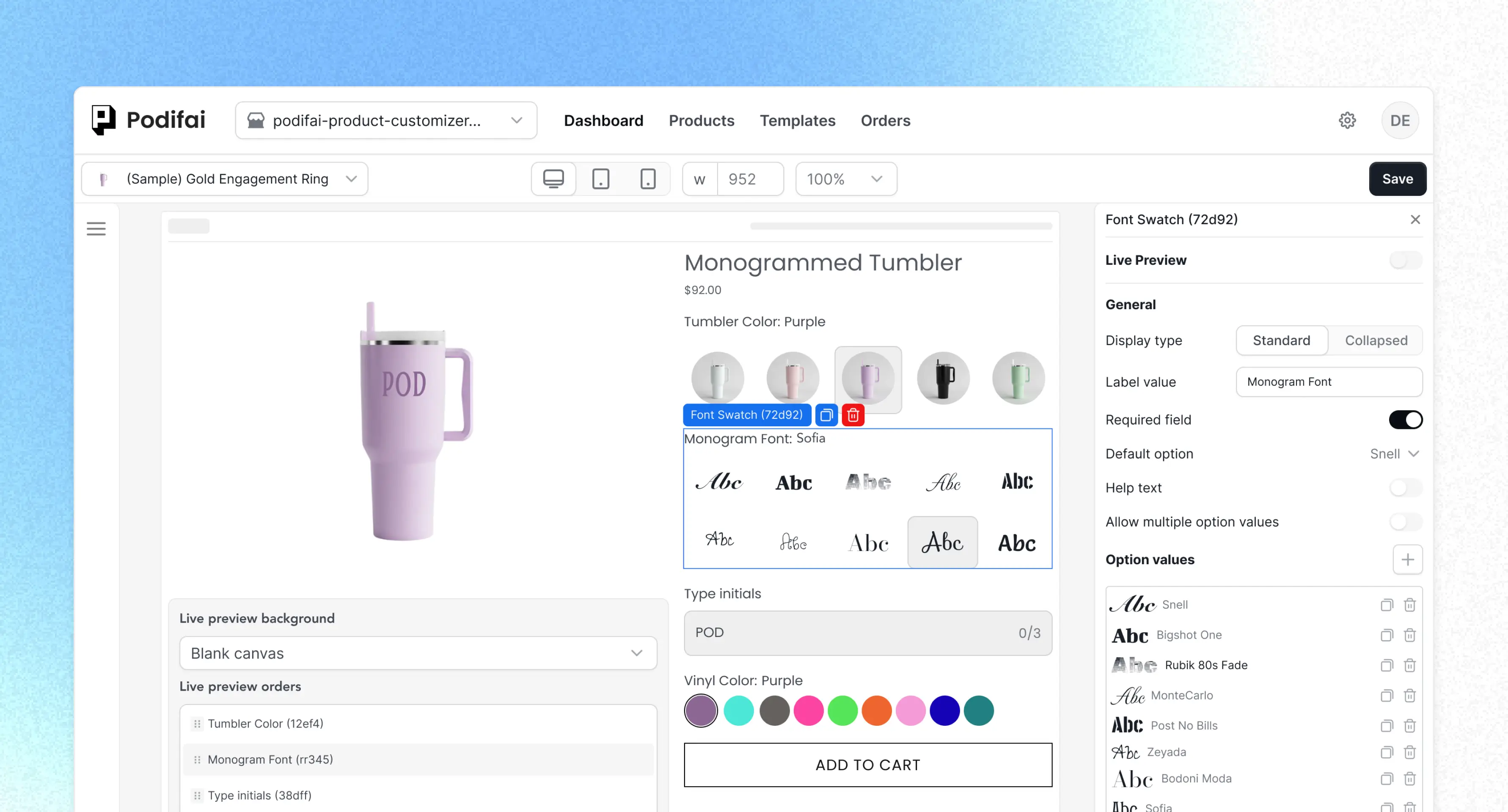
Present script, block, stacked, or center-large monogram choices visually and connect the selected font to the text preview.
Offer thread colors, foil finishes, engraving treatments, or product placements without turning every choice into a Shopify variant.
Show only eligible choices, change validation by style, and add a fixed personalization charge before the shopper reaches checkout.
Two-letter and three-letter monograms
Choose a two- or three-letter mode, scale each letter, adjust spacing, and connect the style to shopper input.
Set an exact two-character input and control the relative scale and spacing of both letters.
Compose left, center, and right initials with individual letter scale and overall spacing controls.
Product evidence
These product recordings show the actual controls behind shopper-entered letters, linked font choices, and the saved personalization result.
Enable a shopper text field for the layered 2D preview and position it inside the intended decoration area.
Connect approved font choices to the initials field so the preview changes with the selected monogram style.
Keep product, selected values, price, status, and the preview result readable after Shopify checkout.
Continue exploring
Use the adjacent option, configurator, preview, and implementation pages to plan the complete monogram workflow.
Configure initials, styles, colors, placements, and paid add-ons.
Review the full storefront-to-order customization workflow.
Map text, fonts, colors, and images to a layered preview.
Configure monogram fonts and connect them to customer text.
Reuse the same option system, but set fields and rules around the product's actual material and production method.
| Product | Shopify variants | Monogram options | Important rule |
|---|---|---|---|
| Backpack | Color or size | Design, initials, thread color | Character count changes with the selected design |
| Robe | Length, color, size | Method, style, initials, color | Embroidery and applique can use different prices |
| Leather bag | Leather or product color | Initials, text style, finish, placement | Material choice controls eligible treatments |
| Jewelry | Metal, size, chain length | Left, center, and right initials | Each position has a fixed meaning and limit |
Shopify workflow
Use variants for the base product choices that identify a stocked SKU, such as robe size, bag color, leather, or necklace metal.
Add the initials input, design, font, color, finish, placement, and optional personalization control required by production.
Map visible choices to the product image, hide invalid combinations, and show any personalization charge before add to cart.
Verify the product page, cart, checkout, Shopify Admin, Podifai Orders tab, and the merchant's production or printing workflow.
Scope
Podifai covers the Shopify storefront and order-capture workflow: custom fields, layered 2D preview, conditional choices, supported price add-ons, and line item properties.
Enabled print-ready generation exports included text and customer-uploaded image layers as transparent PNGs; product backgrounds and Image Swatch artwork are excluded. It does not generate embroidery-machine, SVG, DXF, or laser-ready files. Merchants should keep their artwork preflight, proof approval, and manufacturing checks in the production process. Multiple Views can separate front, back, and other supported 2D product surfaces when each view is prepared and configured accurately. Set up and check print-ready PNG files
Merchant proof
Verified Shopify App Store reviews from merchants using Podifai for names, logos, engraving choices, and custom products.
4.9 on the Shopify App Store · 24 reviewsI run a custom apparel lab (DTF printing and embroidery) and Podifai has been exactly what I needed to offer personalization directly on my Shopify store. The live customizer works beautifully — customers can see their name, number, and logo on the garment in real time. What really stood out was the support… that level of founder-direct support is rare.
Podifai est hyper intuitif ! Très complet, l'équipe est très disponible et disposée à améliorer notre expérience. J'avais envie d'une fonctionnalité particulière, ils l'ont mise en place dans les 10 jours ! Ça change complètement l'expérience client pour moi qui propose de la personnalisation !
The options available are great for engraving customisations on my products. The support team have been amazing with helping to guide me and make my set up quicker, look and feel the way I hoped. Thank you Podifai team!
Use the guides to explain monogram order and plan the complete Shopify implementation around the product's production rules.
Understand common monogram types, product methods, and the difference between initials and a finished monogram design.
Initial order guideUnderstand common initials ordering and help shoppers enter the design they intend.
Shopify implementationConfigure font swatches, two-letter and three-letter layouts, and the connected text input.
Customer stories
Theo Leathercraft shows how a five-character rule and foil choices can be captured for a handmade leather product.
Theo Leathercraft
See a focused monogram workflow with a five-character limit and no-foil, gold, antique-gold, and silver choices.
Read customer storyA Shopify monogram product customizer lets shoppers enter initials, choose a monogram design, font, color, finish, or placement, preview supported choices on the product, and submit the complete configuration with the order.
No. Use Shopify variants for inventory-bearing choices such as product size, material, or base color. Store shopper-entered initials and monogram choices as product options and line item properties instead of creating a variant for every possible letter combination.
Yes. A Text Input can be required and configured with a character limit, placeholder, and help text. Merchants should set the limit for each design and use conditional logic when different monogram styles accept different numbers of letters.
Yes. Podifai can render supported text, fonts, colors, and placement on a layered 2D product preview. The preview should represent only the product face and production choices the merchant can configure accurately.
Yes. Podifai supports fixed price add-ons and linked Shopify variant prices for option choices. Quantity-based pricing rules are not currently configured inside the customizer.
Podifai attaches the selected customization values to the Shopify cart line as line item properties. Merchants can review the selections in Shopify Admin and the Podifai Orders tab, then configure downstream print or fulfillment templates as needed.
Podifai has a Free forever plan for up to 3 custom products. Starter supports 30 products for $7.9/month, and Growth supports unlimited products for $15.9/month. Existing customers keep their current full access.

Start free with up to 3 custom products, or choose a paid plan from $7.9/month as your catalog grows.