2D personalization, 3D and production

Last verified: October 6, 2026

Zakeke Pricing vs Podifai: Which Workflow Fits?

Zakeke offers 2D personalization, model-based 3D configuration, AR and multiple production formats. Podifai focuses on Shopify layered 2D text/photo products and documented PNG artwork. Choose by the required assets, pricing rules and supplier handoff, then compare the applicable plan.

TL;DR: which app should you choose?

  • Choose Podifai when your Shopify product fits layered 2D text/photo preview and the documented PNG handoff. Free covers three custom products; the published plans have no app transaction fee. Qualify bulk rosters, formulas and fulfillment separately.
  • Choose Zakeke when you need model-based 3D/AR or vector-aware production formats. Grow adds bulk forms and customization pricing rules; Scale lists configuration pricing rules. Prepare the required 3D assets and qualify output content.

Feature availability depends on the plan and setup. See the pricing and workflow comparison below.

Published pricing

Zakeke

From $69.90/mo + per-item sales fee

Starter $69.90/month for 10 published products plus 1.9% per customized item; Grow $129.90 for 50 plus 1.7%; Scale $299.90 for 100 plus 1.5%. Fees use final item price excluding tax/shipping. Grow adds white-label, customization pricing rules and bulk forms; Scale adds configuration pricing rules. Free is development-store only; paid plans offer a 14-day trial. Official sources disagree on the minimum fee ($0.02 vs $0.03); confirm account terms.

Podifai

$0

Published plans: Free for 3 custom products; Starter is $7.90/month for 30 products; Growth is $15.90/month for unlimited products. No transaction fee in these published plans.

Zakeke vs Podifai: price, workflow, and fit

Compare the plan needed for the complete task. A 3D software subscription does not prepare the product model, and a PDF/SVG extension does not guarantee that every element is vector artwork.

CriteriaZakekePodifai
Published plansStarter $69.90/month for 10 published products plus 1.9% per customized item; Grow $129.90 for 50 plus 1.7%; Scale $299.90 for 100 plus 1.5%. Fees use final item price excluding tax/shipping. Grow adds white-label, customization pricing rules and bulk forms; Scale adds configuration pricing rules. Free is development-store only; paid plans offer a 14-day trial. Official sources disagree on the minimum fee ($0.02 vs $0.03); confirm account terms.Published plans: Free for 3 custom products; Starter is $7.90/month for 30 products; Growth is $15.90/month for unlimited products. No transaction fee in these published plans.
Fee basis and extrasNot a fee on the whole cart. The standalone 3D/AR Viewer is excluded. Additional sales channels, manual orders, assets or services can have separate costs.No app transaction fee is specified in the published plans. Shopify, supplier and unrelated service costs are separate.
Plan for the taskStarter provides tool access for 10 products. Grow adds white-label, bulk forms and customization pricing rules; Scale lists configuration pricing rules. Confirm Shopify-specific configuration pricing and required add-ons.Published plans share supported features and vary by custom-product count: 3 / 30 / unlimited.
2D versus 3D/ARInteractive 3D and AR use a suitable model, materials and mapped print areas. Device compatibility and asset preparation need qualification.One to five layered 2D views; this is not a model-based 3D or AR engine.
Text and image editingTemplates and printing methods govern editable text, upload tools, masks and background removal. Controls and output vary with configuration.Merchant-configured text/photo fields, masks and enabled image controls. Output contains included text/upload artwork, not every visual element in the preview.
Shopper chargesGrow customization rules support text-length conditions, setup fees and quantity tiers. Shopify cart quantity changes do not recalculate those tier charges. 3D option pricing uses a separate variant/charge mapping.Fixed adjustments and linked Shopify add-on prices are documented. Published sources conflict on percentage adjustments; confirm the current calculation before depending on it. General dimension formulas and per-character billing are not established.
Bulk personalizationNames and Numbers extends Grow bulk forms; tagged fields collect per-item names, numbers or images and generate separate outputs. CSV form population is documented.Single-product name/number fields are supported. An equivalent roster form and per-person production batch are not established.
Production formatsOrders generate PDF, PNG, SVG and DXF per print area. DXF excludes raster content unless vectorized; EPS/AI and mixed PDFs are rasterized on upload. Download the full ZIP for all sides and inspect the supplier file.With generation enabled (off by default), documentation describes a flattened PNG per view containing included text/upload artwork, up to 3600 pixels on its longest side at 300 DPI. Product backgrounds and Image Swatch graphics are excluded; an uploaded photo background remains. Inspect the supplier file; native POD submission is not established.
Printful handoffNative mapped catalog products can be sent after payment. Manual confirmation is the default; enable automatic confirmation deliberately. Multiple designs of the same variant can need manual draft correction.Download documented PNG artwork for your production workflow. Native automatic provider submission is not established.
Inventory requirementsShopify attribute/variant mapping is documented for 3D configuration. It does not independently prove stock deduction, cancellation restoration or custom SKU/barcode parity.Documentation describes linked Shopify variants or independent custom stock with SKU/barcode and hide/disable controls. Deduction is documented at order creation, including unpaid orders; cancellation/refund does not automatically restore it. Numeric changes were not independently tested.

Public product demos · October 2026

Compare real product examples

Explore customization across different product types. Each pair records the inputs and visible result in the linked demos, with template differences explained below. Product prices shown in screenshots are separate from app subscription prices.

Apparel: ALEX text

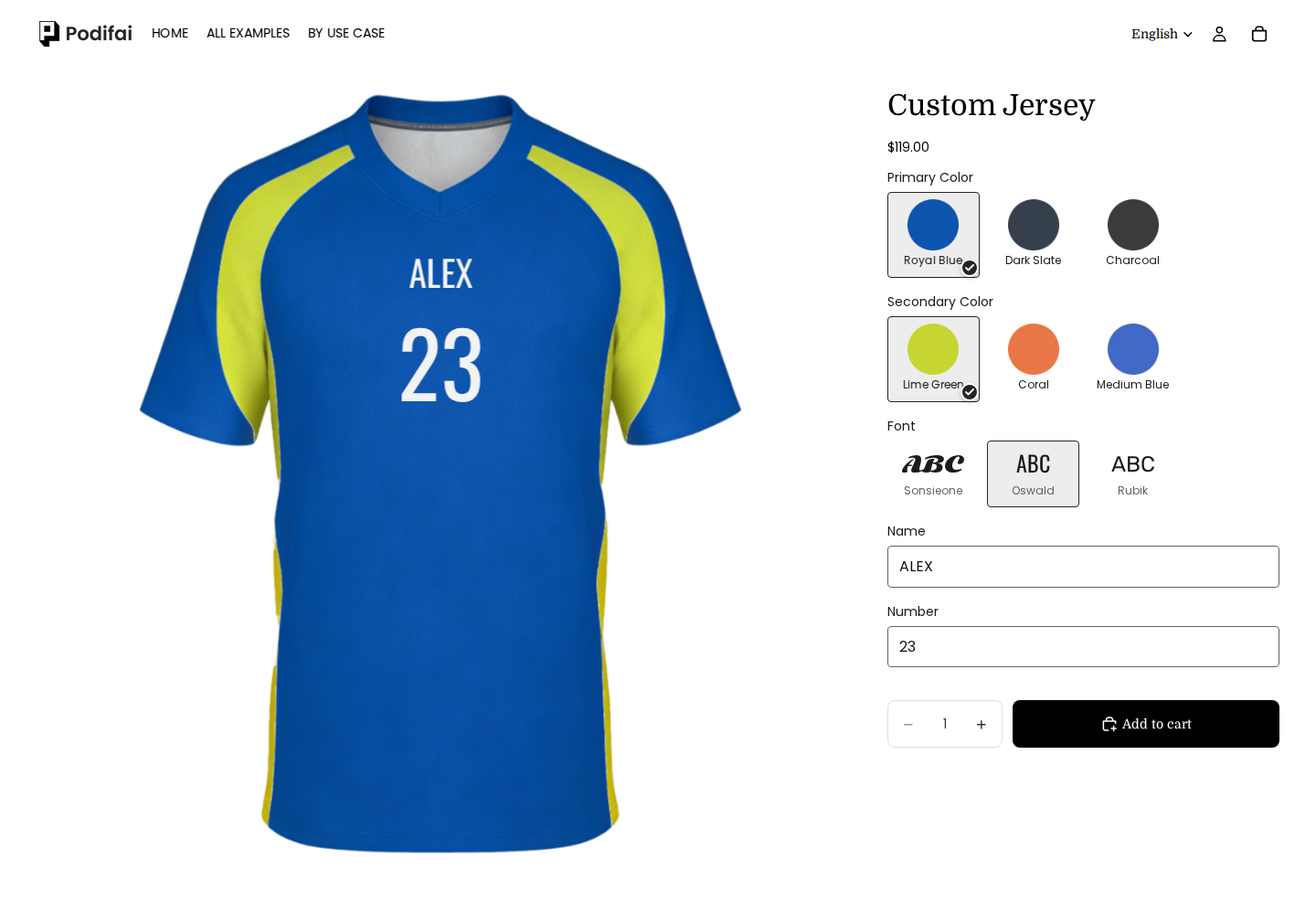
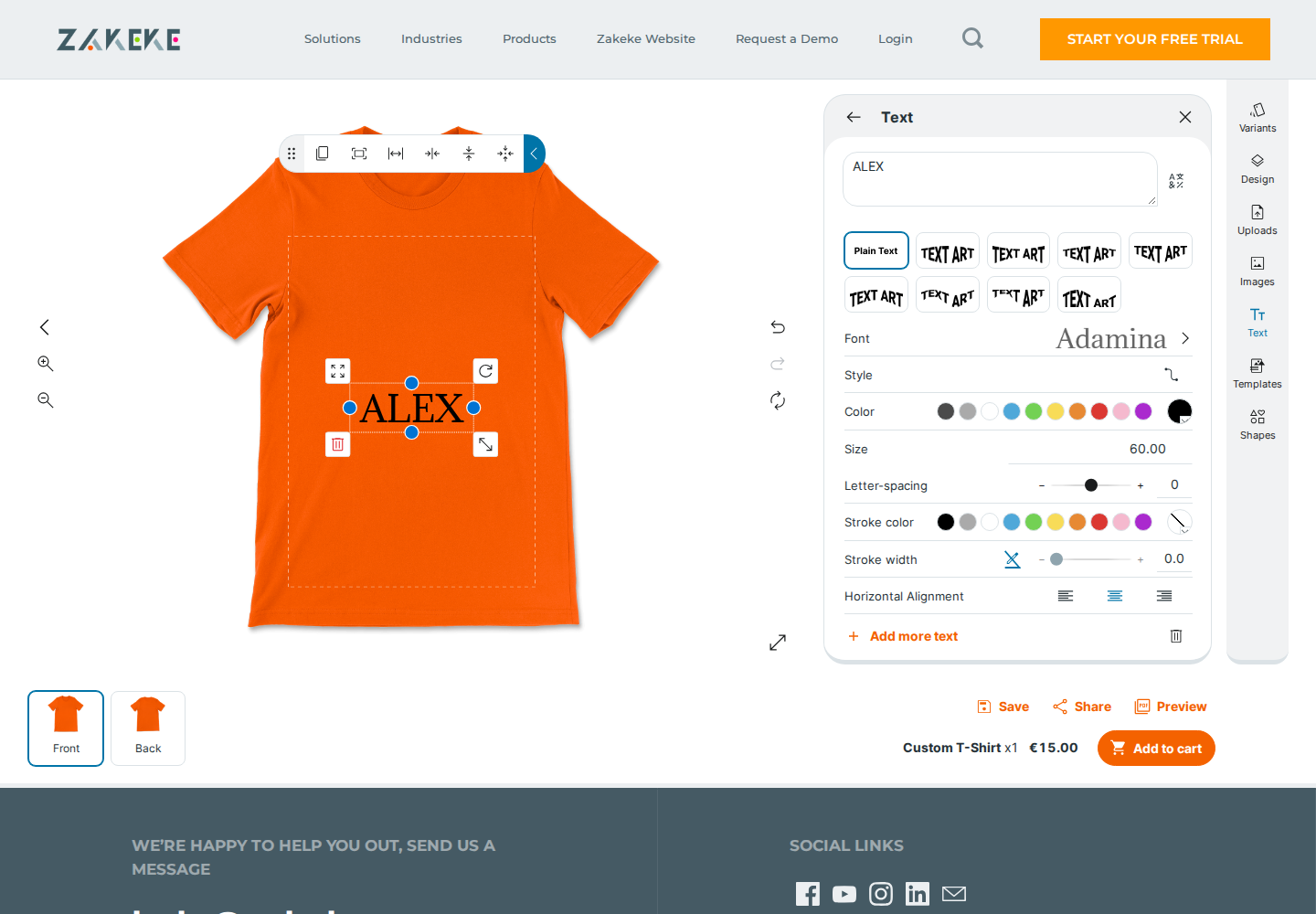
ALEX is the shared input. Podifai also includes 23; the T-shirt and jersey, colors and editors differ.

Podifai
Podifai demo: ALEX / 23 appears in Oswald on the front of the Royal Blue jersey.

ALEX / 23 appears in Oswald on the front of the Royal Blue jersey.

Captured 2026-10-06

Zakeke
Zakeke demo: Black ALEX text appears on the orange T-shirt in the 2D editor. This screenshot does not verify 3D or production output.

Black ALEX text appears on the orange T-shirt in the 2D editor. This screenshot does not verify 3D or production output.

Captured 2026-10-06

Sofas: dark finishes

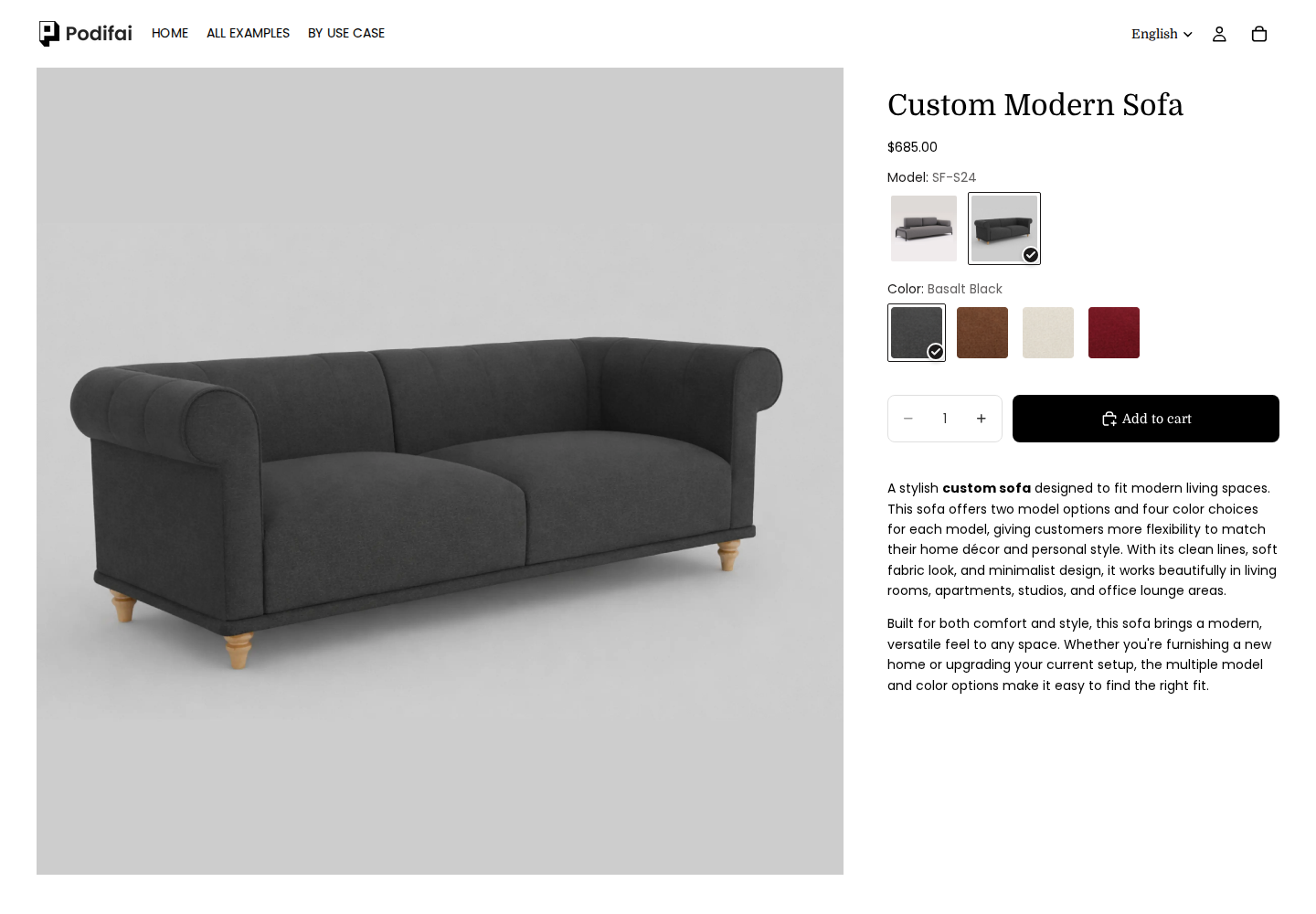
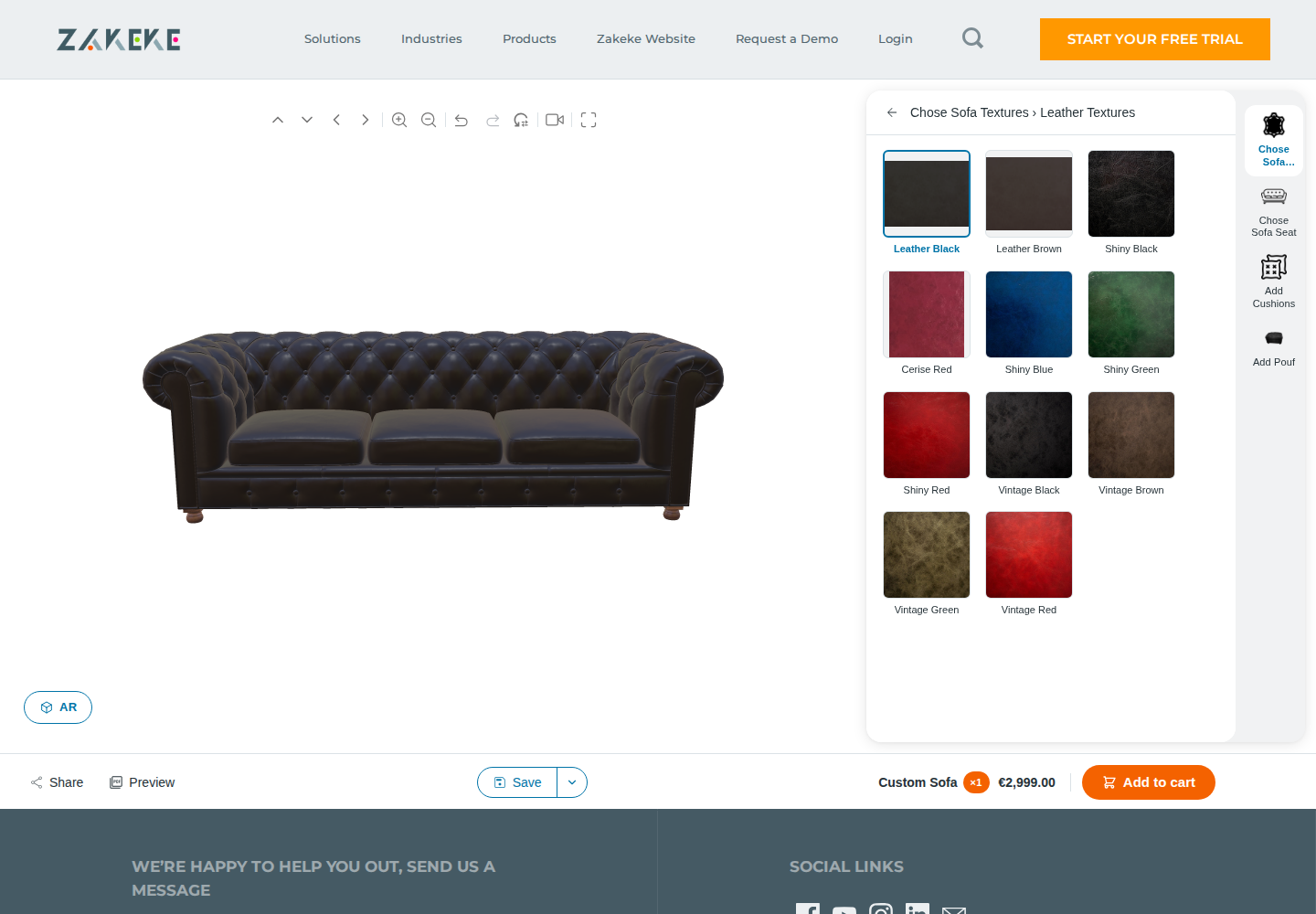
Basalt Black and Leather Black are options in their respective templates. Sofa styles, materials and display methods differ; this is not a test of material realism or AR.

Podifai
Podifai demo: SF-S24 and Basalt Black selected. The preview shows the black sofa; this screenshot alone does not establish 3D rendering.

SF-S24 and Basalt Black selected. The preview shows the black sofa; this screenshot alone does not establish 3D rendering.

Captured 2026-10-07

Zakeke
Zakeke demo: Leather Black selected in the Custom Sofa configurator. The black sofa model is visible; AR was not tested.

Leather Black selected in the Custom Sofa configurator. The black sofa model is visible; AR was not tested.

Captured 2026-10-07

These screenshots document storefront configuration and previews. They do not establish checkout, production-file quality, merchant setup effort or every mobile interaction. A template that retains its original product photo does not establish that the app lacks preview support elsewhere.

Zakeke vs Podifai: feature comparison

✓ Supported · × Not supported · — Not confirmed

Options

FeatureZakekePodifai
Image swatchesConditional support: 3D attributes/options use image or color icons and configurable dependency constraints.Supported
Preset color swatchesConditional support: 3D attributes/options use image or color icons and configurable dependency constraints.Supported
Arbitrary color pickerNot confirmedNot confirmed
Shopper font choicesConditional support: Custom fonts are included; designer templates can permit font changes.Supported
Dropdown choicesNot confirmedSupported
Text buttons / badgesNot confirmedSupported
Single-line text inputConditional support: Text tools and templates support editable text, styles, alignment, colors, constraints and auto-fit.Supported
Multiline text areaConditional support: Text tools and templates support editable text, styles, alignment, colors, constraints and auto-fit.Supported
Customer image uploadConditional support: Uploaded artwork can appear in the Visual Product Customizer.Supported
Multiple personalized items in one bulk formConditional support: Names and Numbers extends Grow bulk forms with per-item personalization and separate production files.Not confirmed

Preview

FeatureZakekePodifai
Layered 2D live previewConditional support: Uploaded artwork can appear in the Visual Product Customizer.Supported
Uploaded image on productConditional support: Uploaded artwork can appear in the Visual Product Customizer.Supported
Uploaded-photo shape / maskConditional support: Configured shapes can crop uploaded artwork as masks.Supported
Switchable product previewsConditional support: 3D models, mapped print areas, materials and cameras support interactive 3D and optional AR.Supported
Inline storefront customizerNot confirmedSupported
Popup customization workflowNot confirmedSupported
Interactive 3D engineConditional support: 3D models, mapped print areas, materials and cameras support interactive 3D and optional AR.Not supported
Augmented reality workflowConditional support: 3D models, mapped print areas, materials and cameras support interactive 3D and optional AR.Not confirmed
Shopper-added image/text design canvasConditional support: Enabled text/upload tools let shoppers add content; templates and printing methods can restrict it.Not confirmed
Virtual try-onConditional support: Virtual Try-On is listed on the published plans.Not confirmed

Image editing

FeatureZakekePodifai
Move uploaded imageConditional support: The 3D text/image designer has per-element controls for movement, rotation, resizing and font changes.Supported
Resize / zoom uploaded imageConditional support: The 3D text/image designer has per-element controls for movement, rotation, resizing and font changes.Supported
Rotate uploaded imageConditional support: The 3D text/image designer has per-element controls for movement, rotation, resizing and font changes.Supported
Crop / fit uploaded imageConditional support: Configured shapes can crop uploaded artwork as masks.Supported
Automatic photo background removalConditional support: Printing methods can remove backgrounds on upload or expose an optional shopper tool.Supported
Grayscale on uploadConditional support: Configured engraving effects can transform uploaded artwork, including grayscale.Supported

Text

FeatureZakekePodifai
Engraving visual text effectConditional support: Configured engraving effects can transform uploaded artwork, including grayscale.Supported
Text shadowConditional support: Text tools and templates support editable text, styles, alignment, colors, constraints and auto-fit.Supported
Curved textConditional support: Text tools and templates support editable text, styles, alignment, colors, constraints and auto-fit.Supported
Fixed-width text areaConditional support: Text tools and templates support editable text, styles, alignment, colors, constraints and auto-fit.Supported
Automatic text resizingConditional support: Text tools and templates support editable text, styles, alignment, colors, constraints and auto-fit.Supported
Text character limitsConditional support: Text tools and templates support editable text, styles, alignment, colors, constraints and auto-fit.Supported
Color selector linked to textConditional support: Text tools and templates support editable text, styles, alignment, colors, constraints and auto-fit.Supported
Font selector linked to textConditional support: The 3D text/image designer has per-element controls for movement, rotation, resizing and font changes.Supported
Text alignmentConditional support: Text tools and templates support editable text, styles, alignment, colors, constraints and auto-fit.Supported
Custom font uploadsConditional support: Custom fonts are included; designer templates can permit font changes.Supported

Pricing rules

FeatureZakekePodifai
Fixed option surchargeConditional support: Grow adds customization pricing rules, including text-length conditions, setup fees and quantity tiers.Supported
Percentage option adjustmentNot confirmedNot confirmed
Linked Shopify add-on variant pricingNot confirmedSupported
Style changes Shopify variant priceConditional support: Shopify 3D options can adjust price through an existing variant or a created charge variant.Not confirmed
Dimension / quantity formula pricingNot confirmedNot confirmed
Per-character text surchargeConditional support: Grow adds customization pricing rules, including text-length conditions, setup fees and quantity tiers.Not confirmed
One-time add-on chargeConditional support: Grow adds customization pricing rules, including text-length conditions, setup fees and quantity tiers.Not confirmed
Quantity-tier shopper pricingConditional support: Grow adds customization pricing rules, including text-length conditions, setup fees and quantity tiers.Not confirmed

Inventory

FeatureZakekePodifai
Variant-linked stockNot confirmedSupported
Hide unavailable choicesNot confirmedSupported
Disable unavailable choicesNot confirmedSupported
Independent custom stock countNot confirmedSupported
Custom inventory SKUNot confirmedSupported
Custom inventory barcodeNot confirmedSupported
Paid-order stock deductionNot confirmedSupported

Templates

FeatureZakekePodifai
Reusable templates / option setsNot confirmedSupported

Storefront

FeatureZakekePodifai
Multilingual system messagesNot confirmedSupported
Shopify app-block placementNot confirmedSupported
Removal of app brandingConditional support: Grow and Scale remove Zakeke branding.Not confirmed
Product-page / theme compatibilityNot confirmedConditional support: Modern OS 2.0; nonstandard forms need a compatibility check.
Merchant-supplied option content translationsNot confirmedNot confirmed

Rules

FeatureZakekePodifai
Conditional show / hideConditional support: 3D attributes/options use image or color icons and configurable dependency constraints.Supported
Equals conditionNot confirmedSupported
Not equals conditionNot confirmedSupported

Order handoff

FeatureZakekePodifai
Preview URL retained in cartConditional support: The Cart API supplies preview data for merchant-integrated cart display.Supported
Customized cart thumbnailConditional support: The Cart API supplies preview data for merchant-integrated cart display.Conditional support: Theme template change may be required.
Original upload reference on orderConditional support: Order ZIP includes production files, original uploads and the order summary.Supported
Batch export of uploads / preview filesConditional support: Order ZIP includes production files, original uploads and the order summary.Not confirmed
Configure and request a merchant quoteNot confirmedNot confirmed

Production

FeatureZakekePodifai
Automatic production artworkConditional support: Orders generate production files per print area in PDF, PNG, SVG and DXF; dimensions follow the area.Conditional support: When enabled, generation starts at Shopify order creation, including unpaid orders; complete files download as an order ZIP.
PNG production formatConditional support: Orders generate production files per print area in PDF, PNG, SVG and DXF; dimensions follow the area.Conditional support: Documented flattened RGB PNG artwork, delivered in an order ZIP.
Transparent production canvasNot confirmedConditional support: Full canvas transparent margins are retained; backgrounds already inside uploaded photos remain.
Production resolution / dimensionsConditional support: Orders generate production files per print area in PDF, PNG, SVG and DXF; dimensions follow the area.Conditional support: Documented 300 DPI and longest side up to 3600 pixels; aspect ratio preserved.
Multiple-view production artworkConditional support: Orders generate production files per print area in PDF, PNG, SVG and DXF; dimensions follow the area.Conditional support: One PNG per view containing included text/upload customization; views without included artwork have no PNG.
Production formats beyond PNGConditional support: Orders generate production files per print area in PDF, PNG, SVG and DXF; dimensions follow the area.Not confirmed
Vector paths in production outputConditional support: Vector artwork can be retained for output; DXF contains vector data only.Not confirmed

Fulfillment

FeatureZakekePodifai
Native Printful integrationConditional support: Native Printful integration supports connected catalog products and paid-order transfer.Not confirmed
Native Printify integrationNot confirmedNot confirmed
Automated provider order submissionConditional support: Native Printful integration supports connected catalog products and paid-order transfer.Not confirmed

Production workflow

FeatureZakekePodifai
Machine embroidery outputNot confirmedNot confirmed
Laser cutting / engraving outputNot confirmedNot confirmed

Platforms

FeatureZakekePodifai
Documented integration APIConditional support: Authenticated design API returns preview URLs and price data for custom cart integrations.Not confirmed

Where each app is stronger

Zakeke is stronger when...

  • Customers need to rotate an actual 3D model or place it in their environment with AR, and suitable assets are available.
  • Production needs vector-aware SVG/DXF or a configured print/engraving workflow; the input artwork and supplier requirements are qualified.
  • You need Names and Numbers bulk forms or a connected Printful workflow and have checked the required plan and exceptions.

Podifai is stronger when...

  • A layered 2D text/photo preview meets the storefront requirement without a 3D model workflow.
  • The supplier can use the documented PNG contents and dimensions after inspecting a sample.
  • The catalog fits Podifai's product-count pricing, including three products on Free, and does not depend on unverified roster or provider automation.
Podifai limitation: Podifai is not a documented replacement for Zakeke's 3D/AR engine, vector output or native Printful workflow. Zakeke's DXF omits raster content unless vectorized, and its Shopify pricing rules need cart-quantity checks. Official minimum-fee amounts conflict; confirm account terms. No merchant production file or provider receipt was inspected in this review.

Validate the replacement before moving the catalog

An automatic Zakeke-to-Podifai importer is not established. Select a product whose storefront and production requirements fit the documented Podifai workflow.

WorkflowMigration statusWhat to expect
2D text/photo templateRebuildRecreate fields, masks and views; compare long text, upload placement and final PNG contents.
3D/AR requirementNot supportedPodifai's documented workflow is layered 2D. Retain a suitable 3D tool if model-based interaction is required.
Production and fulfillmentManualConfirm the supplier accepts PNG; rebuild any provider handoff and qualify roster/formula needs before switching.

Which one should you choose?

Interactive 3D or AR

Zakeke

Its documented model workflow covers those requirements. Prepare assets and verify supported devices.

Names-and-numbers batch

Evaluate Zakeke Grow

Bulk forms with tagged template elements produce per-item files; inspect the complete roster output.

Three 2D text/photo products

Evaluate Podifai Free

The plan includes three custom products if its supported controls and PNG scope meet the task.

Vector cutting or native provider submission

Qualify Zakeke

Check input rasterization, DXF omissions, mapping and payment/confirmation rules rather than relying on a format label.

Common questions

Direct answers for Shopify merchants comparing these tools.

Sources and verification

Kickflip and Zakeke primary sources were reviewed October 6, 2026. Podifai documentation and Customily evidence retain their recorded review dates. This is a documentation review, not a new merchant-account, paid-order, production-file or provider-receipt test. Unknown features remain unconfirmed; plan and template requirements still apply.

Method: this page maps published competitor capabilities to Podifai's current supported workflow. It does not present setup time, page speed, reliability, or migration effort as a measured benchmark unless a section explicitly describes the test and its conditions. Quoted reviews, when present, are selected qualitative examples rather than a representative satisfaction sample; use the linked live archive to review the full rating distribution and current context.

Test your workflow before you switch

Build one real product in Podifai, confirm preview, pricing, cart, and order data, then decide whether it covers the workflow you need.