Options, preview and order workflow

Last verified: October 5, 2026

Globo Pricing vs Podifai: Which Workflow Fits?

Globo offers basic option sets on Free and a visual Personalizer on Advanced. Its paid tiers also cover purchasing workflows such as cart editing and Shopify POS. Podifai supports layered 2D text/photo customization and documented transparent PNG artwork, with plans based on custom-product count.

TL;DR: which app should you choose?

  • Choose Podifai when you want text/photo previews for up to three custom products on Free, or documented transparent PNG output that fits your production workflow.
  • Choose Globo when you need basic options across an unlimited catalog on Free, or Shopify POS and cart editing on Advanced. Live preview also requires Advanced.

Feature availability depends on the plan and setup. See the pricing and workflow comparison below.

Published pricing

Globo

Free / $9.90 / $19.90

Free $0; Premium $9.90/month; Advanced $19.90/month. Shopify Plus: Premium $39.90/month and Advanced $59.90/month. Personalizer preview, cart editing and POS are listed on Advanced. Paid tiers offer a 14-day trial; USD recurring charges are billed every 30 days. A documented Advanced 200 upload-limit variant has no price in the checked guide; confirm the store-specific offer.

Podifai

$0

Published plans: Free for 3 custom products; Starter is $7.90/month for 30 products; Growth is $15.90/month for unlimited products. No transaction fee in these published plans.

Globo vs Podifai: price, workflow, and fit

Compare the paid tier needed for the complete task. Globo's free option sets and Podifai's free custom-product allowance measure different things; a convincing preview also does not establish a production file.

CriteriaGloboPodifai
Published plan pricesFree $0; Premium $9.90/month; Advanced $19.90/month. Shopify Plus: Premium $39.90/month and Advanced $59.90/month. Personalizer preview, cart editing and POS are listed on Advanced. Paid tiers offer a 14-day trial; USD recurring charges are billed every 30 days. A documented Advanced 200 upload-limit variant has no price in the checked guide; confirm the store-specific offer.Published plans: Free for 3 custom products; Starter is $7.90/month for 30 products; Growth is $15.90/month for unlimited products. No transaction fee in these published plans.
Live previewPersonalizer preview is listed on Advanced: $19.90/month for standard Shopify plans or $59.90/month for Shopify Plus. Free and Premium do not include it; confirm any Advanced 200 offer in-app.Layered 2D preview is included in the published plans, including Free for three custom products.
Fields and validationFree covers basic text and choices; Premium adds specialized fields/limits; Advanced adds remaining types, groups and date restrictions. Detailed lead-time behavior needs qualification.Text, uploads, swatches and documented conditional rules. A date-picker workflow or general dimension calculator is not established.
Preview controlsAdvanced documentation describes configured layer drag, resize, rotate, masks, curved text and auto-fit. Controls depend on option type and setup.Documented image positioning, scaling, rotation, opacity and grayscale, plus masks and one to five 2D views; enable the required controls.
Option pricingPremium price add-ons; linked physical add-ons can use Shopify pricing/inventory. Qualify percentage/formula requirements separately.Fixed adjustments and linked Shopify add-on prices are documented. Published sources conflict on percentage adjustments; confirm the current calculation before depending on it. General dimension formulas and per-character billing are not established.
Cart and channelsAdvanced includes in-cart option editing and a Shopify POS option workflow. POS preview parity was not tested.Online Store workflow; preview display in cart requires theme setup. Equivalent in-cart editing and POS behavior are not established.
InventoryLinked add-on products can use Shopify stock; Advanced includes out-of-stock handling. Independent custom stock, SKU/barcode fields and numeric deduction need separate evidence.Documentation describes linked Shopify variants or independent custom stock with SKU/barcode and hide/disable controls. Deduction is documented at order creation, including unpaid orders; cancellation/refund does not automatically restore it. Numeric changes were not independently tested.
Production handoffDesign previews and original upload references are documented on cart/orders. A downloadable preview does not establish transparent, dimensioned production artwork.With generation enabled (off by default), documentation describes a flattened PNG per view containing included text/upload artwork, up to 3600 pixels on its longest side at 300 DPI. Product backgrounds and Image Swatch graphics are excluded; an uploaded photo background remains. Inspect the supplier file; native POD submission is not established.

Public product demos · October 2026

Compare real product examples

Explore customization across different product types. Each pair records the inputs and visible result in the linked demos, with template differences explained below. Product prices shown in screenshots are separate from app subscription prices.

Apparel: names and numbers

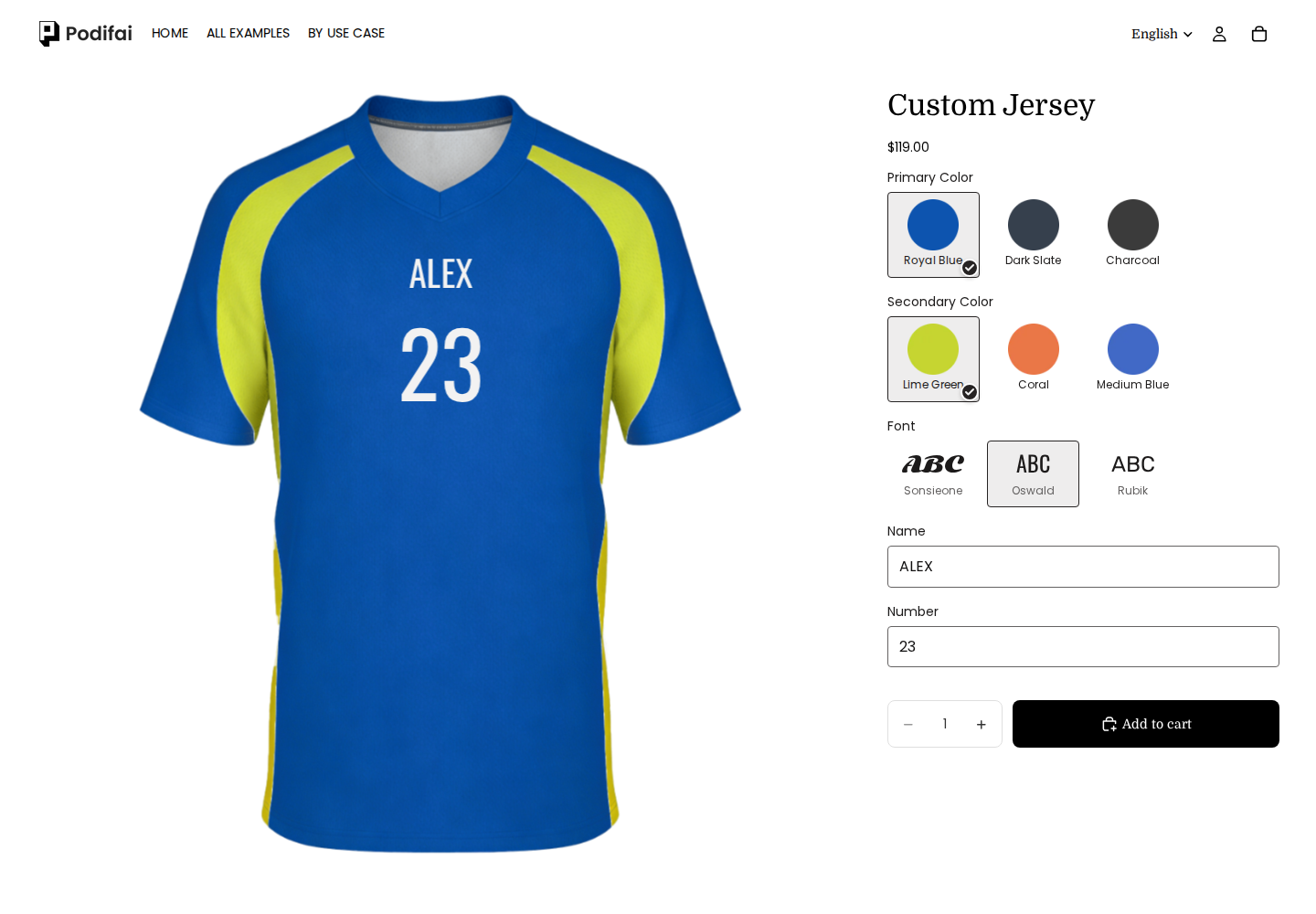
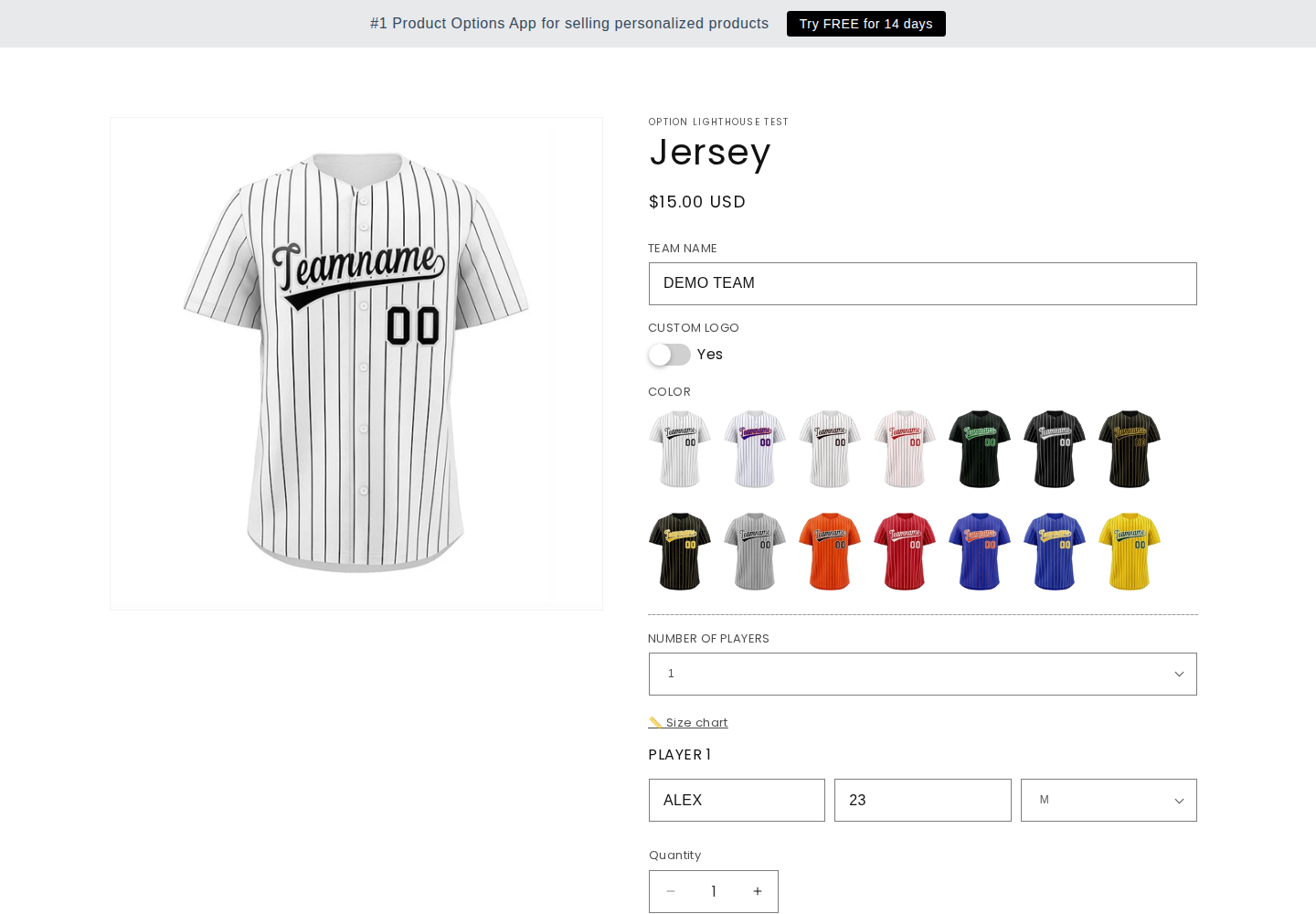
The shared inputs are ALEX / 23. Globo also collects team and size fields; its recorded photo keeps placeholder artwork. This does not establish app-wide preview limitations.

Podifai
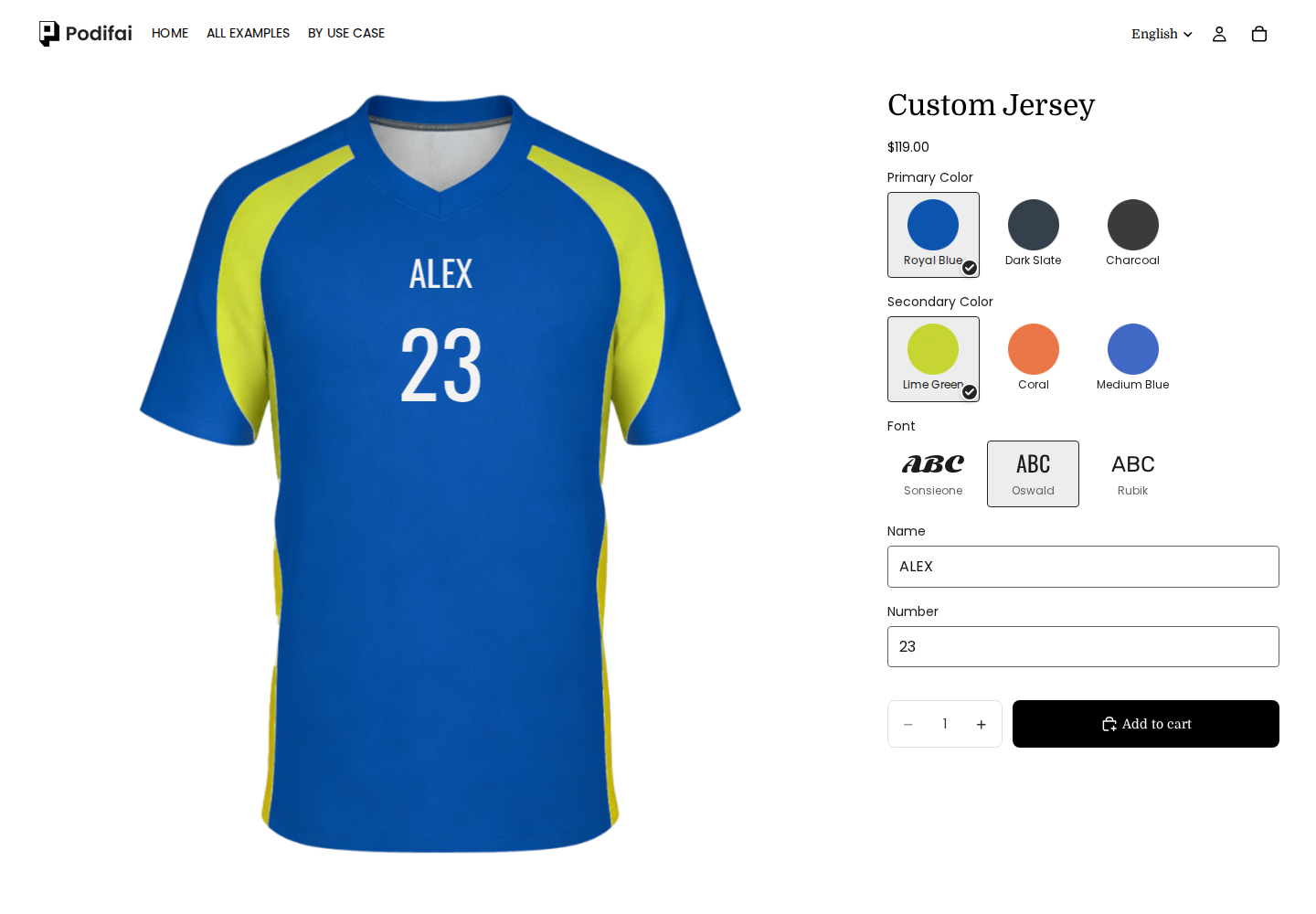
Podifai demo: ALEX / 23 in Oswald on a jersey. The entered text appears in this recorded preview.

ALEX / 23 in Oswald on a jersey. The entered text appears in this recorded preview.

Captured 2026-10-04

Globo
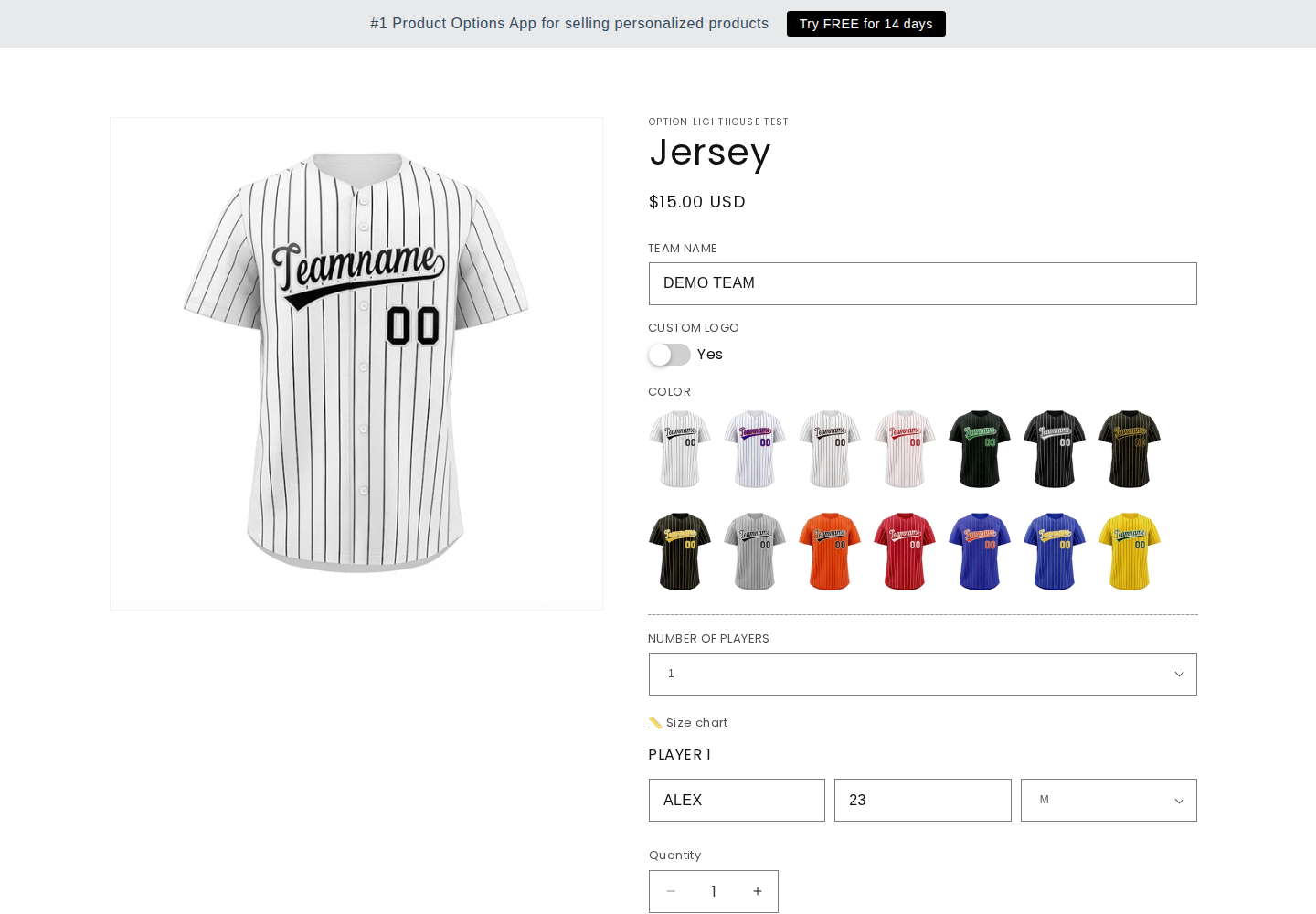
Globo demo: DEMO TEAM / ALEX / 23 / M for one player. This recorded jersey template collects the fields but keeps placeholder artwork. It does not establish that Globo lacks live preview in other configurations.

DEMO TEAM / ALEX / 23 / M for one player. This recorded jersey template collects the fields but keeps placeholder artwork. It does not establish that Globo lacks live preview in other configurations.

Captured 2026-10-04
Jewelry: AB initials

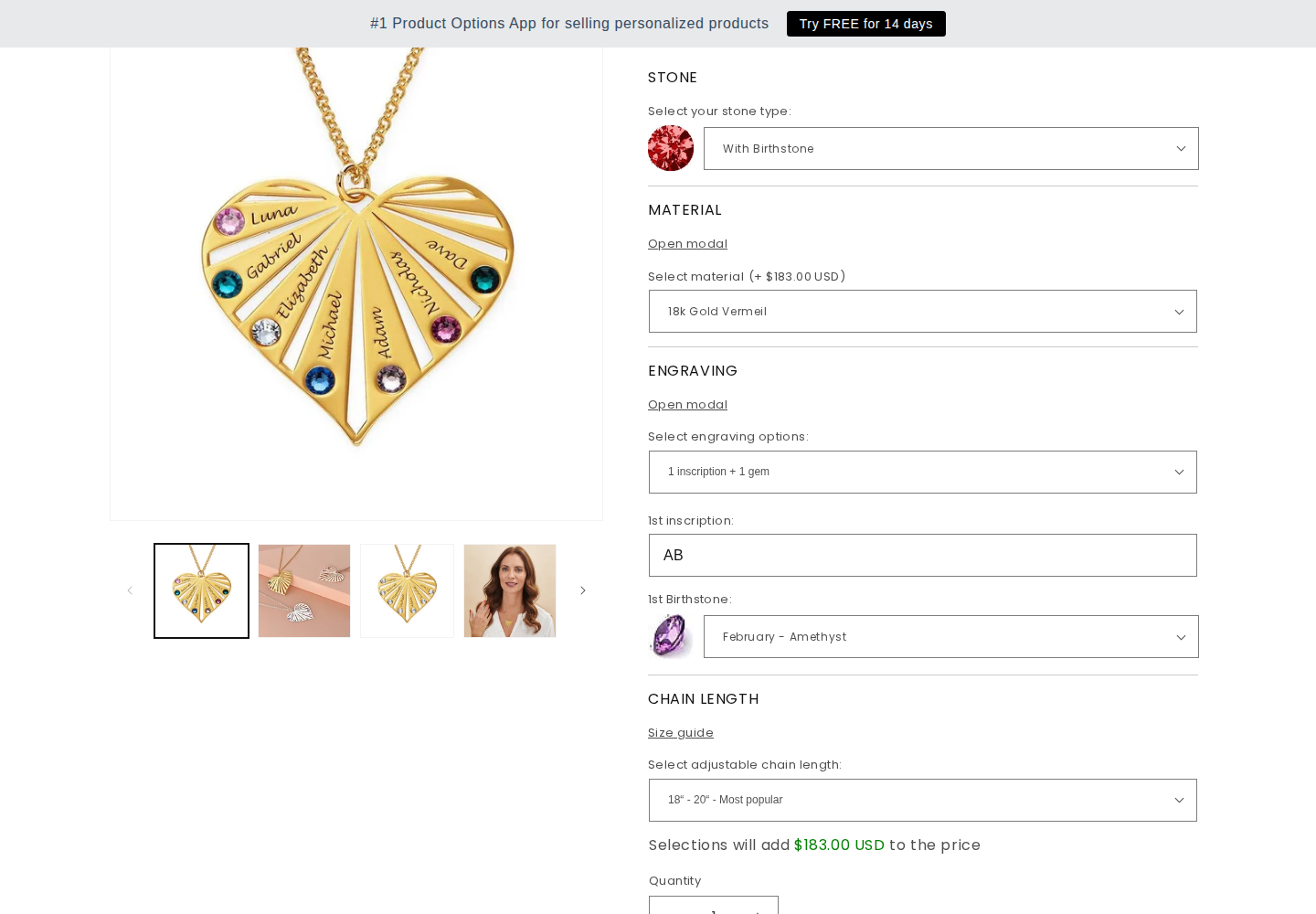
Globo retains AB in the form while Podifai displays the initials on the pendant. Pendant styles, materials and gemstone configurations differ.

Podifai
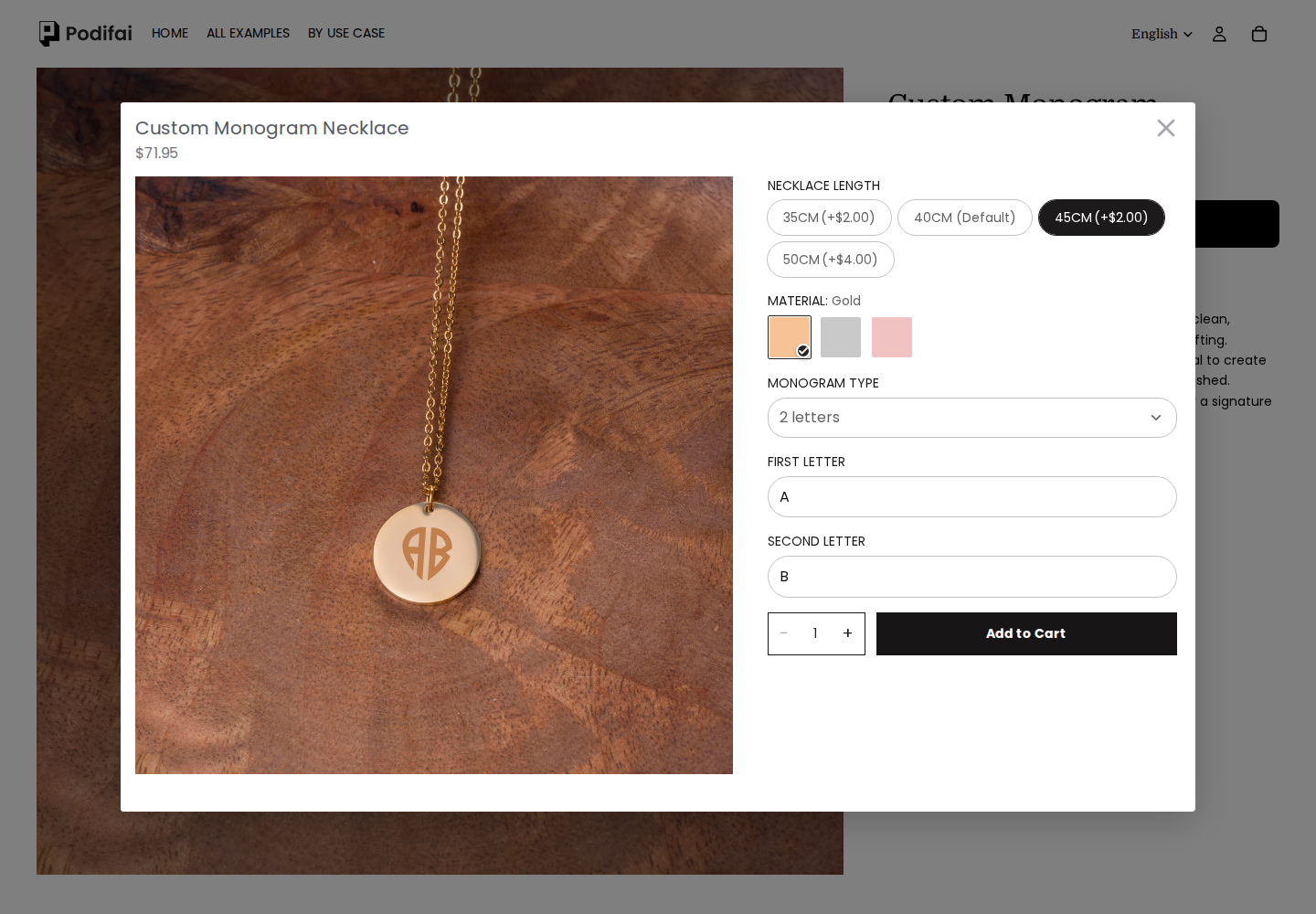
Podifai demo: A and B entered separately; the gold round pendant displays AB. The selected 45 cm chain option carries an additional charge.

A and B entered separately; the gold round pendant displays AB. The selected 45 cm chain option carries an additional charge.

Captured 2026-10-04

Globo
Globo demo: The form retains AB, one inscription and one gem, February–Amethyst, 18k Gold Vermeil and 18–20 inch. The product photo retains its example names; this records the form rather than an updated engraving preview.

The form retains AB, one inscription and one gem, February–Amethyst, 18k Gold Vermeil and 18–20 inch. The product photo retains its example names; this records the form rather than an updated engraving preview.

Captured 2026-10-07

These screenshots document storefront configuration and previews. They do not establish checkout, production-file quality, merchant setup effort or every mobile interaction. A template that retains its original product photo does not establish that the app lacks preview support elsewhere.

Public demo observations · October 4, 2026

Compare a specific customization task

We used the same inputs where the templates allowed them and recorded differences in category, layout and workflow. These are observations of the linked demos, not app-wide performance benchmarks. Demo product prices are separate from subscription prices.

Name and number on apparel

Enter ALEX and 23 for one wearer. Both examples use jerseys; Globo also collects team name and size. This task does not test a team roster, player-level inventory or production artwork.

Podifai

Jersey

Podifai jersey showing ALEX and 23 with color and Oswald font controls
ALEX / 23 in Oswald on a jersey. The entered text appears in this recorded preview. View full size
Try the official example

Input: ALEX / 23, Oswald

Observed result: The preview rendered the name and number. A $119.00 USD cart record retained ALEX, 23, Oswald, selected colors and a preview link.

Use case: A name, number, colors and font for one jersey.

Limits: Back-view changes, input boundaries and production output were not tested.

Globo

Jersey

Globo jersey demo with DEMO TEAM, ALEX, 23 and size M fields; product image retains template text
DEMO TEAM / ALEX / 23 / M for one player. This recorded jersey template collects the fields but keeps placeholder artwork. It does not establish that Globo lacks live preview in other configurations. View full size
Try the official example

Input: DEMO TEAM / ALEX / 23 / M; one player

Observed result: The $15.00 USD cart record retained team name, one player, ALEX, 23 and M. The product image did not render our entered name and number in this walkthrough.

Use case: Collecting team and player details; a separate two-player test retained two groups in one cart record.

Limits: This template does not establish that Globo cannot render personalization in another setup. One cart item is not proof of player-level inventory mapping.

Podifai rendered the name/number and retained a cart preview link. Globo retained the entered details, but that jersey template did not draw them on the product image in the recorded walkthrough. Globo's current documentation describes a visual Personalizer: qualify that setup separately rather than treating this template result as an app-wide absence.

Merchant setup and production output

Merchant-admin setup was not independently tested. A storefront screenshot cannot establish setup effort, inventory deduction or fulfillment reliability. Podifai's transparent PNG documentation describes production artwork; actual files and provider requirements need a separate merchant-side check.

Globo vs Podifai: feature comparison

✓ Supported · × Not supported · — Not confirmed

Options

FeatureGloboPodifai
Image swatchesSupportedSupported
Preset color swatchesSupportedSupported
Arbitrary color pickerConditional support: Premium or above is required for these input/validation settings.Not confirmed
Shopper font choicesConditional support: Advanced adds font picker/custom fonts and option groups.Supported
Dropdown choicesSupportedSupported
Text buttons / badgesSupportedSupported
Single-line text inputSupportedSupported
Multiline text areaSupportedSupported
Customer image uploadConditional support: Premium or above is required for these input/validation settings.Supported
Minimum selection validationConditional support: Premium or above is required for these input/validation settings.Supported
Maximum selection validationConditional support: Premium or above is required for these input/validation settings.Supported
Hover help tooltipsNot confirmedSupported
Collapsible option groupsConditional support: Advanced adds font picker/custom fonts and option groups.Supported
Quantity per option valueNot confirmedNot confirmed
Date selection with blockouts / lead timeNot confirmedNot confirmed
Same-day / next-day date cutoffNot confirmedNot confirmed

Preview

FeatureGloboPodifai
Layered 2D live previewConditional support: Configured Advanced Personalizer draws text and uploaded images on the product photo; shape masking is described.Supported
Uploaded image on productConditional support: Configured Advanced Personalizer draws text and uploaded images on the product photo; shape masking is described.Supported
Uploaded-photo shape / maskConditional support: Configured Advanced Personalizer draws text and uploaded images on the product photo; shape masking is described.Supported
Switchable product previewsNot confirmedSupported
Inline storefront customizerConditional support: Configured Advanced Personalizer draws text and uploaded images on the product photo; shape masking is described.Supported
Popup customization workflowNot confirmedSupported
Enlarged design previewConditional support: Personalized cart items link to the design; configured cart editing and original upload references are described.Supported
Variant-driven preview backgroundNot confirmedSupported
Interactive 3D engineNot confirmedNot supported

Image editing

FeatureGloboPodifai
Move uploaded imageConditional support: Personalizer layers expose configured customer drag/resize/rotate controls and crop boundaries.Supported
Resize / zoom uploaded imageConditional support: Personalizer layers expose configured customer drag/resize/rotate controls and crop boundaries.Supported
Rotate uploaded imageConditional support: Personalizer layers expose configured customer drag/resize/rotate controls and crop boundaries.Supported
Crop / fit uploaded imageConditional support: The cart/order guide describes enabling the upload image editor so shoppers crop photos; merchant-defined layer crop boundaries are separate.Supported
Shopper image opacity controlNot confirmedSupported
Shopper grayscale controlNot confirmedSupported
Automatic photo background removalNot confirmedSupported

Text

FeatureGloboPodifai
Engraving visual text effectNot confirmedSupported
Emboss visual text effectNot confirmedSupported
Curved textConditional support: Configured text layers include curve/auto-fit, placement and alignment/color settings; availability varies by input type.Supported
Automatic text resizingConditional support: Configured text layers include curve/auto-fit, placement and alignment/color settings; availability varies by input type.Supported
Text character limitsConditional support: Premium or above is required for these input/validation settings.Supported
Color selector linked to textConditional support: Configured text layers include curve/auto-fit, placement and alignment/color settings; availability varies by input type.Supported
Font selector linked to textNot confirmedSupported
Text alignmentConditional support: Configured text layers include curve/auto-fit, placement and alignment/color settings; availability varies by input type.Supported
Custom font uploadsConditional support: Advanced adds font picker/custom fonts and option groups.Supported

Pricing rules

FeatureGloboPodifai
Fixed option surchargeConditional support: Premium price add-ons are documented.Supported
Percentage option adjustmentNot confirmedNot confirmed
Linked Shopify add-on variant pricingConditional support: Linked add-on products use separate Shopify pricing/inventory.Supported
Dimension / quantity formula pricingNot confirmedNot confirmed
Per-character text surchargeNot confirmedNot confirmed
One-time add-on chargeNot confirmedNot confirmed

Inventory

FeatureGloboPodifai
Variant-linked stockConditional support: Linked add-on products use separate Shopify pricing/inventory.Supported
Hide unavailable choicesConditional support: Advanced includes out-of-stock option handling; confirm the chosen behavior and linked item.Supported
Disable unavailable choicesConditional support: Advanced includes out-of-stock option handling; confirm the chosen behavior and linked item.Supported
Independent custom stock countNot confirmedSupported
Custom inventory SKUNot confirmedSupported
Custom inventory barcodeNot confirmedSupported
Paid-order stock deductionNot confirmedSupported

Templates

FeatureGloboPodifai
Ready-made personalization templatesSupportedSupported
Reusable templates / option setsSupportedSupported

Storefront

FeatureGloboPodifai
Multilingual system messagesNot confirmedSupported
Automatic option-label translationNot confirmedConditional support: AI Auto Translation covers custom option content; reviewed translations take effect after confirmation.
In-app option stylingConditional support: Premium includes custom widget styling.Supported
Removal of app brandingNot confirmedNot confirmed
Merchant-supplied option content translationsNot confirmedNot confirmed

Rules

FeatureGloboPodifai
Conditional show / hideSupportedSupported
Equals conditionNot confirmedSupported
Not equals conditionNot confirmedSupported

Order handoff

FeatureGloboPodifai
Final preview URL on orderNot confirmedSupported
Preview URL retained in cartConditional support: Personalized cart items link to the design; configured cart editing and original upload references are described.Supported
Customized cart thumbnailNot confirmedConditional support: Theme template change may be required.
Original upload reference on orderConditional support: Personalized cart items link to the design; configured cart editing and original upload references are described.Supported
Custom preview thumbnail at checkoutNot confirmedNot supported
Edit customization in cartConditional support: Personalized cart items link to the design; configured cart editing and original upload references are described.Not supported
Batch export of uploads / preview filesNot confirmedNot confirmed

Production

FeatureGloboPodifai
Automatic production artworkNot confirmedConditional support: When enabled, generation starts at Shopify order creation, including unpaid orders; complete files download as an order ZIP.
PNG production formatNot confirmedConditional support: Documented flattened RGB PNG artwork, delivered in an order ZIP.
Transparent production canvasNot confirmedConditional support: Full canvas transparent margins are retained; backgrounds already inside uploaded photos remain.
Production resolution / dimensionsNot confirmedConditional support: Documented 300 DPI and longest side up to 3600 pixels; aspect ratio preserved.
Multiple-view production artworkNot confirmedConditional support: One PNG per view containing included text/upload customization; views without included artwork have no PNG.
Production formats beyond PNGNot confirmedNot confirmed

Fulfillment

FeatureGloboPodifai
Automated provider order submissionNot confirmedNot confirmed

Platforms

FeatureGloboPodifai
Shopify POS option workflowConditional support: Advanced documents a Shopify POS option workflow; test any preview/charge requirements separately.Not confirmed

Merchant setup

FeatureGloboPodifai
Option-set import / exportConditional support: Premium supports importing and exporting option sets; this is not a cross-app automatic migration importer.Not confirmed

Where each app is stronger

Globo is stronger when...

  • You need Advanced's documented Shopify POS option workflow or in-cart option editing.
  • You need its wider field catalog, option groups or plan-specific date restrictions.
  • You need option-set import/export; confirm the exact format and plan before a bulk rollout.

Podifai is stronger when...

  • Your product fits supported layered 2D text/photo preview and the required option rules.
  • Your production team can use documented full-canvas transparent PNG artwork after checking dimensions.
  • Your catalog fits the published custom-product allowance and you want to start with three products on Free.
Podifai limitation: This review does not establish a universal winner for setup time, support, speed or total cost. Globo's plan guide also mentions Advanced 200 with a larger upload limit but does not give its price; confirm availability and store-specific billing in-app. Free watermark descriptions differ between Globo's pricing page and detailed plan table. Podifai's percentage pricing remains a published-source conflict. Merchant production files, numeric stock changes and automatic provider submission were not tested.

Which one should you choose?

Need POS options or in-cart editing

Globo Advanced

Those workflows are documented on Advanced; confirm any preview requirement on the actual channel.

Need shoppers to see text or uploaded images

Both

Globo documents its Advanced Personalizer; Podifai documents 2D preview. Test the actual template rather than extrapolating from one demo.

Need transparent artwork for production

Evaluate Podifai

PNG output is documented; check canvas dimensions and provider requirements. Globo's downloadable design preview is not equivalent proof.

Run Shopify Plus

Compare store-specific prices

Globo's paid Plus rates differ from standard Shopify rates; use the complete required plan when comparing cost.

Common questions

Direct answers for Shopify merchants comparing these tools.

Sources and verification

Globo/Easify primary pricing and capability sources were reviewed October 5, 2026. Targeted Podifai translation, PNG and stock documentation was reviewed October 5; percentage-pricing sources remain contradictory. Public-demo observations were recorded October 4 and were not rerun. Documentation, preview files and order exports do not establish independently inspected production artwork or fulfillment.

Method: this page maps published competitor capabilities to Podifai's current supported workflow. It does not present setup time, page speed, reliability, or migration effort as a measured benchmark unless a section explicitly describes the test and its conditions. Quoted reviews, when present, are selected qualitative examples rather than a representative satisfaction sample; use the linked live archive to review the full rating distribution and current context.

Test your workflow before you switch

Build one real product in Podifai, confirm preview, pricing, cart, and order data, then decide whether it covers the workflow you need.