
Customer story
How Theo Leathercraft adds personalization to a handmade card holder
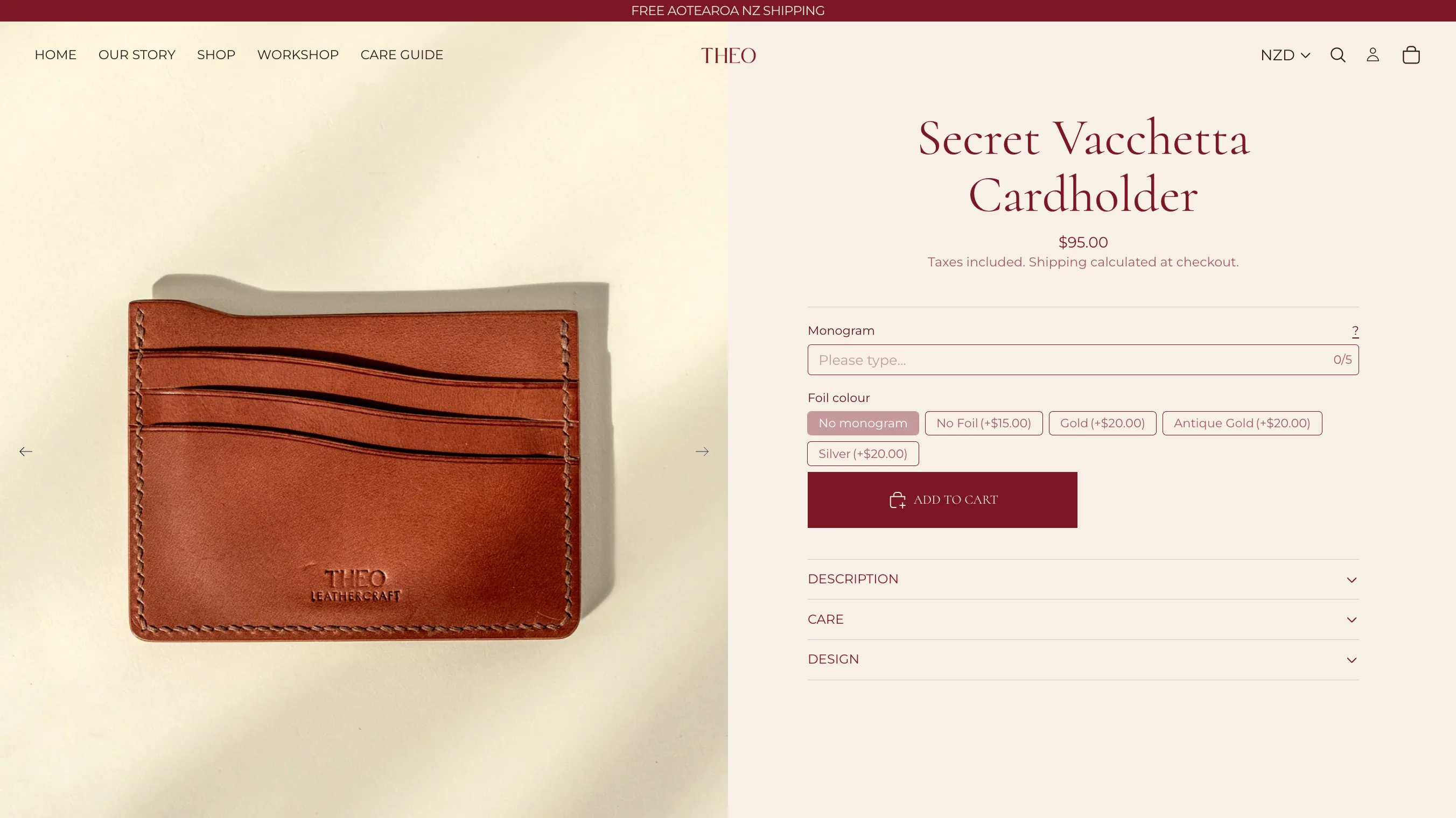
Theo Leathercraft adds a five-character monogram and a concise set of foil or no-foil choices to its Secret cognac Vacchetta card holder.
Customer story at a glance
- Business
- Handmade leather goods.
- Products
- Leather card holders, Personalized leather accessories
- Podifai setup
- Text Input, Five-character limit, Badge Group, Additional price, Appearance settings, Tooltip and help content, No Live Preview
About the brand
Why personalization matters for Theo Leathercraft.
The business
Theo Leathercraft makes leather goods in which material, finish, and small production details carry much of the product’s character. The featured storefront example is a Secret Vacchetta Cardholder with a short monogram and foil choice. The related Podifai editor capture shows the same option pattern on a Cherish Buttero Cardholder, so the story treats the setup as a reusable approach rather than presenting the two screenshots as the same SKU.
Podifai's role
Podifai gives Theo a compact Text Input, a five-character limit, price-bearing Badge Group values, and tooltip or help content for production guidance. Appearance settings let the option buttons fit the storefront’s visual style without requiring Live Preview. The value is precise data collection, controlled add-on pricing, and a personalization form that supports the craft instead of overwhelming the product page.
“It ties my website together beautifully”
“I love this app. It ties my website together beautifully and is also aesthetically pleasing to use. The developer is a fantastic communicator, too, which made setup and tweaks really easy.”
Theo Leathercraft
New Zealand Shopify merchant
Archived Shopify App Store review
The problem
Personalization should support the craft, not obscure it.
Theo Leathercraft adds a five-character monogram and a concise set of foil or no-foil choices to its Secret cognac Vacchetta card holder.
Personalization on a handmade leather product should complement the material and craftsmanship while collecting exactly the information the maker needs.
The product page
Monogram and foil choices stay inside the product form.
The product page keeps the shopper’s choices connected to the item before checkout.
On the linked Secret Vacchetta Cardholder product, the captured product page shows a monogram field with a five-character counter. The shopper can choose no monogram, a no-foil imprint, Gold, Antique Gold, or Silver. The Podifai editor capture demonstrates how Theo applies the same concise option pattern and styling controls to another cardholder product.
The Podifai setup
How Theo Leathercraft styles a concise monogram flow.
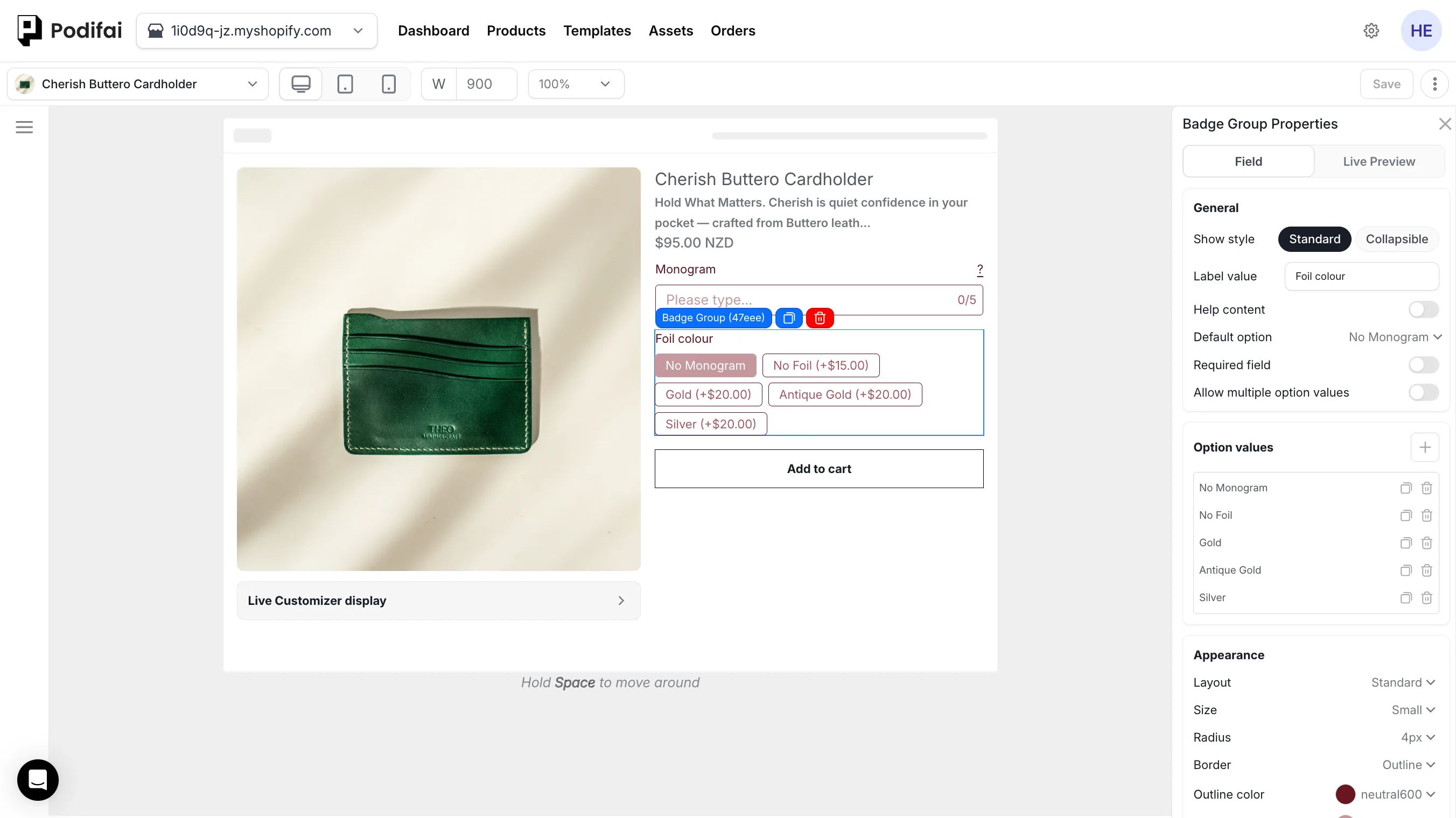
A five-character Text Input, styled Badge Group, tooltip, and per-finish additional prices collect the order without Live Preview.
Step 01
Five-character Text Input
The visible counter limits the monogram entry to five characters.
Step 02
Badge Group with additional prices
Customers can choose no monogram, no foil (+$15), Gold (+$20), Antique Gold (+$20), or Silver (+$20).
Step 03
Option Appearance settings
Theo uses Badge Group controls for layout, small button size, radius, outline border, and brand-aligned colours.
Step 04
Tooltip and help content
A visible question-mark tooltip gives shoppers extra monogram guidance without lengthening the product form.
Step 05
Options without Live Preview
This workflow collects the monogram and finish without claiming a connected visual preview.
What the workflow supports
A concise monogram workflow for made-to-order leather goods.
The product combines a tightly constrained monogram with a small, production-relevant finish set. Theo’s review says the app fits the site aesthetically and that setup and tweaks were easy with developer support; no commercial metric is claimed.
- Text Input
- Five-character limit
- Badge Group
- Additional price
- Appearance settings
- Tooltip and help content
- No Live Preview
Why this setup works
Value for the shopper, merchant, and order workflow.
- Shopper
- Enter a short monogram, understand the foil choices, and see the relevant surcharge in a compact form.
- Merchant
- Control character count, guidance, button appearance, and per-finish pricing without needing Live Preview.
- Order handoff
- Receive a constrained monogram and explicit finish value instead of interpreting an open-ended note.
This workflow is useful for
- Monogrammed leather goods
- Short character limits
- Styled option buttons
- Tooltip-led guidance
Direct answers
Questions about the Theo Leathercraft workflow.
- What does Theo Leathercraft use this product personalization workflow for?
- Theo Leathercraft adds a five-character monogram and a concise set of foil or no-foil choices to its Secret cognac Vacchetta card holder.
- Which Podifai controls create the monogram flow?
- A Text Input collects up to five characters, and a Badge Group presents no-monogram, no-foil, Gold, Antique Gold, and Silver choices. A tooltip provides extra guidance beside the monogram label.
- Does Theo Leathercraft use Live Preview for this setup?
- No connected Live Preview is documented. The strength of this example is a concise, well-styled option form that collects the monogram and finish choices needed by the merchant without requiring a visual renderer.
- How are appearance and additional prices configured?
- Badge Group Appearance settings control layout, button size, radius, border treatment, and colours. Individual values then carry the relevant +$15 or +$20 additional price. Explore product options
- What should another leather merchant verify?
- Set the character limit to the physical stamping area, explain capitalization or production rules in tooltip or help content, keep button labels short, and test every price-bearing finish before launch.
Build a similar workflow