
Charm Builder
Choose distinct or repeated charms with Image Swatch, then configure Multiple position with Drag & snap or Drag freely for the live preview.
Last updated: 2026-11-06
Build a Charm Builder with an Image Swatch, Multiple position in Live Preview, per-value Dynamic Pricing, and optional Shopify variant-linked inventory. The same workflow also fits patches, beads, stickers, shoe accessories, chocolates, and other selectable components.
How the Charm Builder Works
The Charm Builder is a connected Podifai workflow rather than a separate option type. One Image Swatch contains the available charms. The Field tab controls which charms shoppers can choose and how many. Multiple position in the Live Preview tab controls how the selected images are placed on the product.
Choose Different Charms or Repeated Units
- Ordinary multiple selection: turn on Allow multiple option values and leave Allow quantity per option off. Each charm value can be selected once. Min selections and Max selections count different selected values.
- Quantity per option: turn on Allow quantity per option when shoppers need several of the same charm. Set Min quantity / Max quantity for each value and Min total quantity / Max total quantity for all selected units combined.
Three stars plus two hearts is five units across two different values. Use quantity mode for that choice; use ordinary multiple selection when each design should appear once. See Image Swatch selection settings for setup steps and examples.
Organize a Larger Charm Collection with Group Options
Use Group options to organize one Image Swatch's charm collection into tabs such as Birthstones, Letters, and Symbols. This helps shoppers browse a larger catalog without scrolling through one long list. They can mix charms from different groups in the same design, and switching tabs keeps their selections.
- Select the charm Image Swatch and open Properties → Field → Option values.
- Enable Group options, name the groups, and add the corresponding charms. Each field supports up to 10 groups.
- Optionally enable Show “All” tab and Show search bar. Search checks option labels across all groups, even when a specific tab is active.
- Set the selection or quantity limits for the whole field, then configure Multiple position for the preview.
For example, a shopper can choose a birthstone, switch to Letters, and add an initial without losing the birthstone. A maximum of three selections allows three charms across the field, not three per tab. Use Allow quantity per option separately when shoppers need repeated units of the same charm.
Group tabs organize the catalog; Drag & snap controls adding, replacing, and swapping charms on the preview. See charm drag actions and the Group options setup guide. Group options is supported by Image Swatch and Checkbox.
Set Up a Charm Builder
What this shows
- Add an Image Swatch and create one option value for each charm or component.
- Upload a clear thumbnail and a transparent preview image for every value.
- In Field, choose ordinary multiple selection or Allow quantity per option, then set the matching selection or quantity limits.
- Open Image Swatch Properties > Live Preview, enable Live customizer, and choose Drag & snap or Drag freely under Multiple position > Mode.
- For free placement, enable On-canvas image controls and choose Allow move, Allow resize, and Allow rotate as needed.
- Add a price adjustment to each value when charms have different prices.
- Link each value to a Shopify variant when Shopify should track that charm's stock.
- Save and test selection order, pricing, stock behavior, and Add to Cart on desktop and mobile.
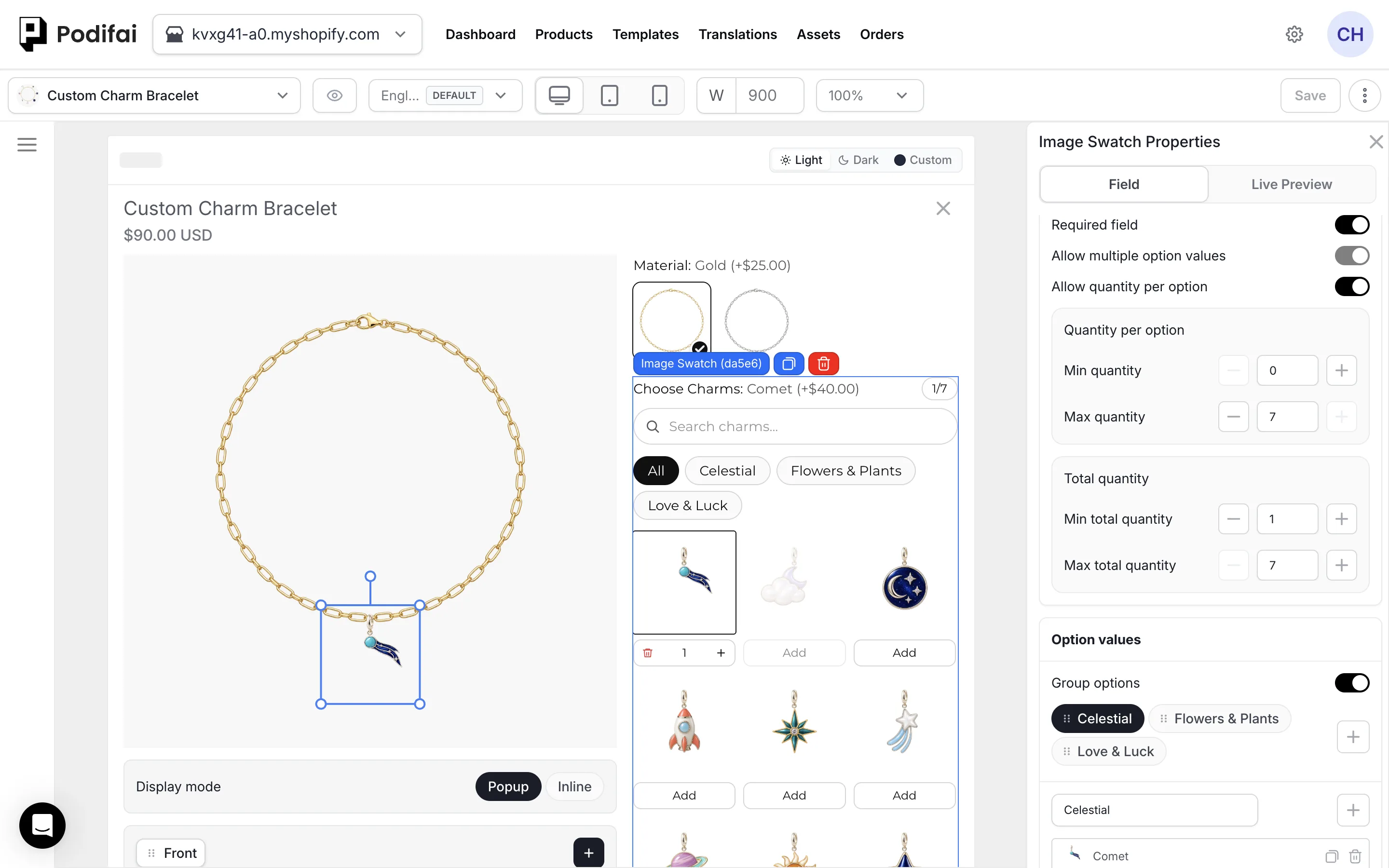
Multiple position in Live Preview
Use Multiple position for the placement of images selected through ordinary multiple selection or quantity per option. Position cards provide Width/height, X-Axis, Y-Axis, and Rotate controls. Choose a placement mode below, then check the layout as shoppers add, remove, or repeat charms. Prepare preview files with consistent dimensions and transparent backgrounds so the result stays visually balanced.
Each position card sets where one selected charm appears. Selected charms fill the cards in the order shoppers choose them, so add a card for every charm a shopper can select: up to Max selections, or up to Max total quantity when Allow quantity per option is on.
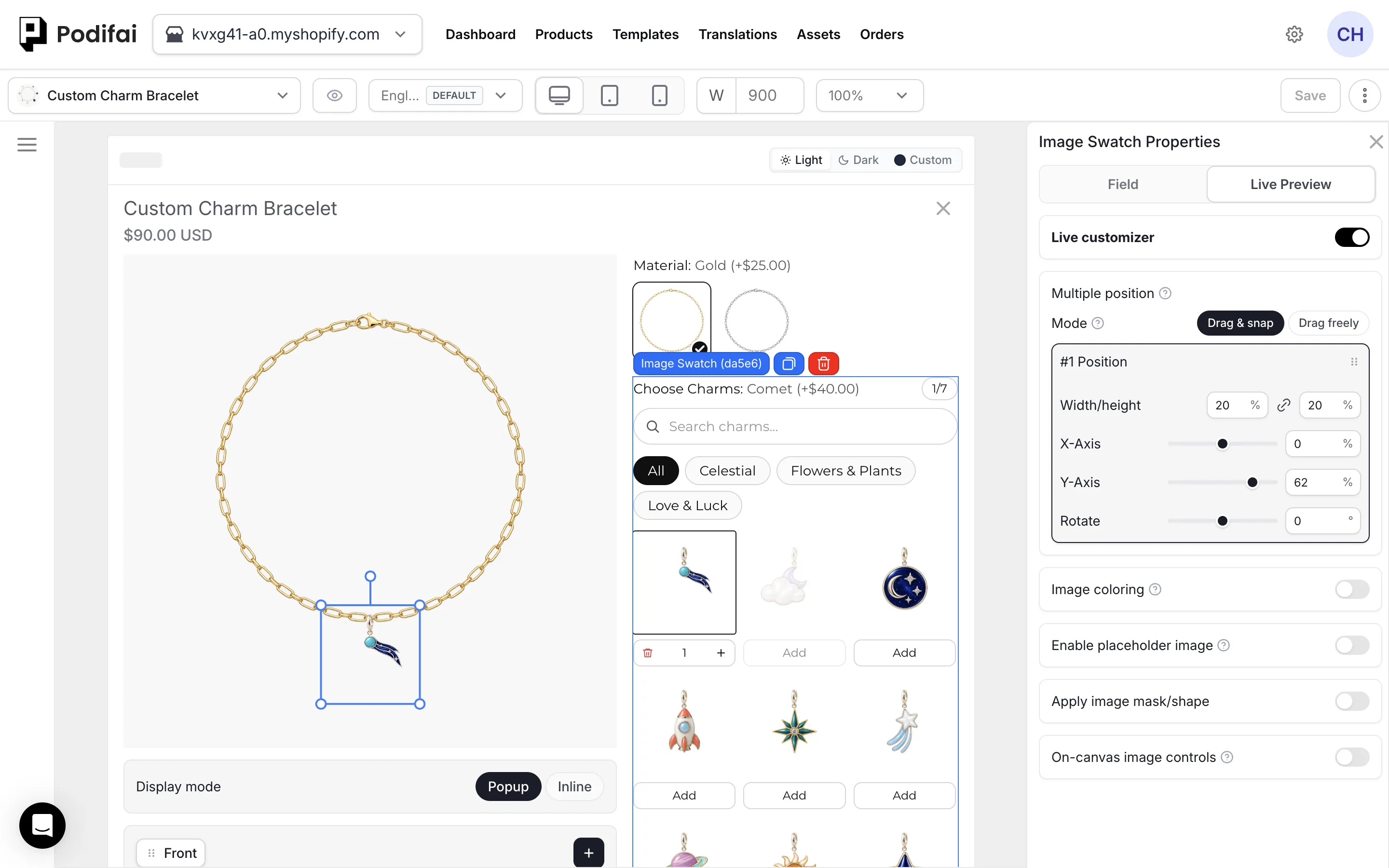
Choose a Placement Mode
In the Image Swatch's Live Preview tab, configure the image positions, then choose a Mode under Multiple position. Use the chocolate box examples below to compare a fixed arrangement with a freely editable layout.
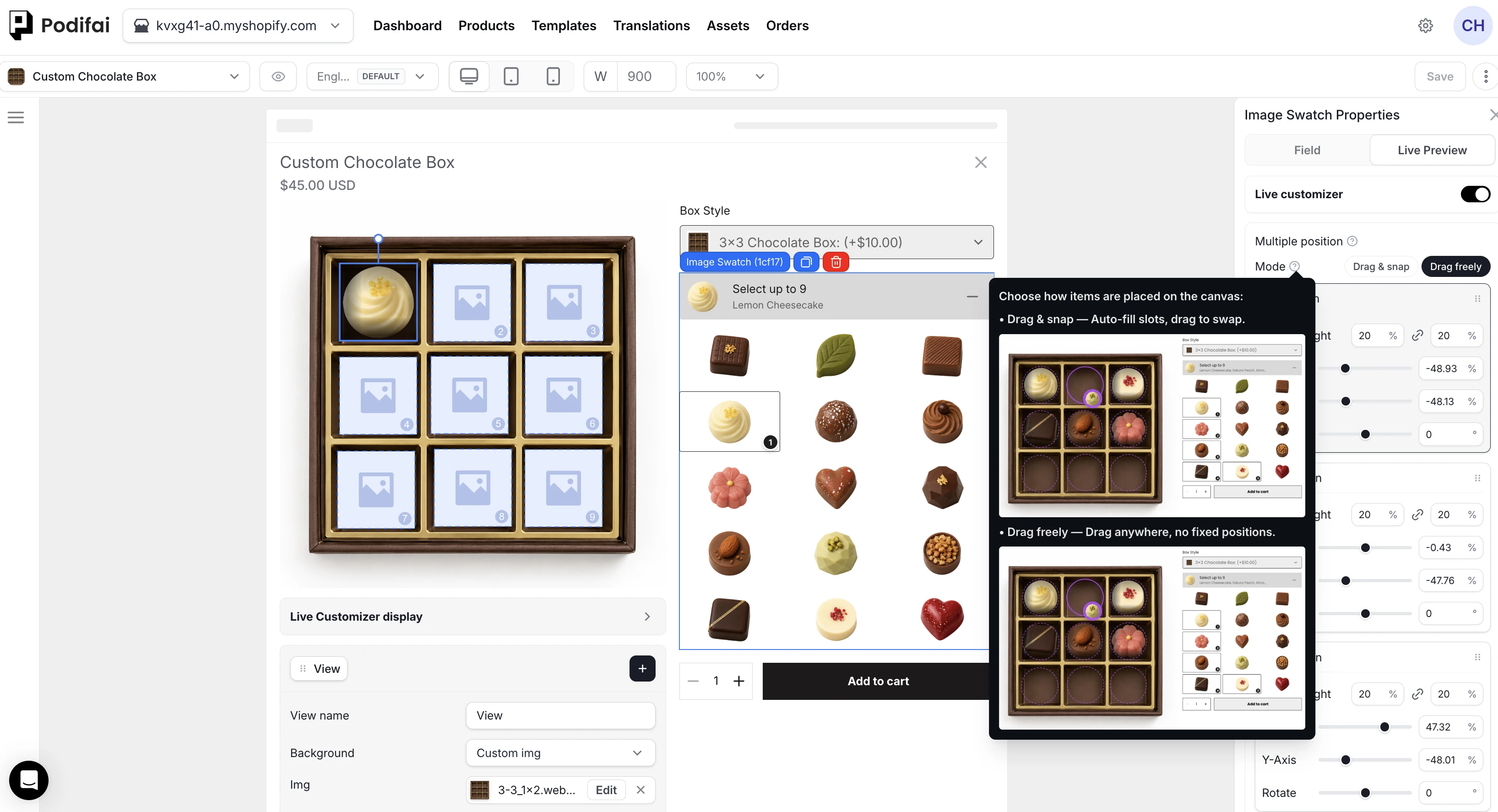
Drag & snap: Use Fixed Slots
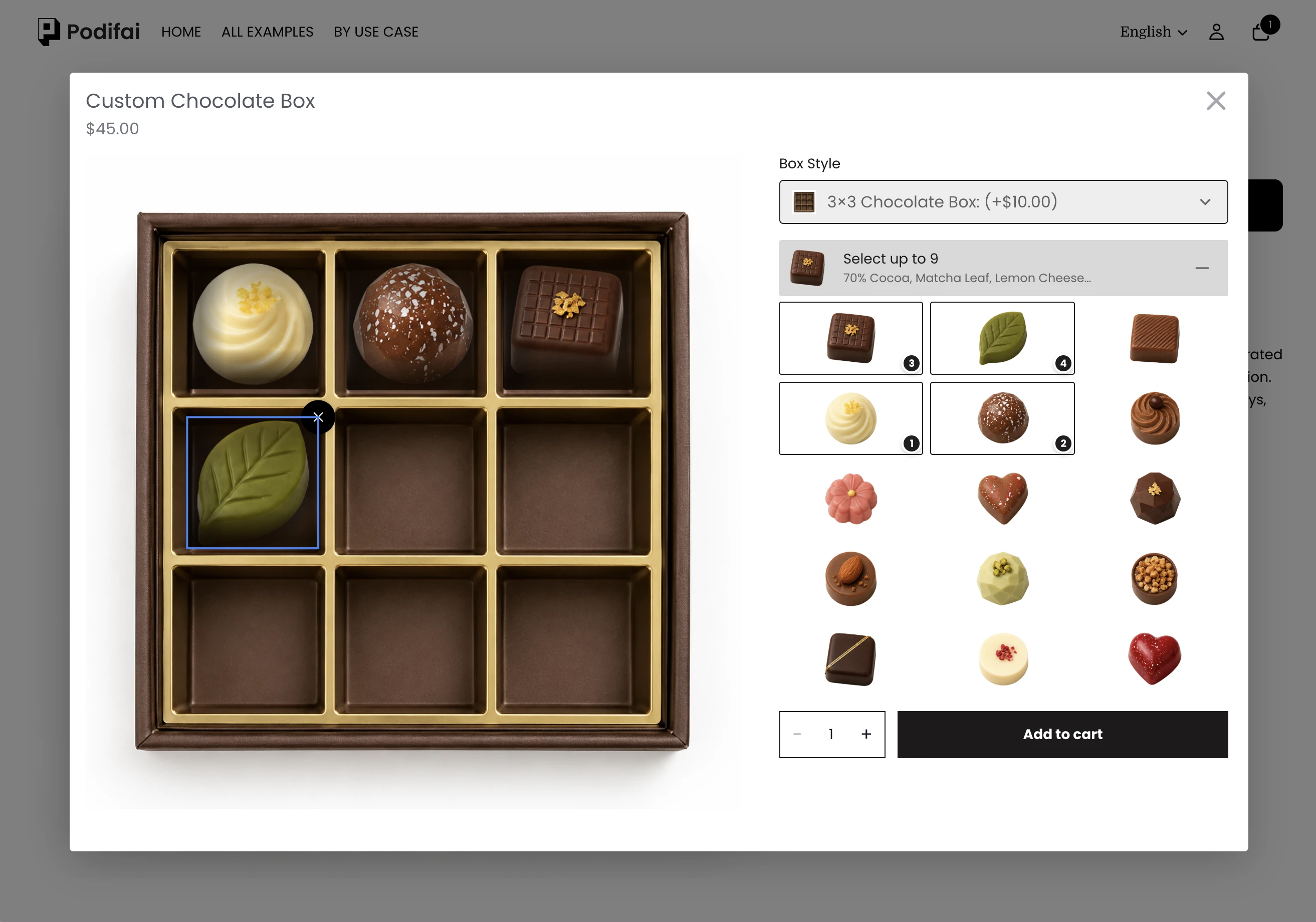
Set up the positions where each item should sit. Selected images automatically fill these slots; shoppers can drag items between slots to swap their positions. Items snap into the configured layout, so shoppers do not need to adjust their exact placement manually. This is useful for chocolate boxes, bead arrangements, and other products with fixed spaces.
Drag Freely: Move Anywhere on the Canvas
Choose Drag freely when shoppers should be able to position images freely instead of snapping them into fixed slots. Use On-canvas image controls to decide whether they can move, resize, or rotate the images. Free placement does not automatically enable all three actions.
Control Moving, Resizing, and Rotating
In Image Swatch Properties → Live Preview, scroll to On-canvas image controls. Turn it on, then choose the actions shoppers can use on the selected preview image:
- Allow move: let shoppers change the image's position on the canvas.
- Allow resize: let shoppers change the image's size.
- Allow rotate: let shoppers change the image's angle.
These permissions are separate. For example, you can allow movement and rotation while keeping the image size fixed, or allow only movement while keeping both size and angle fixed.
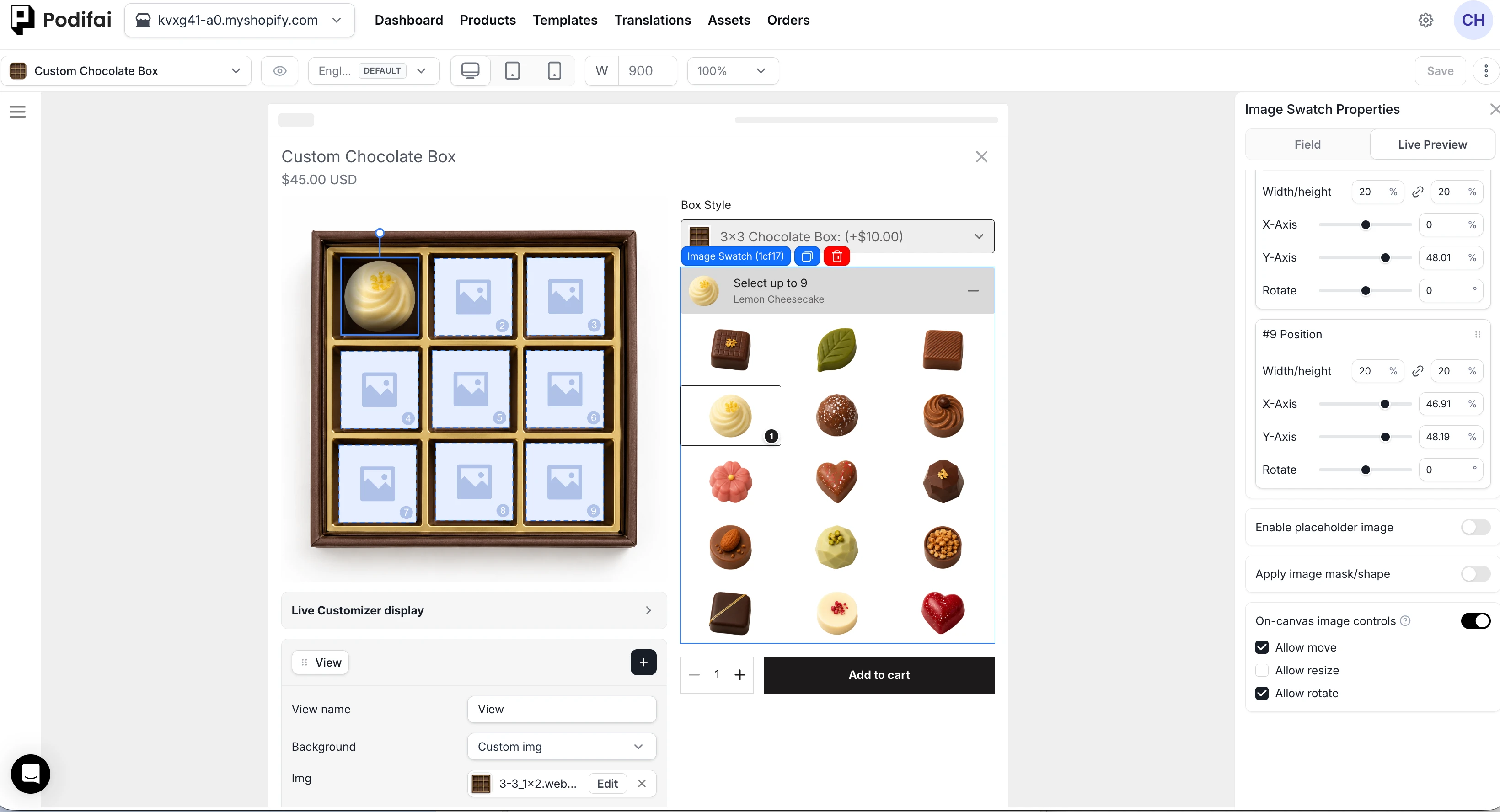
Example: Move Freely and Rotate, with a Fixed Size
Select Drag freely, turn on Allow move and Allow rotate, and turn off Allow resize. Shoppers can drag a chocolate anywhere on the canvas and use the rotation handle to change its angle. They cannot resize it.
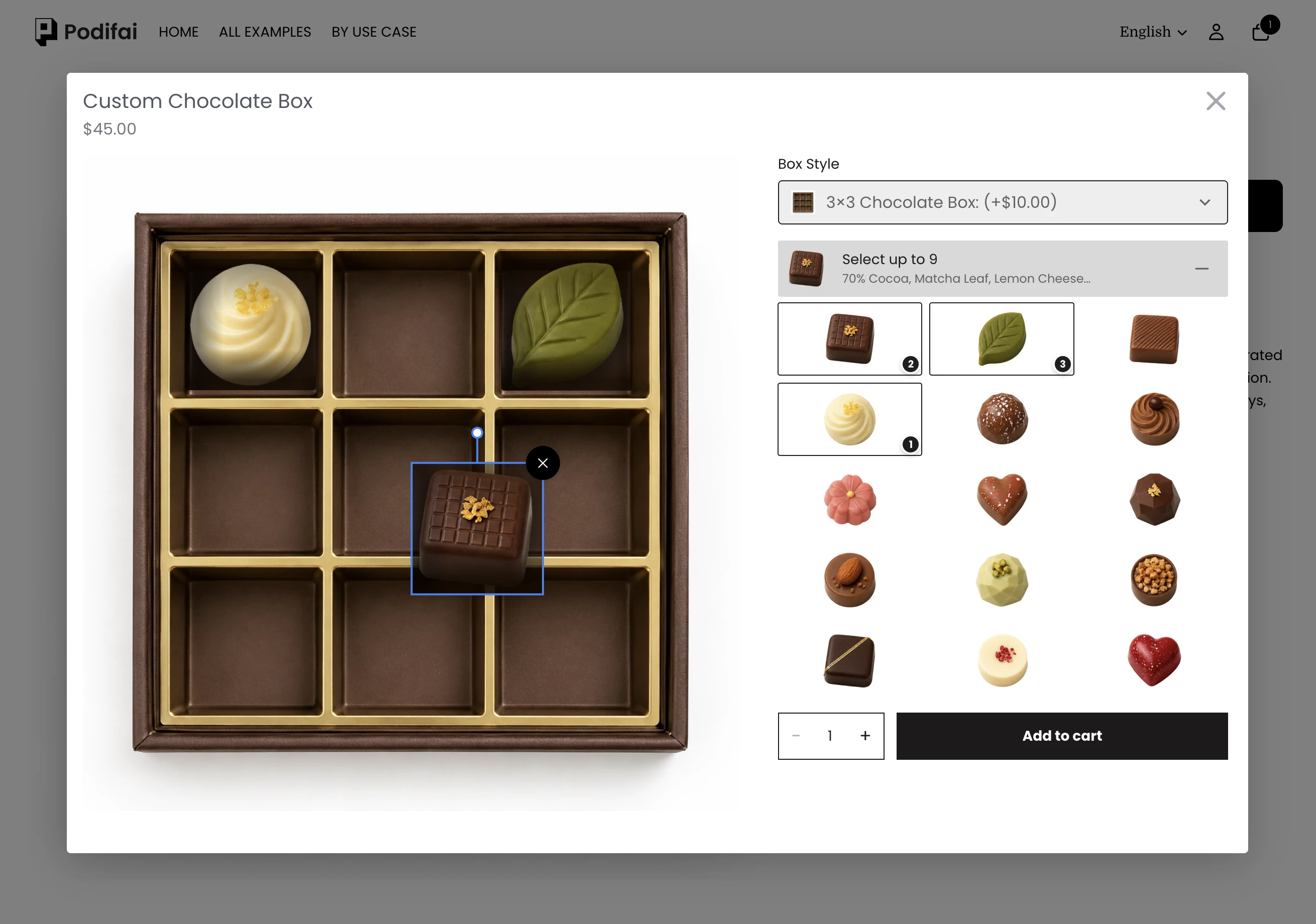
Example: Move Freely Only, with a Fixed Size and Angle
Select Drag freely, turn on Allow move, and turn off both Allow resize and Allow rotate. Shoppers can reposition the selected image, but cannot resize or rotate it.
Price Each Charm
Configure a Dynamic Pricing rule on each Image Swatch value. When the shopper adds or removes a charm, Podifai updates the custom product price from the active selections. Use fixed add-ons when each charm contributes a known amount.
Track Charm Inventory
To track each charm separately, create or choose a Shopify variant for that component, then set the Image Swatch value's inventory mode to Linked to a variant. Podifai reads Shopify's current availability and can hide or disable out-of-stock choices according to your global setting.
With Allow quantity per option off, a multi-select group selects each value once. If a shopper chooses three different linked charms for one necklace, each selected charm's variant is deducted once when the order is created. See Multi-Select Inventory for details.
Prepare Charm Assets
- Use recognizable thumbnails that remain clear at swatch size.
- Use transparent PNG, WebP, or SVG preview assets when the product background should remain visible.
- Keep consistent canvas dimensions, scale, padding, and orientation across all charm previews.
- Keep each Image Swatch thumbnail and preview image within the documented 2 MB limit.
See Image & Asset Requirements for formats and preparation guidance.
Charm Necklace Example
Reorder and Remove Charms
Enable Allow multiple option values and configure Drag & snap under Live Preview > Multiple position. Shoppers can then:
- Add a charm: drag an unselected charm from the option list onto an empty slot in the preview.
- Replace a charm at the selection limit: drag an unselected charm from the list onto the filled preview slot to replace.
- Swap selected charms: drag a charm directly on the preview onto another filled slot.
- Remove a charm: on desktop, hover over the charm in the preview to reveal its delete control.
For example, with a maximum of two charms and Ruby plus Diamond selected, drag Emerald from the list onto Ruby's preview slot. Emerald replaces Ruby, Diamond stays in place, and two charms remain selected.
Dragging one selected swatch onto another within the option list does not reorder them. In Drag freely mode, shoppers reposition selected images on the preview when Allow move is enabled.
Selection Limits While Editing and Submitting
With Allow quantity per option off, shoppers can temporarily select fewer than Min selections or more than Max selections while editing. Podifai displays a warning and still lets them add or remove values. Final validation blocks submission when the selection is below Min selections or above Max selections.
For example, with a range of 3 to 7 charms, shoppers can continue adjusting an out-of-range selection. The final selection must contain 3 to 7 charms before submission.
With Allow quantity per option on, use the per-option and total quantity limits instead. Test both repeated units of one charm and mixed charms; the ordinary selection-count rules above apply only when quantity mode is off.
Order Details and Production References
Place a test order with several charms, then check the saved charm selections, final preview, and configured charges. If you use linked inventory, check the component variants separately from the necklace's base Shopify variant. See Managing Orders.
FAQ
How can shoppers see where charms will go before they choose any?
Turn on Enable placeholder image in the Image Swatch Live Preview tab. Before the first selection, every charm position shows the placeholder on the storefront, for example a translucent circle. Once a charm is selected, unused positions are hidden. The same image is used for every position, so it cannot show slot numbers.
Do selected charms show numbers?
No. In ordinary multiple selection, selected charms are marked without selection-order numbers; their order still maps to the configured positions. With Allow quantity per option, swatches show the selected quantity.
How do I make a DIY or build-your-own charm bracelet?
Use Charm Builder. Create one Image Swatch for the charm catalog, allow several selections, and configure Multiple position so each selected charm appears on the bracelet, necklace, or other base product in the Live Preview.
Can I organize charms into categories?
Yes. Enable Group options under the Image Swatch field’s Option values to create up to 10 groups, such as Birthstones, Letters, and Symbols. Optional search finds option labels across all groups. Switching tabs preserves selections, and selection or total quantity limits apply across the whole field.
What is the difference between Drag & snap and Drag freely?
Drag & snap automatically fills predefined slots and lets shoppers drag items between slots to swap positions. Drag freely allows placement anywhere on the canvas when Allow move is enabled. Resizing and rotation are controlled separately.
Can shoppers move images without resizing or rotating them?
Yes. Choose Drag freely, enable On-canvas image controls and Allow move, and leave Allow resize and Allow rotate off. To allow rotation while keeping the size fixed, enable Allow rotate as well.
Can shoppers drag and drop or delete selected charms?
Yes. In Drag & snap mode, drag an unselected charm from the option list onto an empty preview slot to add it. At the selection limit, drop an unselected charm onto a filled slot to replace that charm. Swap selected charms by dragging them on the preview. In Drag freely mode, moving selected charms depends on Allow move. On desktop, hover over a preview charm to reveal its delete control.
How is a Charm Builder created in Podifai?
Use one Image Swatch for the charm catalog. In Field, choose ordinary multiple selection for different charms once each, or Allow quantity per option for repeated charms. Then choose Drag & snap or Drag freely under Live Preview > Multiple position > Mode. Configure pricing and inventory per value as needed.
Can I limit how many charms a shopper selects?
Yes. With Allow quantity per option off, set Min selections and Max selections on the multi-select Image Swatch. Shoppers can temporarily select fewer than Min selections or more than Max selections while editing. Podifai displays a warning and still lets them add or remove values. Final validation blocks submission when the selection is below Min selections or above Max selections. For repeated charms, enable Allow quantity per option and configure per-option and total quantity limits instead.
Can each charm have a different price?
Yes. Configure a price adjustment for each Image Swatch value. Podifai recalculates the displayed price as the shopper adds or removes charms.
Can each charm track its own inventory?
Yes. Link each charm value to its own Shopify variant and use Linked to a variant inventory mode. With Allow quantity per option off and one main product ordered, each selected value deducts its linked variant once when the order is created. Verify actual stock changes separately for repeated charm units, larger product quantities, or shared component links.
Continue with your product setup
- Explore charm product workflows — Review charm-builder use cases and storefront examples.
- Connect stock and paid add-ons — Decide whether a linked variant tracks stock, adds a charge, or both.