Custom fields, operational rules and design previews

Last updated: October 7, 2026

Infinite Options vs Hulk Product Options vs Podifai

These apps overlap on paid choices and product personalization, but stores may use them for different jobs. A gift-message field, a dimension-based quotation and a photo placed on a product need different acceptance tests. This comparison is published by Podifai.

TL;DR: which app should you choose?

  • Choose Infinite Options when fields and priced bundle choices already capture what fulfillment needs, without a design-placement step.
  • Choose Hulk Product Options when cart editing, Enterprise formulas, inventory/SKU tools or POS are requirements.
  • Choose Podifai when supported text/photo personalization, fixed or percentage adjustments and PNG output meet the requirements.

Feature availability depends on the plan and setup. See the pricing and workflow comparison below.

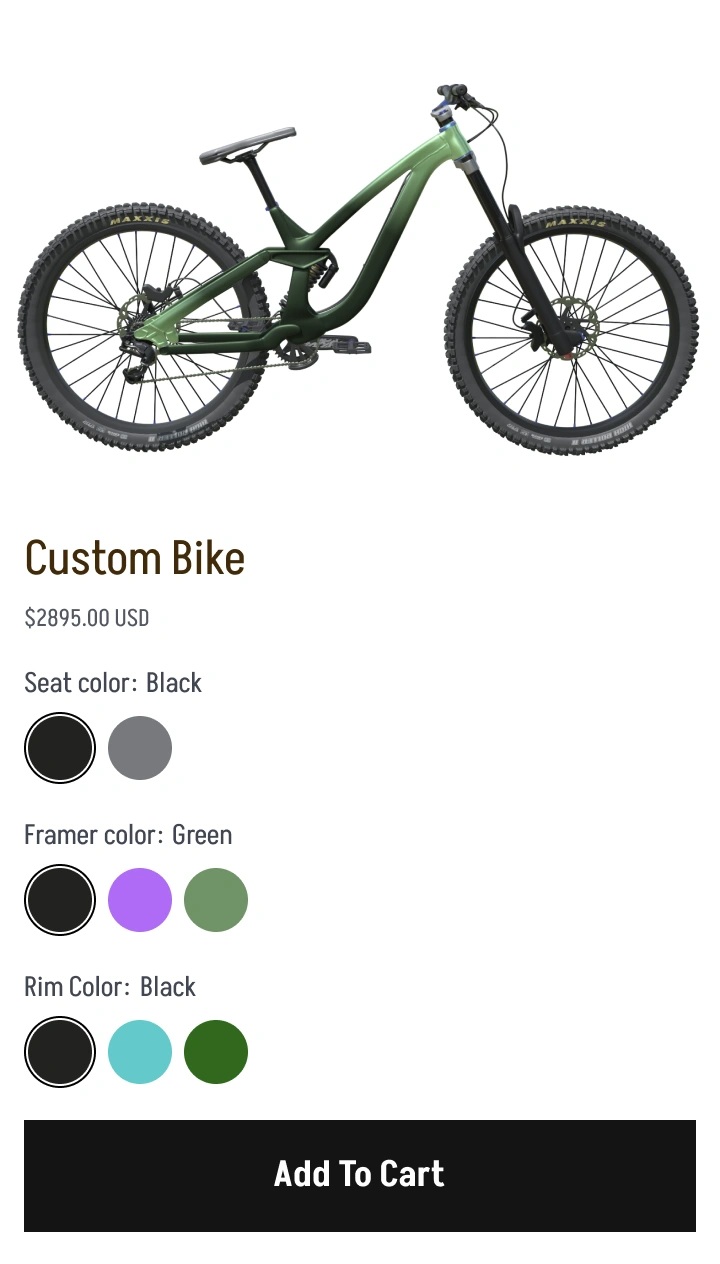
Podifai storefront example: bicycle color selections with live product preview
Podifai storefront example · See every app’s interface below

Public product demos · October 2026

Compare real product examples

Explore customization across different product types. Each pair records the inputs and visible result in the linked demos, with template differences explained below. Product prices shown in screenshots are separate from app subscription prices.

These are separate two-app examples. They do not represent one identical product tested across all three apps.

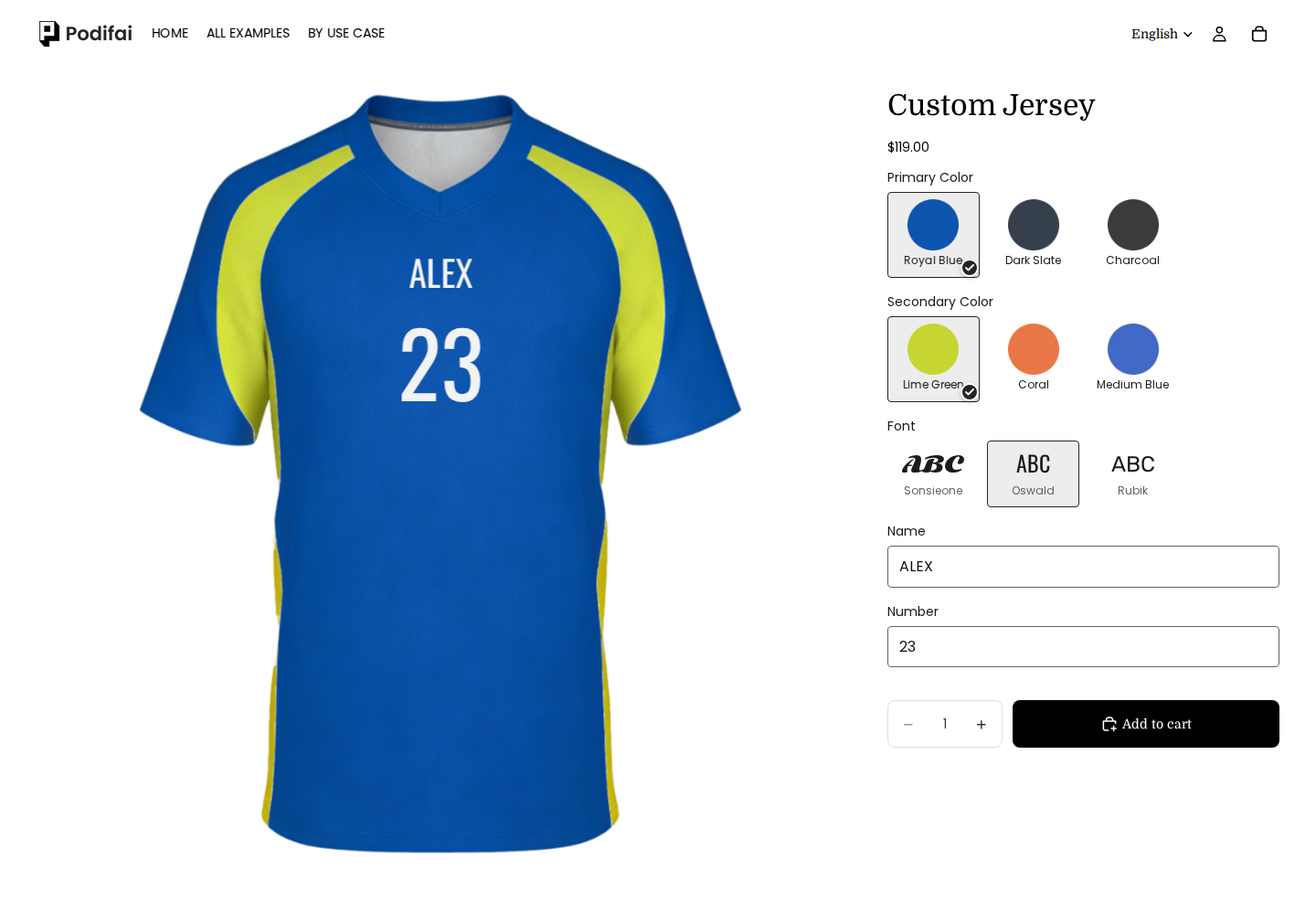
Apparel: ALEX input

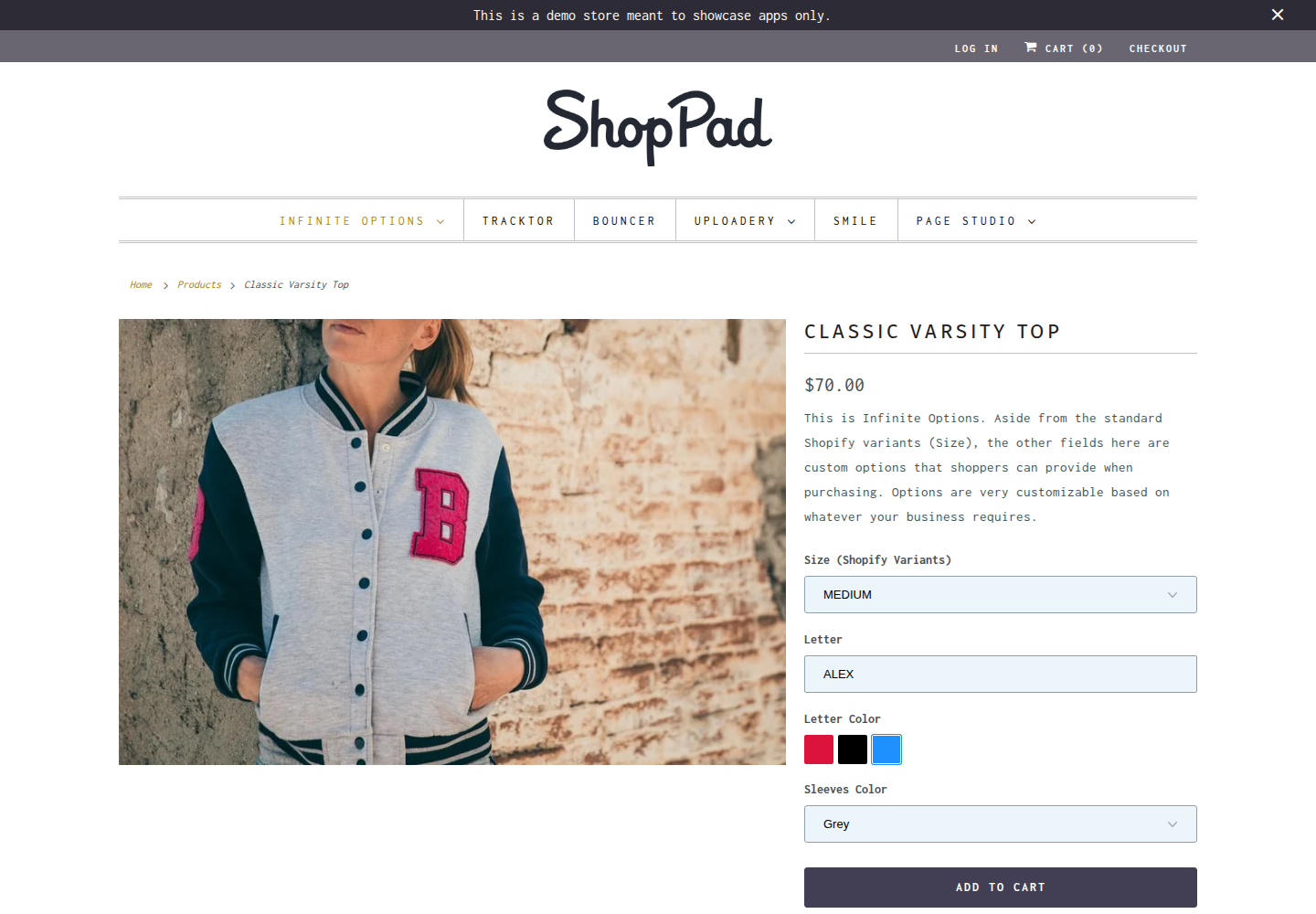
Infinite Options accepts ALEX in the Letter field while its photo retains B. Podifai renders ALEX and also includes 23; this observation applies to these templates.

Podifai
Podifai demo: ALEX / 23 appears in Oswald on the front of the Royal Blue jersey.

ALEX / 23 appears in Oswald on the front of the Royal Blue jersey.

Captured 2026-10-06

Infinite Options
Infinite Options demo: The Letter field accepted ALEX, with Medium, Blue and Grey sleeves selected. The product photo retains B; this screenshot records the form state.

The Letter field accepted ALEX, with Medium, Blue and Grey sleeves selected. The product photo retains B; this screenshot records the form state.

Captured 2026-10-07

Candle sets: scent selection

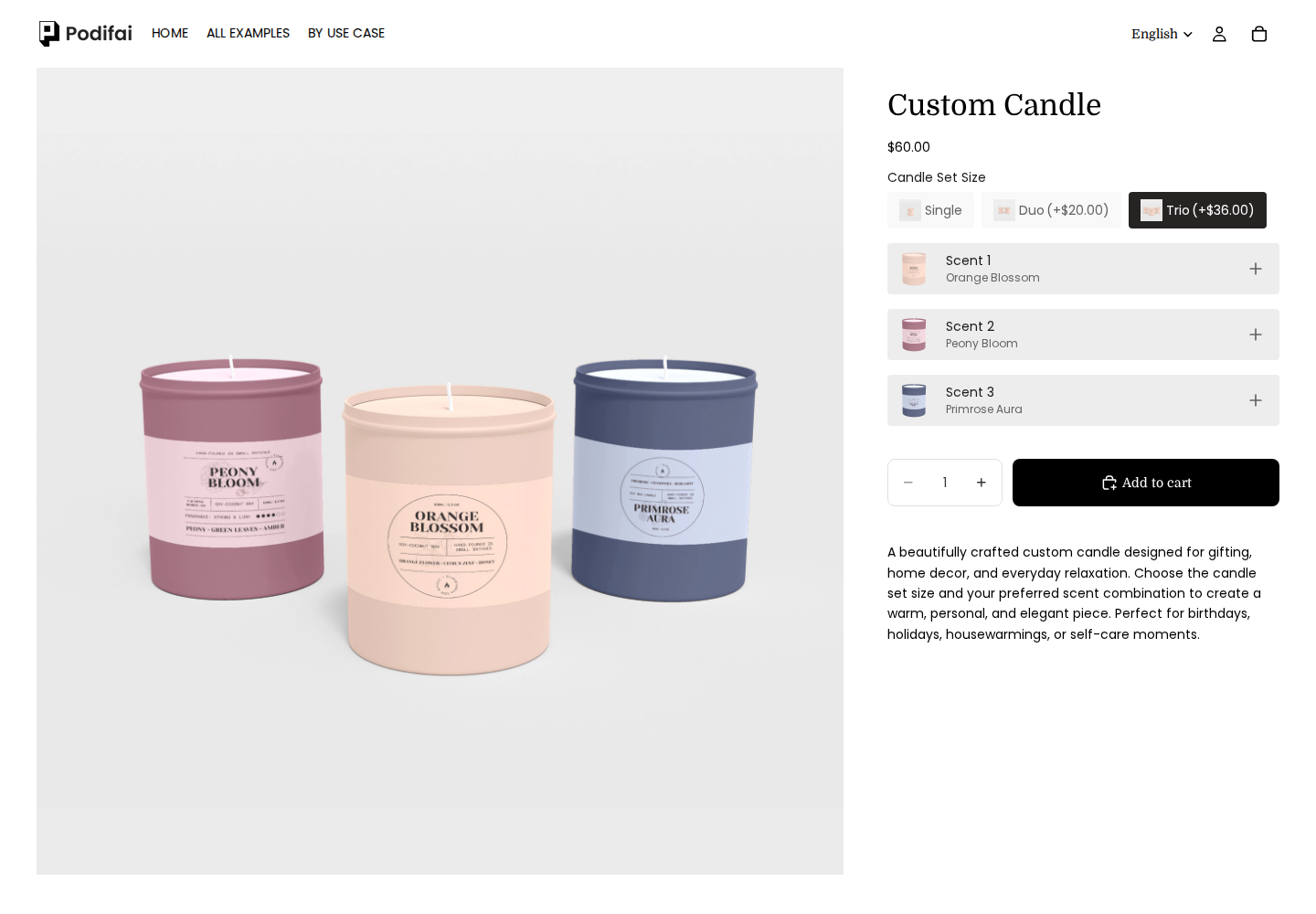
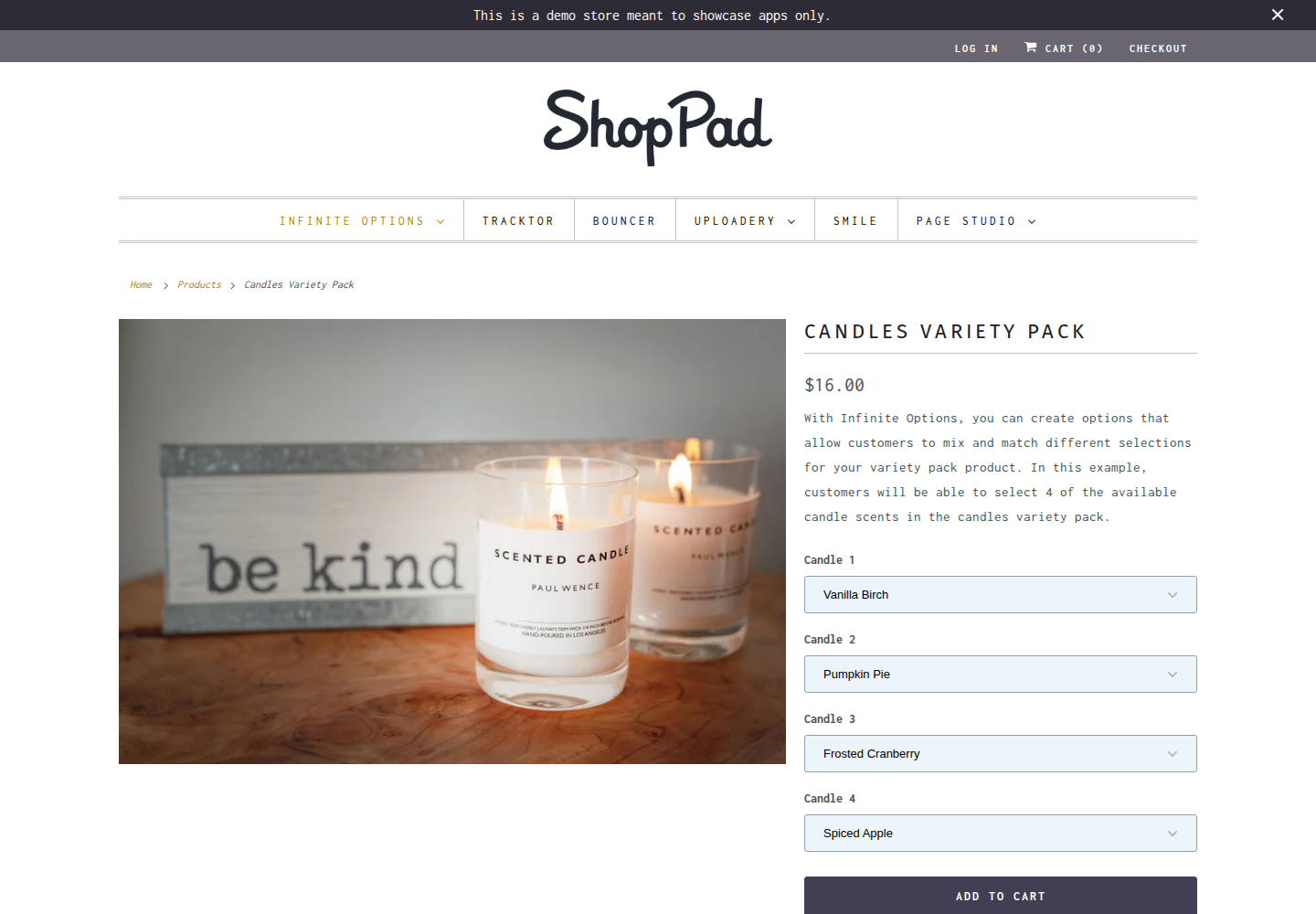
Both examples collect scent choices for multiple positions. Three-candle and four-candle sets, scent lists and product visuals differ; formulas and prices are not compared.

Podifai
Podifai demo: Trio with Orange Blossom, Peony Bloom and Primrose Aura selected across three candle positions.

Trio with Orange Blossom, Peony Bloom and Primrose Aura selected across three candle positions.

Captured 2026-10-04

Infinite Options
Infinite Options demo: Four candle options selected: Vanilla Birch, Pumpkin Pie, Frosted Cranberry and Spiced Apple. The product photo remains unchanged.

Four candle options selected: Vanilla Birch, Pumpkin Pie, Frosted Cranberry and Spiced Apple. The product photo remains unchanged.

Captured 2026-10-07

Mugs: LUNA input

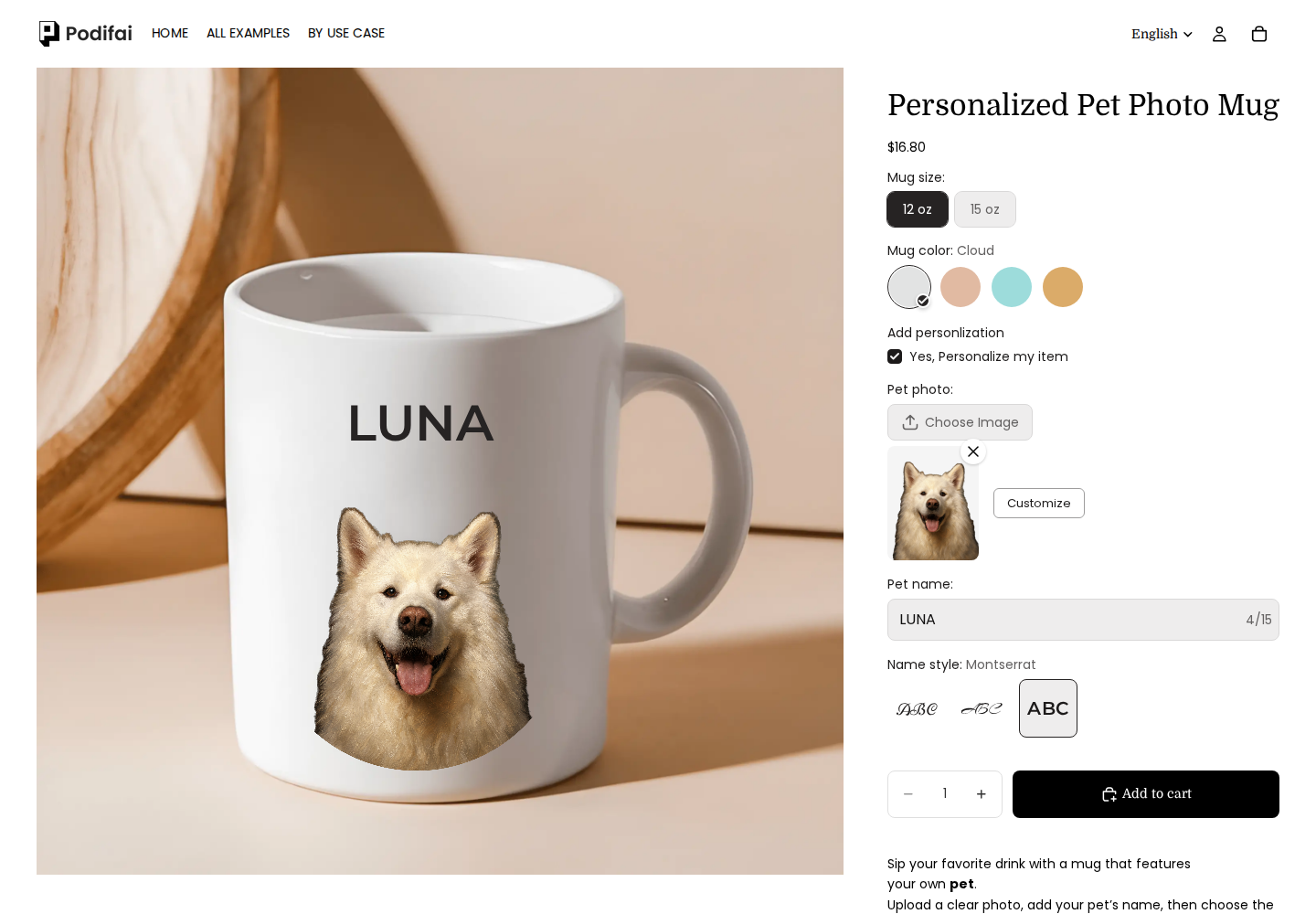
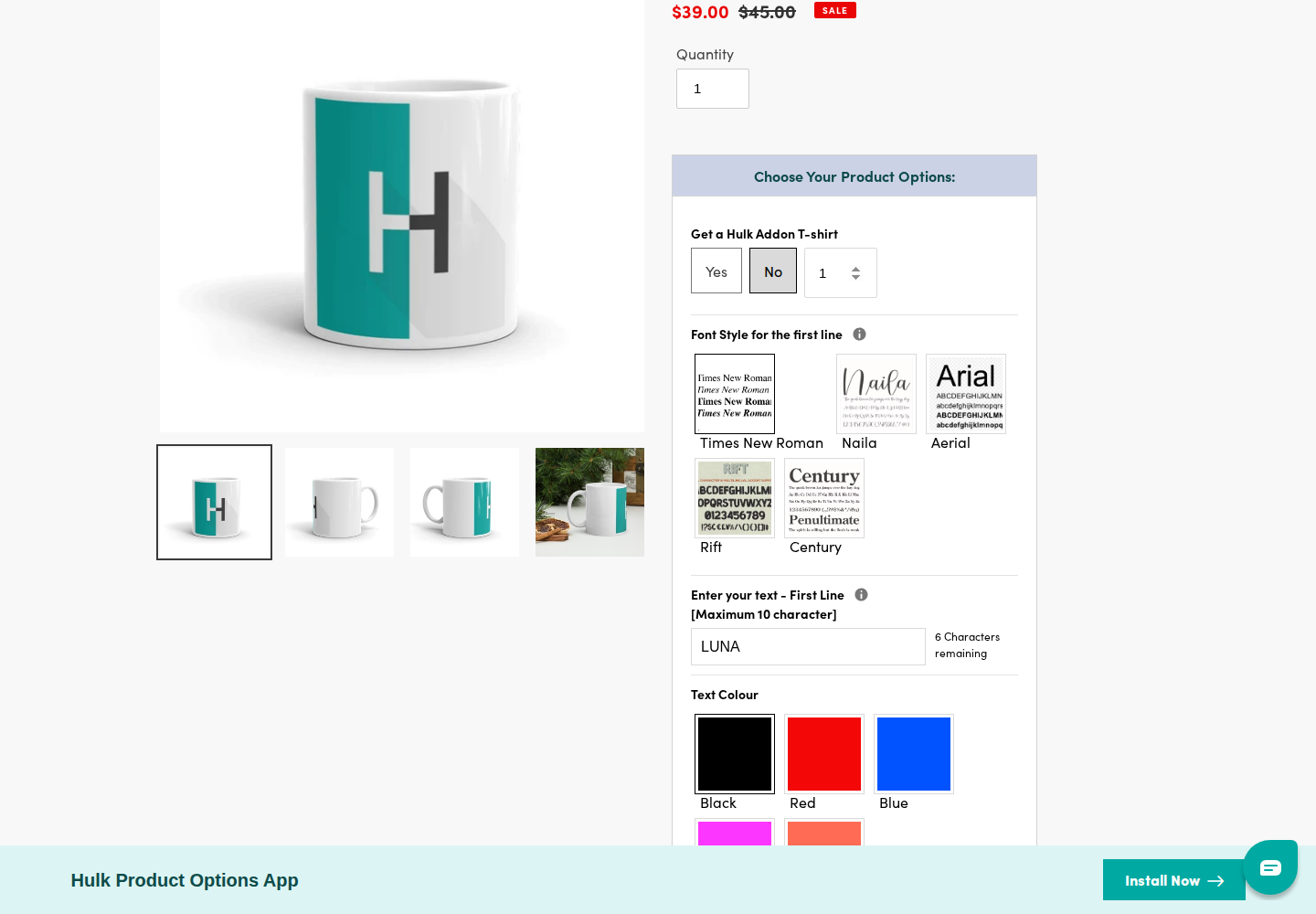
LUNA is the shared input. No photo was uploaded in Hulk and its photo retains H, so this pair does not compare image-upload or background-removal support.

Podifai
Podifai demo: LUNA with the shared pet photo, automatic background removal and 100% image scale. Both ears remain visible.

LUNA with the shared pet photo, automatic background removal and 100% image scale. Both ears remain visible.

Captured 2026-10-06

Hulk Product Options
Hulk Product Options demo: LUNA entered with Times New Roman, Black and Round. No logo was uploaded. The product photo still shows H.

LUNA entered with Times New Roman, Black and Round. No logo was uploaded. The product photo still shows H.

Captured 2026-10-07

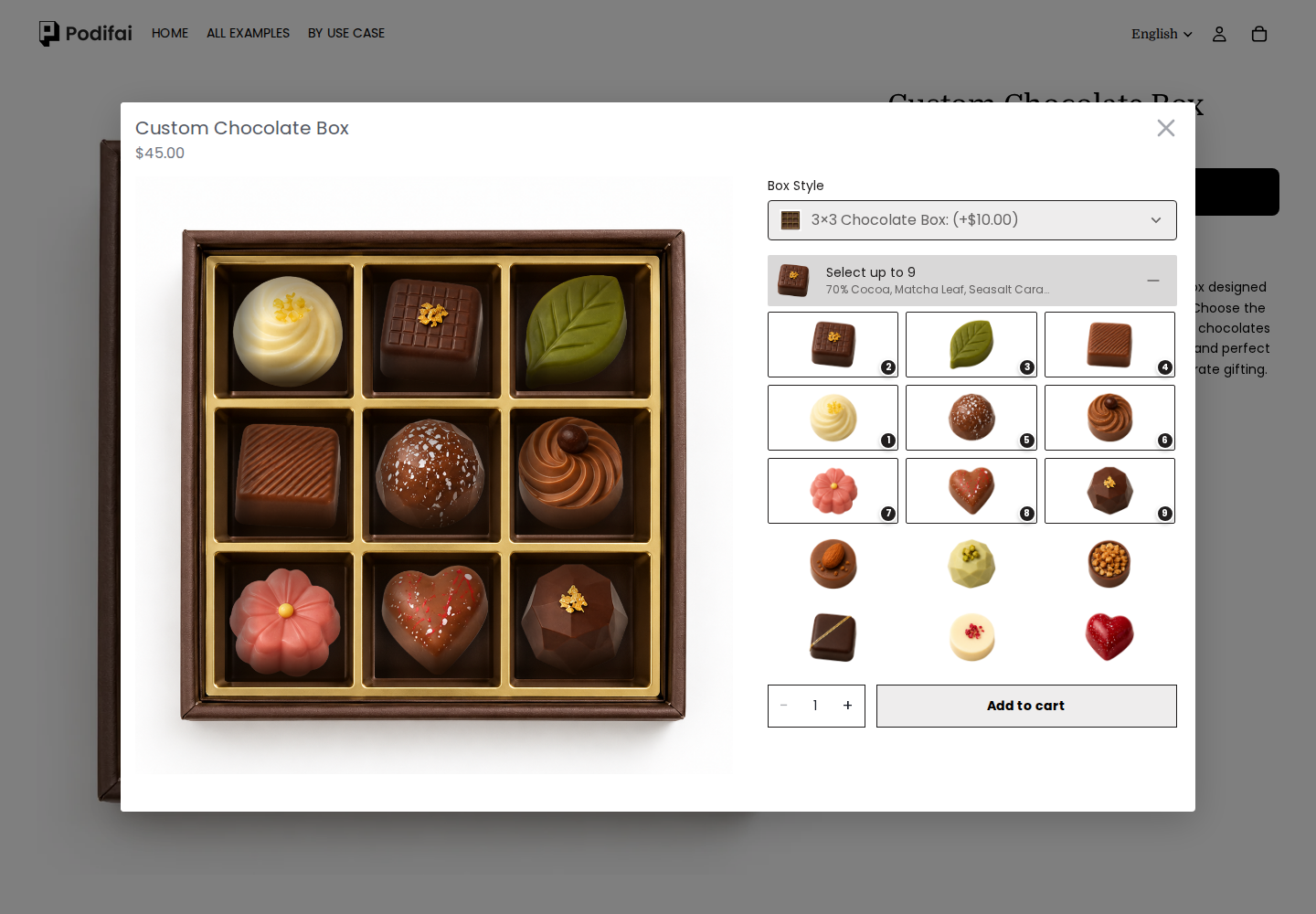
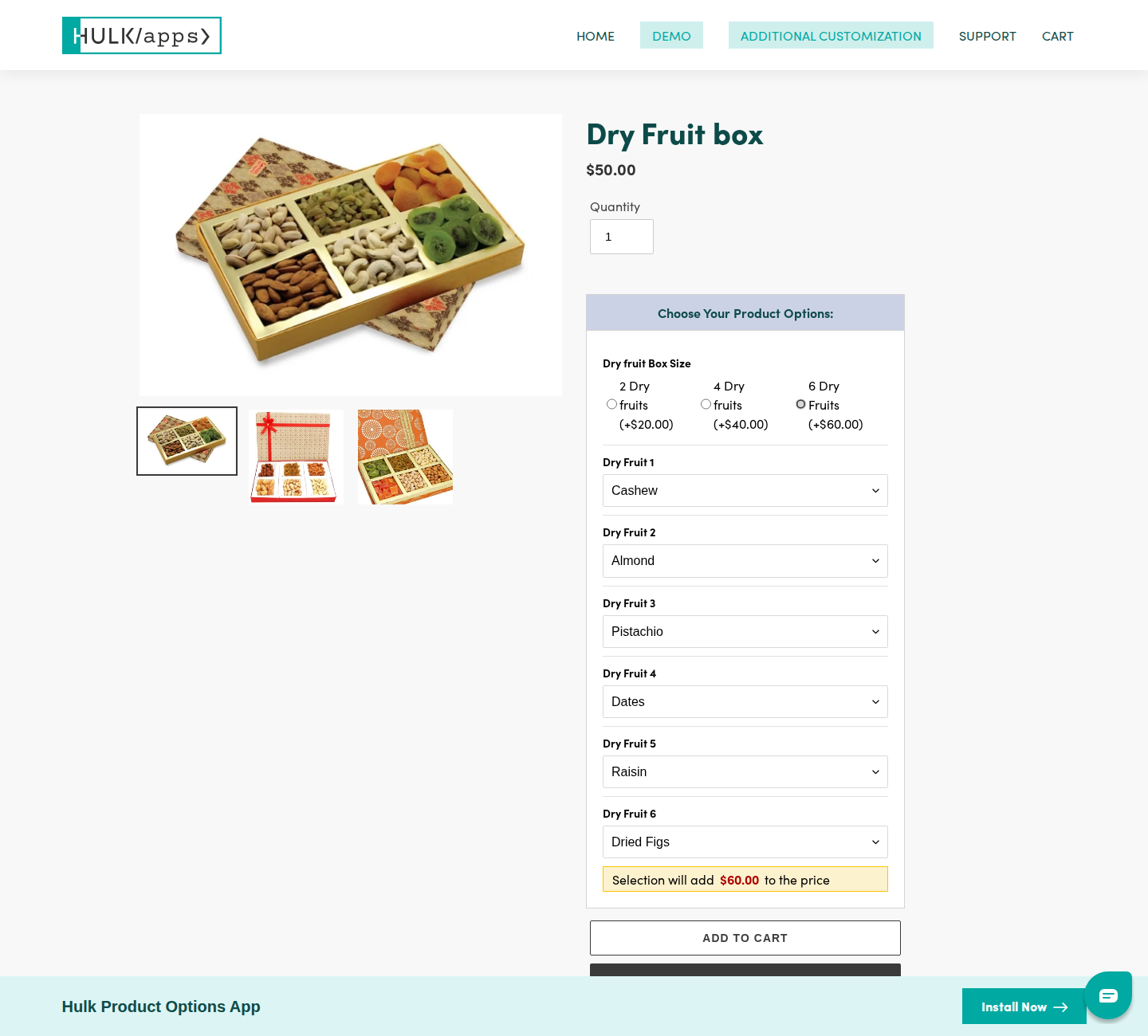
Food gift boxes: filling each position

A nine-position chocolate box and six-position dried-fruit box demonstrate selection of box contents. Foods, quantities and prices differ.

Podifai
Podifai demo: All nine positions in the 3 × 3 chocolate box are filled with flavor selections.

All nine positions in the 3 × 3 chocolate box are filled with flavor selections.

Captured 2026-10-04

Hulk Product Options
Hulk Product Options demo: Six Dry Fruits positions filled with Cashew, Almond, Pistachio, Dates, Raisin and Dried Figs. The product photo remains the original illustration.

Six Dry Fruits positions filled with Cashew, Almond, Pistachio, Dates, Raisin and Dried Figs. The product photo remains the original illustration.

Captured 2026-10-07

These screenshots document storefront configuration and previews. They do not establish checkout, production-file quality, merchant setup effort or every mobile interaction. A template that retains its original product photo does not establish that the app lacks preview support elsewhere.

Public demo observations: options and calculated charges

Checked October 4, 2026, in fresh desktop browser sessions. These are different example products, not a controlled speed test or an overall UX ranking. We distinguish successful field changes from unverified cart and fulfillment behavior.

Infinite Options: collecting an initial and colors

On Classic Varsity Top, we selected medium, entered A, chose Blue for Letter Color and Black for Sleeves Color. The controls retained those choices. The product photo still showed its original red B; this example demonstrates collecting instructions, not rendering the chosen letter on the garment.

The medium selection showed $70; the initial XS selection showed $78. Size is explicitly labeled as a Shopify variant, so this is not evidence of an app-calculated personalization surcharge. A tooltip intercepted our automated color click; keyboard selection worked. This observation alone does not establish a general mouse-accessibility problem.

Open the tested Infinite Options demo

Hulk: a charge driven by a numeric input

On Collage Photo Frame, the base price was $50, the read-only default field showed 4, and we entered 6 in More photos. After typing and leaving the field, the page explicitly showed a $24 additional charge. The visible input constraints were 5–8. One input/output pair does not establish the underlying formula or prove a width-by-height quotation workflow.

An earlier automated fill attempt had left a required-field message. The later successful price update means we do not treat that earlier attempt as proof of a broken pricing feature. For a merchant, the next check is whether the same charge and input survive the cart and order.

Open the tested Hulk demo

Cart verification and the Podifai reference

Both walkthroughs included an Add to cart attempt. The carts we subsequently opened were empty, so we have not verified order-data transfer for these examples. Hulk’s header Cart link also changed from productoptions.hulkapps.store to demo-productoption.myshopify.com. These observations do not isolate the cause or prove that either app lacks working cart support. No checkout was completed.

Our separate Podifai tumbler test retained a $5 text-personalization charge, ALEX, the selected font and a preview link in the cart. That is evidence for that configured product, not proof of a general formula engine or an equivalent apparel workflow. Read the Podifai cart and preview observations.

For a simple initial-and-color order, prioritize accurate instructions reaching fulfillment. For calculated charges, test several valid inputs and boundary values against a known price sheet. Where multiple apps meet those requirements, these demos provide no basis for forcing a winner. Merchant setup, mobile editing, uploads and production files remain outside this pass.
Feature and Cost Comparison

How Infinite Options, Hulk Product Options, and Podifai compare on the criteria merchants actually decide on.

CriteriaInfinite OptionsHulk Product OptionsPodifai
Published pricingEssential is $12.99/month with a 14-day trial. No permanent free plan is published in the listing.App Store monthly pricing: Basic $10, Advanced $20, Enterprise $49.90; 7-day trial. Free use is for partner development stores. Hulk’s website displays different Basic/Advanced figures; check the Shopify billing offer before subscribing.Published plans: Free for 3 custom products; Starter is $7.90/month for 30 products; Growth is $15.90/month for unlimited products. No transaction fee in these published plans.
Main decisionCollect choices and sell extras.Preserve operational option rules.Let customers inspect the customized appearance.
Visual workflowFields and swatches are established; verify product-image composition if required.Hulk lists an image customizer with uploads and Google Font text; its Advanced plan lists option-driven image changes. Test the required composition and plan separately.Text and customer images on a layered 2D preview, with one to five views and inline or popup display.
Pricing dependenciesEvaluate each priced upgrade and bundle line.Evaluate plan-specific charges and any required formulas.Test fixed/percentage adjustments and linked add-on products.
Cart and operationsCheck bundle removal, quantities and existing integrations.Check in-cart editing, inventory and any POS use on the chosen plan.Check cart preview theme setup, linked stock and complete Shopify order data.
Artwork for productionNot established by the checked sources; ask for a representative output if essential.Not established by the checked sources; validate the actual production requirement.When enabled (off by default), orders generate flattened RGB transparent PNGs for views containing supported text or customer uploads. Product backgrounds and Image Swatch artwork are excluded; longest side up to 3600 pixels at 300 DPI. Vector and editable-layer export are not documented.

Feature-by-feature: what each app actually covers

The criteria include competitors’ operational capabilities as well as Podifai’s visual features. Plan restrictions and workflow differences stay in the cells. “Not established” means the sources checked do not settle that requirement; it does not mean the app cannot do it. This is an official-source review, not an independent test of every capability. Product-specific review dates appear with the plans below.

On a small screen, scroll each table horizontally to compare every app.

Inputs & appearance

Capability / why it mattersInfinite OptionsHulk Product OptionsPodifai
Text, swatches and selections

Collect the exact choices fulfillment needs.

Text, dropdowns, checkboxes, swatches and date pickers.SourceBasic: 10 option types; Advanced: 20.SourceImage/color/font swatches, text, dropdowns, badges and image uploads.Source
Customer file uploads

Receiving a file is different from placing it on the product.

The current plan lists file inputs. Separate Uploadery integration is also documented; confirm which upload path your setup uses.SourceFile upload is listed on Basic.SourceCustomer image uploads with optional storefront image-editing tools.Source
On-product visual preview

Check whether text and images are composed on the product, or only selected fields/images change.

Not established in the reviewed listing and documentation. Ask for a demonstration of this specific requirement.SourceAdvanced changes product images by option. The listing also advertises image customization; verify its exact text/photo controls.SourceLayered 2D text and image preview; merchant-controlled masks, text effects and placement.Source
Multiple views & components

A front/back design and a parts-based configurator are different requirements.

Not established in the reviewed listing and documentation. Ask for a demonstration of this specific requirement.SourceNot established in the reviewed listing and documentation. Ask for a demonstration of this specific requirement.Source1–5 views; charm-style multi-select placement is documented. This is not a general 3D engine.Source

Rules & pricing

Capability / why it mattersInfinite OptionsHulk Product OptionsPodifai
Conditional options

Hide irrelevant choices and prevent invalid combinations.

Show/hide rules for option selections.SourceAdvanced; enhanced rules on Enterprise.SourceShow/hide rules based on selections, including equals/not-equals conditions.Source
Option charges

Check both the displayed price and the amount charged at checkout.

Native Bundling increases the main product price; legacy bundles add a separate product.SourceBasic add-ons; Advanced adds one-time and percentage charges.SourceFixed or percentage increases/decreases and linked Shopify variant prices. Percentages use the same effective base price, without compounding. General dimension formulas and quantity-tier pricing are not supported by the current documentation.Source
Dimension or custom price formulas

Made-to-measure products may need width × height pricing rather than a fixed surcharge.

Not established in the reviewed listing and documentation. Ask for a demonstration of this specific requirement.SourceEnterprise includes formula-based options.SourceNo general dimension/formula calculator is documented. Fixed or percentage adjustments are not equivalent.Source
Option quantities & bulk ordering

Quantity per choice, quantity discounts and cart quantity are not interchangeable.

Not established in the reviewed listing and documentation. Ask for a demonstration of this specific requirement.SourceEnterprise lists a quantity selector; verify discounts and size-breakdown requirements.SourcePopup product quantity and multi-select limits are documented; per-choice quantities and quantity-tier pricing are not established.Source
Date and scheduling fields

A delivery calendar may need blocked dates and lead-time rules.

Date picker is documented; validate scheduling restrictions separately.SourceNot established in the reviewed listing and documentation. Ask for a demonstration of this specific requirement.SourceA dedicated date picker with blocked dates/lead times is not documented in the current option catalog.Source

Cart & operations

Capability / why it mattersInfinite OptionsHulk Product OptionsPodifai
Linked products and bundles

Determine which products and quantities reach the cart and order.

Legacy bundles support radio buttons, checkboxes, dropdowns and swatches; an optional price block supports Shopify 2.0 themes.SourceNot established in the reviewed listing and documentation. Ask for a demonstration of this specific requirement.SourceAdd variant price links pricing to Shopify items. It is not a general bundle engine; inspect generated cart lines, discounts, removals and quantity changes.Source
Edit selections in cart

Changing choices after adding to cart requires an explicit supported flow.

Not established in the reviewed listing and documentation. Ask for a demonstration of this specific requirement.SourceAdvanced includes editing options in cart.SourceCart preview display needs theme setup. Editing the option selection inside the cart is not established.Source
Inventory & SKU handling

Stock tracking and generating a combined production SKU solve different problems.

Not established in the reviewed listing and documentation. Ask for a demonstration of this specific requirement.SourceEnterprise includes inventory/SKU management.SourceLinked Shopify or custom inventory is documented. Linked inventory alone checks availability, not the full required quantity. Add variant price has separate cart-line and quantity rules; validate shared variants and cart edits.Source
Shopify POS

Online-store support does not establish an in-person selling integration.

Not established in the reviewed listing and documentation. Ask for a demonstration of this specific requirement.SourceEnterprise explicitly lists POS compatibility.SourceCurrent documentation covers the online storefront; POS parity has not been established.Source

Production & integration

Capability / why it mattersInfinite OptionsHulk Product OptionsPodifai
Generated production artwork

Verify formats, layers, dimensions and transparency with production.

Not established in the reviewed listing and documentation. Ask for a demonstration of this specific requirement.SourceNot established in the reviewed listing and documentation. Ask for a demonstration of this specific requirement.SourceWhen enabled (off by default), orders generate flattened RGB transparent PNGs for views containing supported text or customer uploads. Product backgrounds and Image Swatch artwork are excluded; longest side up to 3600 pixels at 300 DPI. Vector and editable-layer export are not documented.Source
APIs and external systems

An ERP or custom frontend needs a documented integration, not just order notes.

The listing names MESA, Recharge and Klaviyo integrations. That is not a general-purpose API guarantee.SourceNot established in the reviewed listing and documentation. Ask for a demonstration of this specific requirement.SourceA public configurator/ERP integration API is not documented; do not assume a drop-in replacement for one.Source
Storefront languages

App interface languages and translated option labels are different.

Not established in the reviewed listing and documentation. Ask for a demonstration of this specific requirement.SourceNot established in the reviewed listing and documentation. Ask for a demonstration of this specific requirement.SourceSystem messages and product/template custom options support multiple languages, with AI-assisted translation and merchant review.Source

Strengths and limitations

Infinite Options

Reasons to choose it

  • Its form and bundle workflows can be sufficient for gift messages or add-ons without preparing visual design layers.
  • The documented separate-product bundle path gives operations a concrete way to inspect add-on items in orders.

Limitations and checks

  • An on-product artwork compositor and generated production files were not established by the sources checked; ask for a demonstration if either is essential.
  • Legacy Product Bundles and Native Bundling behave differently in the cart. Do not transfer a configuration without checking the active mode.

Hulk Product Options

Reasons to choose it

  • Enterprise explicitly covers formula options, inventory/SKU management and POS, making it worth evaluating for stores with operational requirements beyond a visual product page.
  • Advanced supports cart editing. Podifai’s saved order preview is not evidence of equivalent cart editing.

Limitations and checks

  • The features most relevant to operations are split across Advanced and Enterprise; Basic pricing is not the price of the full workflow.
  • Changing a product image is not necessarily the same as placing arbitrary shopper text or artwork on it. Confirm the demonstrated personalizer controls.

Podifai

Reasons to choose it

  • Preview and supported PNG artwork are included from the three-product free plan.
  • Product-based subscriptions have no published order caps or app transaction fee; this can be useful when a small catalog sells frequently.

Limitations and checks

  • Generation is off by default. PNG output excludes backgrounds and Image Swatch artwork, and preserves the full view canvas. A vector or editable-layer format and automated POD fulfillment are not documented.
  • Current docs do not support a general formula engine, delivery scheduling, cart option editing, POS parity or an ERP API. Evaluate those requirements before switching.

Choose around the job your store needs done

These are illustrative buying scenarios, not customer case studies or measured results. The recommendation follows the documented capabilities above.

Gift messages and care-kit add-ons

Requirement: A buyer enters a message and adds a separately fulfilled care kit to a gift.

How the apps fit: Infinite Options can be a sensible fit when the order fields and add-on item are the complete deliverable. Podifai’s preview is more relevant if the message is engraved and the buyer must approve its placement.

Test before choosing: Change the main quantity, remove the kit and apply a discount. Confirm the order still makes the relationship between items clear.

One configurable product sold online and in person

Requirement: Staff and online shoppers need the same paid choices, stock behavior and order data.

How the apps fit: Hulk Enterprise is the stronger documented candidate for POS. Podifai’s current evidence covers the online customizer; do not select it for POS parity without a demonstrated integration.

Test before choosing: Create one online order and one POS order, including an out-of-stock choice and a paid option. Compare the charged totals and the fulfillment record.

A small catalog of photo gifts or engraved products

Requirement: Shoppers choose text or upload a photo, inspect the result and order supported artwork.

How the apps fit: Podifai is worth testing when its 2D preview, supported option rules and transparent PNG fit the product. A formula-priced, POS-dependent or vector-cutting workflow may favor another app.

Test before choosing: Use a long name and a low-resolution upload, change the variant, place an order and inspect the PNG in production software. Confirm the full-canvas dimensions and that all required customized elements reach the production file.

Pricing: budget for the workflow, not the starting price

Published monthly USD prices; Shopify recurring charges generally run every 30 days. Annual discounts, taxes and separately contracted services are excluded. Examples state their assumptions and are not promises of an equivalent feature set at a lower price.

Infinite Options

Sources checked October 7, 2026.

Essential$12.99 monthly
Published option, conditional-rule and bundle features; 14-day trial.

Budget example: Essential is $12.99/month, based on the App Store. A second numeric vendor pricing table was not found. Separately installed upload or automation apps can add fees; check those subscriptions independently.

Check current plans

Hulk Product Options

Sources checked October 7, 2026.

Basic$10.00 monthly
Inputs, swatches, uploads and add-on prices.
Advanced$20.00 monthly
Conditional rules, cart editing, image changes and percentage/one-time charges.
Enterprise$49.90 monthly
Formula, inventory/SKU, quantity, POS and listed integrations.

Budget example: For cart editing, budget $20/month; for POS plus formulas, budget $49.90/month. These App Store rates differ from Hulk’s vendor table ($8.90/$18.90 for the first two paid plans); verify the subscription screen.

Check current plans

Podifai

Sources checked October 7, 2026.

Free$0
3 custom products
Starter$7.90 monthly
30 custom products
Growth$15.90 monthly
Unlimited custom products

Budget example: 20 custom products fit Starter at $7.90/month; 100 need Growth at $15.90/month. These prices only help if the supported inputs, preview and production output meet the requirement.

Check current plans

Podifai’s production-file boundaries matter as much as its subscription price.

Which One Is Right for You?

A quick guide to help you decide.

Choose Infinite Options when...

  • The job is collecting choices or messages reliably.
  • The existing bundle workflow already works for fulfillment.
  • You do not need a customer-facing design-placement step.

Choose Hulk when...

  • A formula or POS workflow is a requirement, not an optional extra.
  • The chosen plan reproduces the cart editing and inventory process.
  • Its operational fit justifies the complete subscription and setup cost.

Choose Podifai when...

  • A shopper needs to inspect how a name or uploaded photo will look.
  • Supported PNG output and order data are sufficient for production.
  • The documented inputs and pricing rules cover the product without unsupported workarounds.

Common Questions

Direct answers for merchants comparing Infinite Options, Hulk Product Options, and Podifai.

Start Free. Upgrade as Your Catalog Grows.

All core customization features included — live preview, image upload, dynamic pricing, curved text, no-code styling. No credit card. No trial. Just install and start selling custom products.

Free for 3 products; paid plans from $7.9/month

No transaction fee in published Podifai plans

White-label included, no extra charge

Works with all Shopify themes

Sources and verification

Official sources reviewed October 7, 2026. Published capabilities are distinguished from the dated public-demo observations. Merchant billing, competitor production files and every theme/integration were not independently tested. Unresolved source disagreements are retained below.

Method: this page maps published competitor capabilities to Podifai's current supported workflow. It does not present setup time, page speed, reliability, or migration effort as a measured benchmark unless a section explicitly describes the test and its conditions. Quoted reviews, when present, are selected qualitative examples rather than a representative satisfaction sample; use the linked live archive to review the full rating distribution and current context.