Product Visualization for Shopify
Show shoppers supported text, customer images, colors, fonts, charms, and option layers on the product before checkout with a configurable 2D live preview.
 Free install on Shopify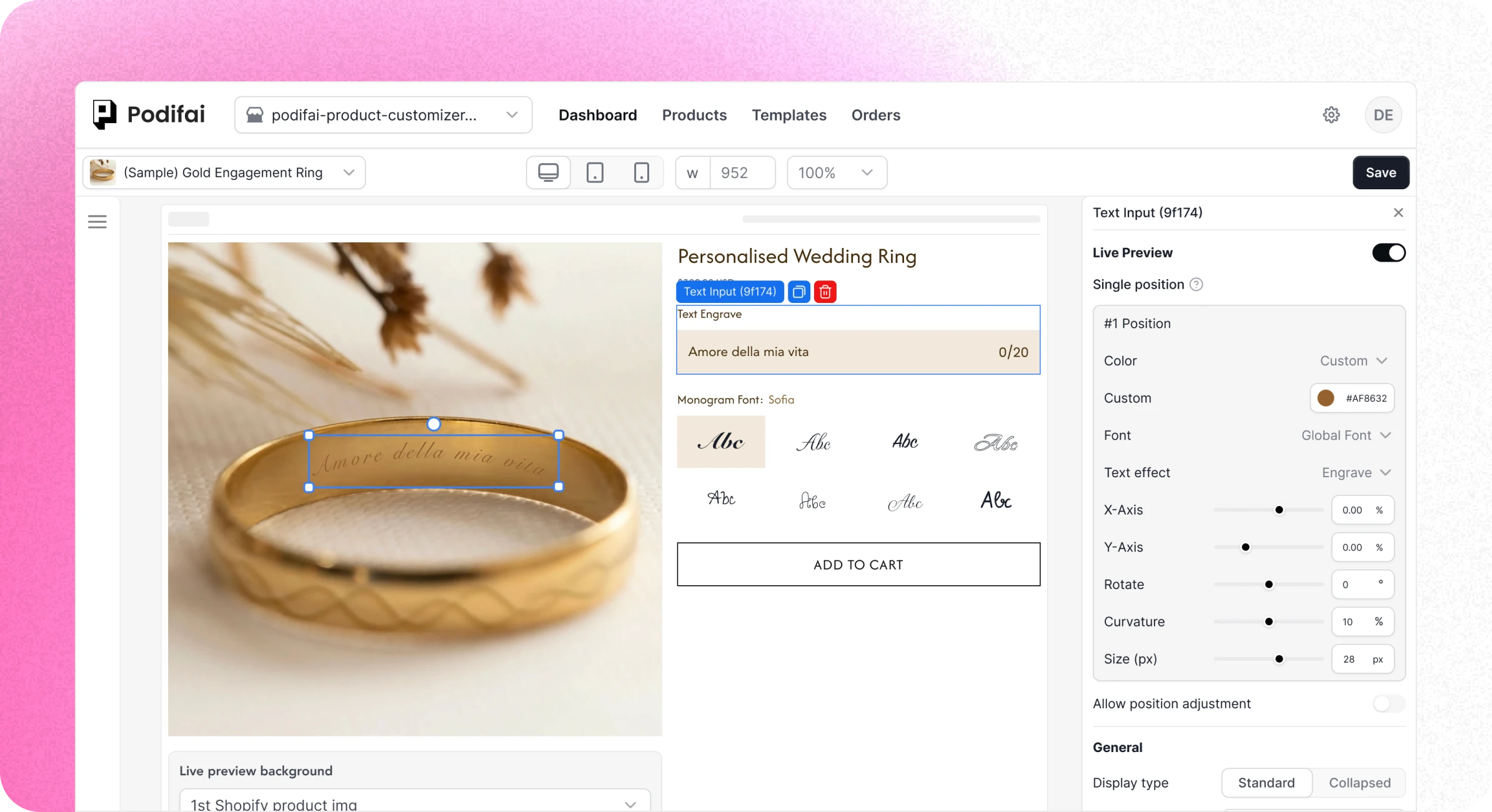
Direct answer
What is ecommerce product visualization?
Product evidence
See how the visual layers are configured
These recordings show real Podifai controls for preview assets, linked text, customer uploads, and the saved order result.
Upload the preview assets
Add the base product image and the visual artwork that will appear when the shopper selects an option.
Show shopper text in the preview
Turn on the live customizer for a text field so names, initials, or messages can update on the product canvas.
Configure a customer-upload layer
Keep the upload as a separate file and optionally display the same image inside the positioned 2D preview area.
Keep the preview result with the order
Review selected values and the live-preview image URL in the Podifai Orders tab after checkout.
Choose the right model
Static product media vs Podifai 2D preview vs 3D or AR
The right visualization method depends on what the shopper needs to understand and what visual assets the merchant can maintain accurately.
| Dimension | Static or variant media | Podifai layered 2D preview | Specialist 3D or AR platform |
|---|---|---|---|
| Best fit | Standard products and a small number of fixed looks | Personalized and made-to-order Shopify products | Spatial, dimensional, or multi-angle products |
| Visual output | Pre-rendered images or variant media | Layered 2D preview on one configured canvas | Interactive 3D scene, AR, or virtual placement |
| Shopper choices | Usually switches between fixed product images | Text, uploads, colors, fonts, charms, and option layers | Materials, components, camera views, and spatial controls |
| Customer upload | Usually collected separately, if supported | Separate file that can also appear in the 2D preview | Capability varies by platform and workflow |
| Views | Any images the merchant prepares | One or more switchable layered 2D product views | May provide multiple views, zoom, rotation, or room placement |
| Asset work | Product photography or rendered images | Base image plus transparent 2D option layers | 3D models, materials, lighting, and scene configuration |
| Order handoff | Normal variant or product order data | Selected values, uploaded image URLs, and preview identifier | Varies by ecommerce and production integration |
| Production files | Not generated | Transparent PNG per customized view when enabled; no vector or machine files | Available from some production-focused platforms |
Visualization capabilities vary by platform, plan, and implementation. Confirm 3D, AR, virtual try-on, room placement, production files, and ecommerce integrations directly with each provider.
Podifai focuses on layered 2D preview with optional switchable Multiple Views for Shopify personalization. It does not currently provide interactive 3D, AR, room placement, or CAD and machine-file generation. Transparent PNG output is available when print-ready generation is enabled.
Implementation workflow
Build the preview from the product's real visual choices
Start with the output the shopper must understand, then connect only the fields and artwork that the preview can represent accurately.
- 01
Prepare the base product image
Choose one product face and a stable canvas where shopper-selected text, images, and option artwork can be positioned.
- 02
Prepare the visual layers
Create transparent images for colors, charms, components, or other choices and upload any approved custom fonts.
- 03
Map options to the canvas
Connect text fields, image uploads, swatches, and option values to their layers, then set position, size, rotation, and display rules.
- 04
Test preview and order data
Verify desktop and mobile product pages, all visible combinations, uploaded files, cart behavior, checkout, and the saved order result.
After checkout
Review the preview and generated artwork separately
Podifai keeps the selected values, uploaded image URLs, and preview identifier with the Shopify line item. Enabled print-ready generation exports included text and customer-uploaded image layers as transparent PNGs; product backgrounds and Image Swatch artwork are excluded. The merchant remains responsible for artwork preflight, physical dimensions, color handling, proof approval, and any vector or machine-file preparation.
Merchant proof
Merchants use live visualization for real personalized products
Verified Shopify App Store reviews covering apparel logos, real-time personalization, and the shopper experience.
4.9 on the Shopify App Store · 24 reviewsThis app is AMAZING! So simple to use and the personalisation options are so much better than what's currently on the market. Not to mention the tech support! I had an issue with it displaying on my website because of my theme, and I got help instantly… it was done in a matter of hours, like in 1 hour! Yeah, its a game changer!
I run a custom apparel lab (DTF printing and embroidery) and Podifai has been exactly what I needed to offer personalization directly on my Shopify store. The live customizer works beautifully — customers can see their name, number, and logo on the garment in real time. What really stood out was the support… that level of founder-direct support is rare.
Podifai est hyper intuitif ! Très complet, l'équipe est très disponible et disposée à améliorer notre expérience. J'avais envie d'une fonctionnalité particulière, ils l'ont mise en place dans les 10 jours ! Ça change complètement l'expérience client pour moi qui propose de la personnalisation !
Continue exploring
Related Podifai pages
Continue with the focused Podifai pages and documentation for each part of this Shopify workflow.
Layered live preview
Configure text, images, fonts, colors, and option layers across the product views you need.
Multiple product views
Create switchable Front, Back, Side, and other layered 2D canvases.
Custom product builder
Connect the visual layer to shopper options, pricing, and order data.
Shopify product configurator
Review the complete storefront-to-order configuration workflow.
Image upload
Collect a customer file and optionally show it in the live preview.
Questions before setup
Product visualization FAQ
Direct answers about layered 2D preview, customer uploads, 3D and AR boundaries, order data, production files, and free eligibility.
What product choices can Podifai visualize?
Podifai can visualize supported text, fonts, colors, option images, charms, components, and configured customer uploads on a layered 2D product canvas.
Can a customer-uploaded image appear in the preview?
Yes, when the merchant enables the image upload field for the live customizer and configures its position. The source upload remains a separate file while the same image can also appear in the 2D preview.
Does Podifai support 3D or augmented reality?
No. Podifai currently focuses on layered 2D live preview. Use a specialist platform when the product requires interactive 3D models, AR placement, virtual try-on, or spatial measurement.
Can Podifai preview the front and back of a product?
Yes. Multiple Views can provide separate switchable Front, Back, Side, or other merchant-defined 2D canvases, each with its own prepared background and assigned preview layers.
Does the live preview generate a production-ready file?
When print-ready generation is enabled and valid print data is saved at Add to Cart, Podifai generates a transparent PNG for each customized view when Shopify creates the order. It includes supported text and customer-uploaded image layers, excluding product backgrounds and Image Swatch artwork. SVG, DXF, CAD, and embroidery-machine output are not provided.
Where does the preview information appear after checkout?
Selected values and uploaded image URLs are attached to the Shopify line item. Merchants can review them in Shopify Admin and in the Podifai Orders tab, together with the saved live-preview image URL when available.
Is Podifai product visualization free?
Podifai has a Free forever plan for up to 3 custom products. Starter supports 30 products for $7.9/month, and Growth supports unlimited products for $15.9/month. Existing customers keep their current full access.

Add layered 2D product visualization to Shopify
Start free with up to 3 custom products, or choose a paid plan from $7.9/month as your catalog grows.