
Customer story · Australia
How Leovia structures personalized leather engraving orders
Leovia gives shoppers a guided way to personalize engraved leather gifts, preview the engraving before purchase, and submit an order for final review before production.
Customer story at a glance
- Business
- Personalized leather accessories and gifts in Australia.
- Products
- Personalized leather wallets, key pouches, and gift sets.
- Podifai setup
- Two 20-character engraving fields, five fonts, an on-page preview, and a final human review before production.
About the brand
Why personalization matters for Leovia.
The business
Leovia sells personalized leather accessories and gift sets, including a slim RFID bifold wallet paired with a six-key pouch. On the featured product, the personalization is part of the value of the gift: the customer chooses wording for two separate leather pieces and needs to understand how that wording will appear before placing the order.
Podifai's role
Podifai keeps the two engraving requests, five visual font choices, character limits, and on-page placement preview inside one product flow. The preview gives the shopper a useful reference, while Leovia retains a human review for centering and balance before production. The value is a clearer handoff from customer idea to reviewed engraving order—not an automated production guarantee.
“Simple to use, with fast theme support”
“This app is AMAZING! So simple to use and the personalisation options are so much better than what's currently on the market. Not to mention the tech support!”
Leovia
Shopify merchant
Shopify App Store review
The problem
Engraving needs to feel clear before the order reaches production.
The customer needs a useful preview, while the merchant still needs reliable order details and a quality-control step.
An engraved leather gift combines a physical product choice with customer-created text. The shopper needs to understand what will be personalized and see a useful representation before committing to the order.
Leovia also needed the personalization experience to fit its Shopify theme cleanly. Its public review notes that the team helped resolve a theme display issue quickly while keeping the setup simple to use.
The product page
Shoppers preview their engraving before they buy.
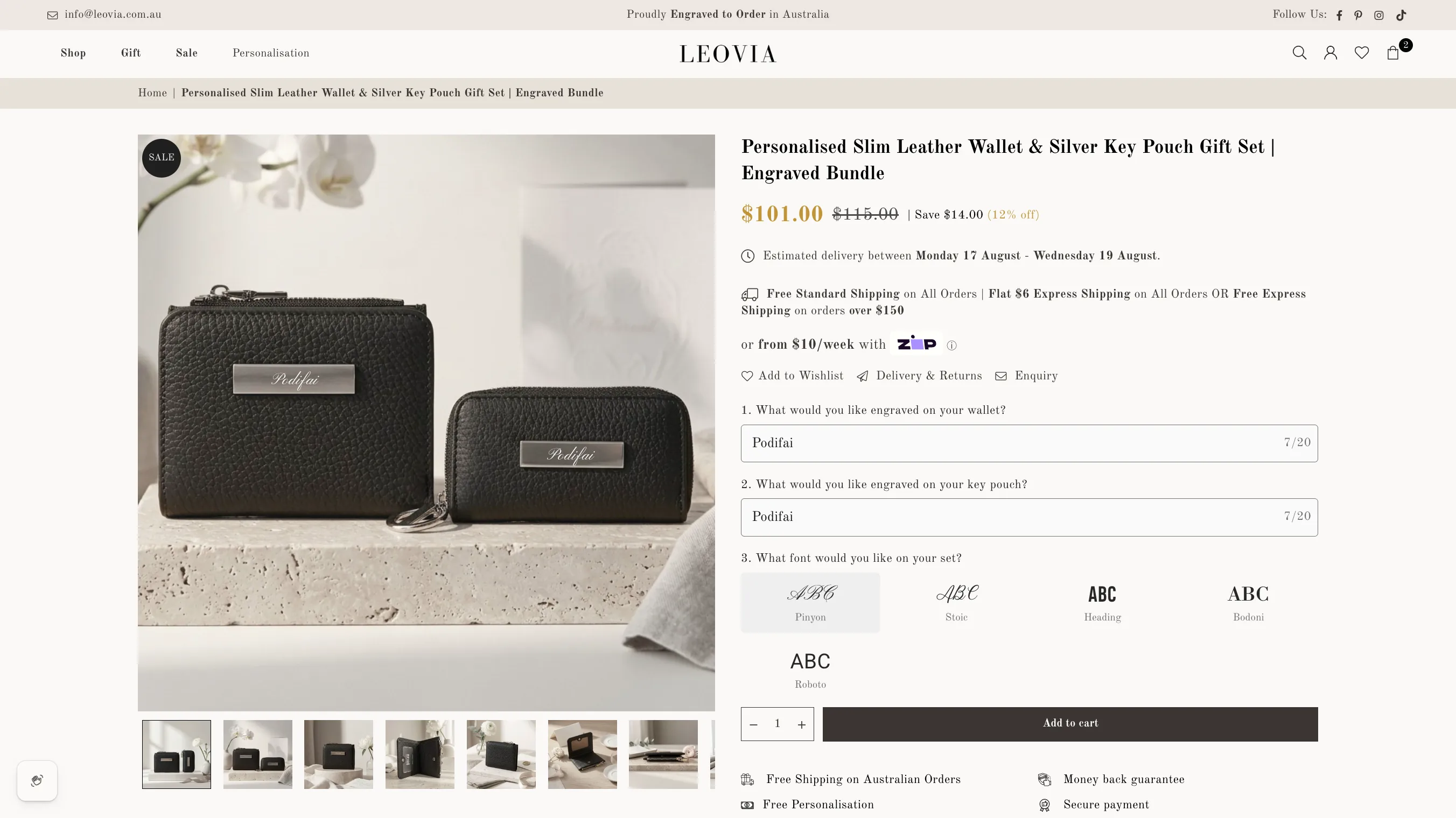
The live product keeps the engraving fields, font choices, preview guidance, and purchase controls in one flow.
On Leovia’s personalized leather products, shoppers can enter their engraving and use the on-page preview as a guide before purchasing. The slim leather wallet and key pouch product brings the personalization into a gift-set purchase rather than sending the shopper to a separate enquiry flow.
Leovia explains that its team personally reviews every order before engraving. That creates a clear handoff: the storefront helps the customer express the requested personalization, while a human check remains part of production quality control.
The Podifai setup
How the Leovia personalization flow is configured.
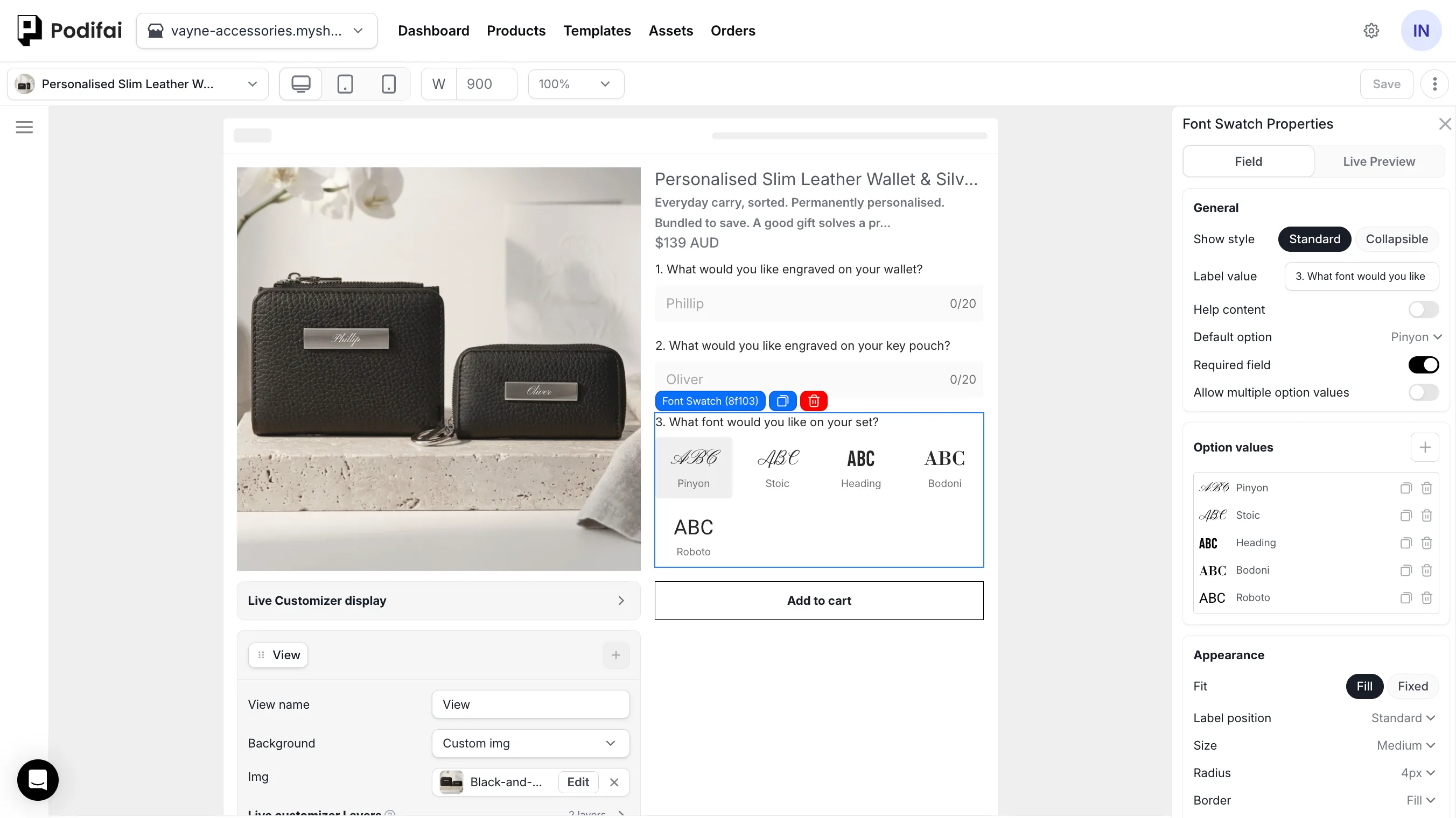
Two text fields, character limits, five fonts, and preview guidance organize the engraving request before checkout.
Step 01
Wallet engraving — up to 20 characters
A dedicated field asks what the shopper wants engraved on the wallet and displays a 20-character limit.
Step 02
Key-pouch engraving — up to 20 characters
A second field separately captures the engraving for the matching key pouch, also with a 20-character limit.
Step 03
Font Swatch
Five visual font values—Pinyon, Stoic, Heading, Bodoni, and Roboto—let shoppers compare the lettering style before ordering.
Step 04
Engraving text effect
The live text layers use an engraving-style treatment so the shopper can review a placement guide on both leather pieces.
Step 05
Gift-set product
The same guided interaction supports a combined slim wallet and key pouch purchase.
Step 06
Human production check
Leovia states that its team reviews every order before it goes to the engraver.
What the workflow supports
A clearer path from engraving idea to reviewed order.
The resulting storefront flow connects personalization, product selection, and purchase on the same page. It gives the shopper immediate visual guidance while preserving Leovia’s final review step before engraving.
- Text Input
- 20-character limits
- Font Swatch
- Engraving text effect
- Live Preview
- Production review
Why this setup works
Value for the shopper, merchant, and order workflow.
- Shopper
- Enter separate engraving requests, compare five fonts, and review placement without leaving the gift-set product page.
- Merchant
- Keep character limits and font choices consistent while preserving a human quality-control step.
- Order handoff
- The two text values and selected font remain connected to the order for review before engraving.
This workflow is useful for
- Engraved leather gifts
- Two-piece gift sets
- Font-led personalization
- Human-reviewed production
Direct answers
Questions about the Leovia workflow.
- What does Leovia use this product personalization workflow for?
- Leovia gives shoppers a guided way to personalize engraved leather gifts, preview the engraving before purchase, and submit an order for final review before production.
- Which Podifai option types organize the engraving request?
- Leovia uses two Text Input components—one for the wallet and one for the key pouch—plus a Font Swatch with five visual font choices. Each engraving input is limited to 20 characters.
- How does the shopper see the engraving before purchase?
- Two live text layers place the entered wording onto the wallet and key-pouch image. The engraving-style treatment makes the preview useful as a placement guide, while Leovia still explains that the on-screen result is not a production guarantee. Learn about Live Preview
- What reaches the engraving workflow after checkout?
- The two text values and selected font remain associated with the product order. Leovia then performs a human check for centering and balance before sending the job to the engraver.
- What should another engraving merchant verify?
- Test the permitted character count, the visual scale of every uploaded font, the placement of each text layer, and the wording of any production disclaimer on the real product image and Shopify theme.
Build a similar workflow
Learn how to build a related product personalization workflow on Shopify.
Shopify Engraving Product Customizer
Explore the Podifai feature or guide related to this customer workflow.
Learn moreLive Preview
Explore the Podifai feature or guide related to this customer workflow.
Learn moreProduct Customizer for Gift Stores
Explore the Podifai feature or guide related to this customer workflow.
Learn more