Custom Phone Case Stores: 25 Brands Reviewed
Explore phone case personalization and merchandising workflows, with official sources, real screenshots and a practical Shopify setup example.

TL;DR: To plan a custom phone case store, start with the shopper's input. CASETiFY documents photo and text customization; Skinnydip offers a case creator; Keyway offers monograms; Ideal Bookshelf collects book choices for a designer-arranged case. Other brands are useful references for device selection, materials and accessories. These are different selling workflows, even when all are described as “custom.”
A personalized phone case incorporates a shopper's own text, artwork or design choices into the product. Choosing a phone model or an existing pattern is product selection. Both matter to Shopify merchants, but they require different controls, inventory rules and production instructions.
This guide revisits 25 brands using their official storefronts, product pages and help pages, reviewed on October 9, 2026. It is a workflow reference, not a ranking by sales or traffic, and it does not assume every store uses Shopify or Podifai. Public documentation supports the feature descriptions; we did not place orders or test every editor and checkout. Saved screenshots illustrate the named pages; prices and promotions within them are historical snapshots.
Which phone case workflow should you study?
| Workflow | Useful examples | What a merchant needs to collect |
|---|---|---|
| Photo or text personalization | CASETiFY; Skinnydip | The customer's content, compatible case and placement choices |
| Initials and material finishes | Keyway; Bouletta; Kulör | Exact spelling, font or finish, and supported production choices |
| Designer-arranged custom work | Ideal Bookshelf; Blessing Custom Leather | A clear design brief and any approval process |
| Text instructions supplied after product selection | MMORE | Text tied unambiguously to the correct item |
| Existing designs and physical accessories | Casely; Carved; Loopy; XOUXOU | Device compatibility, selected design and compatible components |
For your own store, decide whether the customer needs an immediate visual preview, an order form, or a conversation with a maker. Then choose the storefront controls. A unique physical case is not necessarily one that shoppers can design themselves.
25 phone case stores: visual examples and merchant lessons
1. CASETiFY: distinguish the case from the customer's design
CASETiFY's customization help page documents custom photos and text, with layouts, fonts and other choices governed by the selected design. Its phone case customization page is a useful starting point for studying the separation between case selection and personalization.
Merchant takeaway: let shoppers establish device compatibility before asking them to invest time in a design. Explain any design-specific text limits next to the field. Do not assume the same layout or character allowance works across every phone model and case style.

2. Spigen: Make device compatibility easy to find
Spigen is a catalog reference for device families and case series. In the saved example, the compatible devices are shown beside the product imagery. Merchant takeaway: make the phone model explicit before customers select a design or add a case to the cart.

3. Casely: Separate design discovery from product fit
Casely offers an example of browsing existing designs and then selecting the physical case. The saved product page places device and case-type controls beside the same design. Merchant takeaway: distinguish those choices so shoppers know which changes affect compatibility and which affect the case construction.

4. BURGA: Organize several case choices around one design
BURGA is useful for studying case and accessory merchandising. The saved product page groups phone-model and case-type choices alongside an existing pattern. Merchant takeaway: keep the selected artwork visible while customers choose the appropriate physical product.

5. Velvet Caviar: Show the same design from useful angles
Velvet Caviar is a reference for presenting a coordinated case collection. The saved page combines a large case image, supporting thumbnails and model selection. Merchant takeaway: use additional views to explain the physical product while keeping compatibility controls easy to locate.

6. Loopy Cases: Explain accessory and orientation choices
Loopy Cases documents interchangeable loops that work with Loopy cases. The saved case page separately shows phone-brand, model and orientation choices. Merchant takeaway: explain how each component fits the case and how the shopper should choose its orientation.

7. tech21: Name the supported phone clearly
tech21 is a reference for device-specific case merchandising. The saved EvoClear product page names its compatible Samsung model directly in the product title. Merchant takeaway: repeat the model where customers make the purchase decision, rather than relying only on navigation or the product photograph.

8. Sonix: Let product imagery guide browsing
Sonix is a catalog reference for existing designer phone cases. The saved homepage presents several designs together with related accessories. Merchant takeaway: help shoppers recognize a visual collection, then provide a clear route to the compatible product. A design-led collection is different from an artwork-upload workflow.

9. MagBak: Explain the case and accessory system
MagBak presents cases alongside wallets and mounts. The saved product page shows a case with device and type choices. Merchant takeaway: identify which parts are included and which are optional, and make accessory compatibility clear before the customer builds a combination.

10. Skinnydip London: give shoppers a clear entry into the creator
Skinnydip's Create Your Case collection describes personalization with names, slogans, emojis and stickers. Its official walkthrough explains the sequence of choosing a case, selecting the phone size and opening the creator.
Merchant takeaway: make the next action obvious. A collection page can introduce the possibilities, while a product page guides the actual configuration. Show examples of finished designs so customers understand what the creator can produce. The saved image below shows the collection entrance, rather than the editing interface itself.

11. Carved: Show the individual item being sold
Carved describes individually photographed wood-and-resin cases, with the listing photo representing the physical item. Its saved homepage illustrates the variety of these designs. Merchant takeaway: for one-of-a-kind stock, connect each listing to its exact item; uniqueness does not by itself mean shoppers can upload or create artwork.

12. DODOcase: Treat older customizer pages as historical references
The linked DODOcase iPhone customizer references older phone models. It can inform the study of fabric, leather and monogram choices, but it should not establish support for current devices. Merchant takeaway: keep device availability current wherever a customizer is promoted. The saved homepage below illustrates the brand’s craftsmanship presentation, not the legacy customizer itself.

13. Incipio: Keep the selected case model unmistakable
Incipio provides a catalog reference for device-specific case ranges. The saved page shows a Survivor case sold through Incipio, with the supported iPhone model in its title. Merchant takeaway: make model and finish information visible next to the purchase controls, especially when several related ranges share a storefront.

14. Peel: Use clear product families
Peel is a reference for thin-case positioning and device selection. Its saved homepage groups different case families and accessories with product images. Merchant takeaway: explain the difference between product families before asking shoppers to compare individual designs or finishes.

15. Keyway: explain what the preview does and does not show
Keyway's Custom Monogram Phone Case combines initials with background, font and lettering-finish choices. The product page explains that the letters are cut and inlaid. It also warns that changing the text wood resets the letters, placement is not reflected in the thumbnail mockup, and the checkout image shows the stock design.
Merchant takeaway: preview limitations belong beside the controls that cause them. If a selection resets earlier input, explain that before shoppers lose their work. If cart artwork differs from the configured design, provide an accurate written configuration summary. Keyway's separate one-of-a-kind wood-and-resin collection is a different workflow: choosing an existing physical case.

16. Bouletta: Connect personalization to the production method
Bouletta’s personalization guide describes engraving and hot-press services. These documented methods do not imply that every case supports every option. Merchant takeaway: tie the available lettering and placement choices to the selected material and production process. The saved homepage illustrates the leather-case presentation, rather than an engraving editor.

17. Hand & Hide: Define where the inscription goes
Hand & Hide’s FAQ explains inscription placement on its phone-wallet products and the limits of custom requests. Merchant takeaway: show what customers can order directly, state the inscription location, and explain which requests need a conversation with the maker. The saved storefront introduces the phone-wallet format.

18. Ideal Bookshelf: collect a brief for a designer-arranged product
The Custom iPhone Case lets customers choose books from a searchable list and select their phone model. The page explains that the artist arranges the chosen books to fit the case. The name or initials field identifies the custom piece; the page explicitly says that name will not appear on the case.
Merchant takeaway: distinguish production instructions from printed content. Label whether a field will appear on the finished product, and tell customers who decides the final arrangement. A personalized order can be useful without promising that the displayed product photograph is an instant preview of every selection.

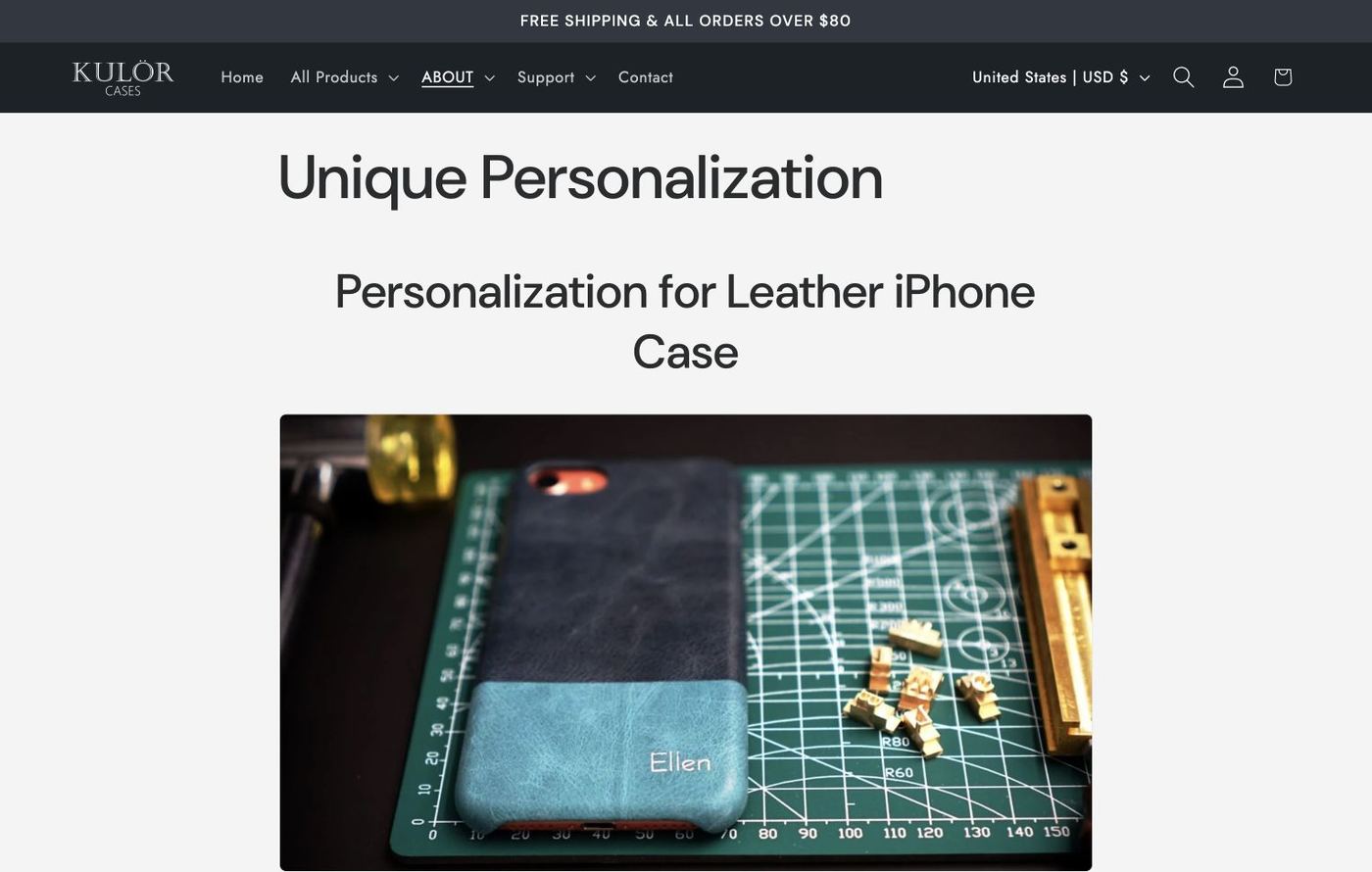
19. Kulör: Explain the finish with a physical example
Kulör documents hot-foil personalization and UV printing. These are distinct production methods. Merchant takeaway: show a relevant physical sample and describe the supported lettering, finish and placement for the selected product. A flat-color mockup alone cannot demonstrate the surface effect of foil.
20. XOUXOU: Make accessory combinations understandable
XOUXOU is a catalog reference for cases, straps and related accessories. The saved homepage presents phone necklaces and accessory categories. Merchant takeaway: help shoppers identify compatible components and understand which pieces they need for a complete combination.

21. Blessing Custom Leather: Separate direct purchase from custom inquiry
Blessing Custom Leather offers a phone-case collection and directs custom-order inquiries to its contact channels. The saved collection displays decorated leather cases. Merchant takeaway: explain which designs can be ordered immediately and which require a brief or discussion with the maker; describe any proof or approval step if your own process includes one.

22. MMORE: make the text-submission step explicit
MMORE's personalized natural-white case includes phone-model and text-layout choices. Its instructions ask the shopper to enter the personalization text in the cart's “Additional comments” field. This is a documented order-note workflow; it should not be described as an interactive design preview.
Merchant takeaway: if text is collected in the cart, tell shoppers exactly where to put it. For orders with several cases, ensure each text instruction is associated with the right item. A dedicated product-level text field can make that relationship clearer, but the appropriate setup depends on the merchant's order process.

23. SnapBands: Collect the customer’s text beside the case choices
The reviewed SnapBands personalized leather case includes phone-series and finish choices with a Personalization text field. Merchant takeaway: keep the requested lettering tied to the correct case and explain the finish. The saved image shows the collection, not a completed configuration or checkout test.

24. WNCS: Historical example; storefront unavailable at review
WNCS was behind a password page when reviewed on October 9, 2026. The image below is a retained historical product-page screenshot. It is included to preserve the visual reference, not to suggest that the offer or product flow is currently available. Merchant takeaway: check availability before directing customers or readers into a customization journey.

25. SIMPLYMDRN: Distinguish existing artwork from customer artwork
SIMPLYMDRN’s reviewed product page is a reference for existing artwork on model-specific cases. The saved screenshot shows a different named design, Gladiator, and is used only to illustrate the product-page layout. Merchant takeaway: describe whether the shopper selects existing artwork or supplies their own; these require different controls and production inputs.

Turn the examples into a Shopify product setup
Start with the physical phone case
Use Shopify variants for choices that determine the actual SKU, stock and base price, such as the device model or a stocked case finish. Use personalization options for the text, font, decoration or customer image applied to that item. Podifai's variants versus options guide explains this distinction: an option value does not automatically replace the Shopify variant submitted by the product form.
Before launch, check that the selected phone model remains correct in the cart and order. A convincing preview does not compensate for the wrong physical case being ordered.
Try a focused text-and-pattern demo
The Podifai custom phone case demo provides a concrete example of pattern or solid styling with optional text, font and text-color controls. The saved configuration below shows “Podifai” on a patterned case and a 10-character allowance for that demo's text field.
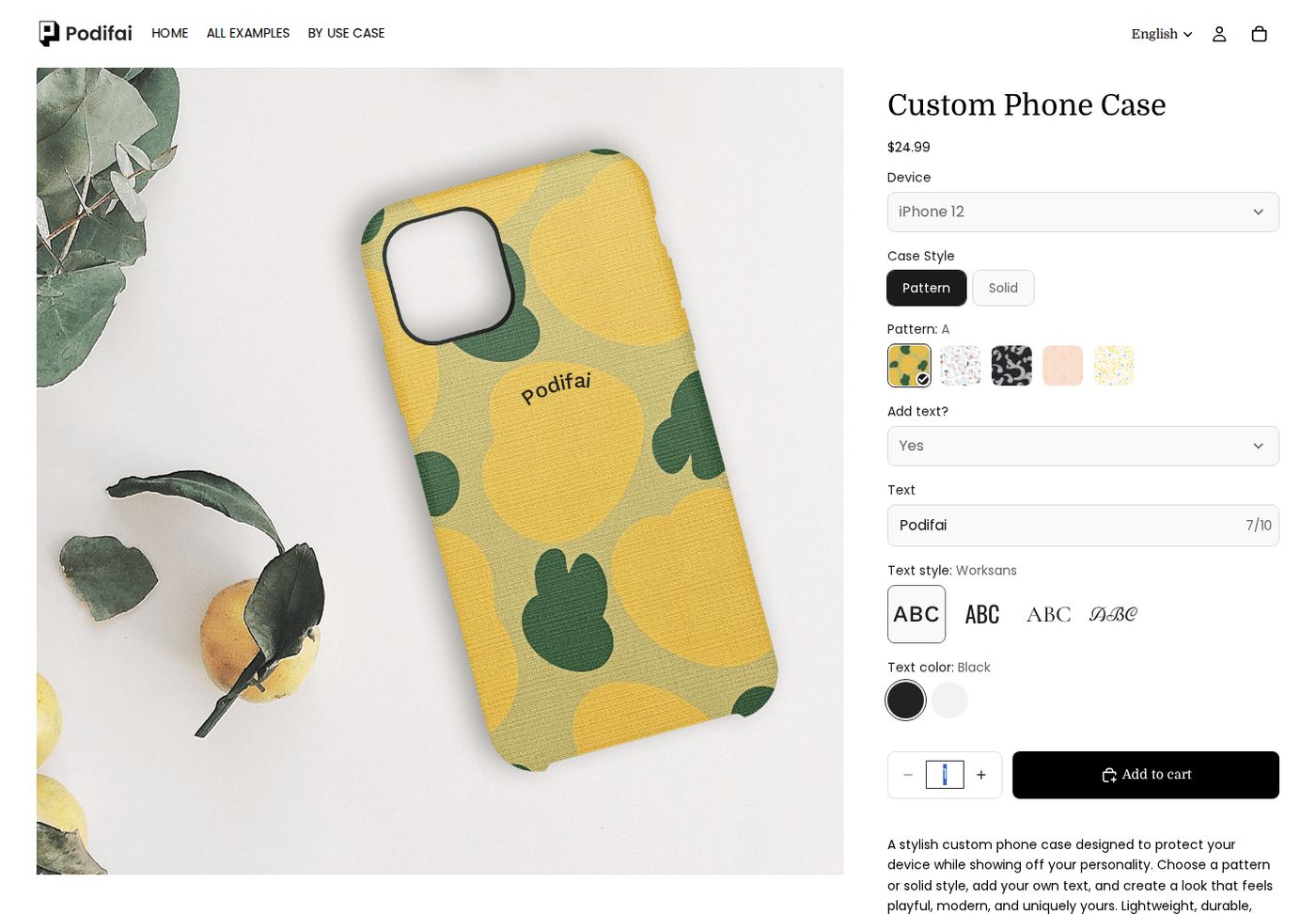
Use Text Input to collect names or initials and enable Live Preview when shoppers should see the result on the product image. Link font and color choices where appropriate. Set the text allowance for the available design area and production method; the limit shown in this demo is not a product-wide limit.
Configure photo uploads as a separate workflow
If your case needs customer artwork, follow the Image Upload guide. Podifai documents optional Live Preview, merchant-configured image masks and enabled shopper editing controls. The phone-case screenshot above demonstrates text and patterns, so it should not be used as proof of a tested photo-case workflow.
For a photo-case setup, prepare the preview and production area around the camera opening and case edges. Test portrait and landscape photos, short and long text, and every supported case shape. Choose which adjustment tools customers need, then check the resulting file against your printer's requirements. A storefront mockup alone does not establish print quality or physical fit.
Verify the handoff from storefront to production
Keep the selected case, customer content and production instructions together. Podifai's order workflow documentation explains where customization details are available, while the print-ready files guide covers the generated artwork workflow.
- Confirm the correct device variant and quantity reach the cart.
- Check that required personalization cannot be omitted and that text fits the intended area.
- Confirm optional charges match the selected customization.
- Review the order's text, image and other choices from the production team's perspective.
- Check the actual output dimensions and supplier requirements before producing a sample.
- Test the same customer journey on desktop and mobile, including returning to edit a selection.
Frequently asked questions
Which examples should I study for photo or text customization?
Start with CASETiFY's official customization documentation and Skinnydip's case-creator collection. For more constrained text personalization, examine Keyway's monogram case. For a designer-led brief, examine Ideal Bookshelf. Each supports a different lesson; none establishes that every case or device uses an identical workflow.
Are all 25 stores Shopify stores with live customizers?
No. This is a cross-brand reference for Shopify merchants. Some sources describe personalization services, some show existing designs or accessories, DODOcase's linked customizer references older models, and WNCS was behind a password page when reviewed. This guide does not attribute a theme or customization app to any store without evidence.
Does a unique design mean the shopper can upload artwork?
No. Carved's individually photographed cases show how a store can sell unique physical items without the customer creating the artwork. Look for an explicit upload or text-personalization workflow before using a store as a reference for those features.
What should I build first for my own phone-case store?
Start with one supported case shape and one clear personalization workflow. Prepare its product image, define the printable area, configure the necessary text or upload controls, and verify the order handoff. Use the phone-case demo for text-and-pattern inspiration and the relevant Help Docs for your own configuration.